EXPERT INSIGHT & TRUSTED REVIEWS

EXPERT INSIGHT & TRUSTED REVIEWS

What in Tech is a user-supported site. When you purchase through our links, we may earn an affiliate commission at no additional cost to you. Learn more

The 10 Most Powerful Gaming Laptops in 2021

Most Powerful Gaming Laptop

The 10 Most Powerful Gaming Laptops in 2021

It’s an exciting time for those after a high-end gaming setup.

Between the new RTX series GPUs and some amazing innovations in screen technology, if you have the budget for a premium gaming machine, you have some truly special offerings available.

But how do you tell which one is the best?

Today’s feature is here to guide you through the most powerful gaming laptops today, for those after the best setup possible.

This isn’t simply a list of the most expensive gaming laptops, but high-end options actually worth buying (with some different budgets in mind).

Top Picks

Best of the Rest: Quick-Fire Picks

Most Powerful Gaming Laptop Worth Buying: ASUS ROG Strix Scar 15

Although there are several great high-end options available, nothing quite ticks all the boxes like this ASUS gaming laptop.

The latest Strix model is a testament to the ongoing improvements of the series, excelling across the board from build quality to hardware.

Speaking of hardware, nothing is more important for choosing a powerful gaming PC, and the Scar 15 boasts:

  • RTX 3080 ROG Boosted GPU – With 16GB of GDDR6 Memory and impressive secondary specs, it’s the best laptop graphics card today
  • AMD Ryzen 9 5900HX CPU – > The most powerful gaming laptop processor available
  • 32GB DDR4 RAM – > While 16GB is plenty, 32GB is perfect for premium users after as much future-proofing as is reasonable
  • 1TB NVMe M.2 SSD – > Plenty for a decent gaming library, and we really appreciate how ASUS has not cheaped out by going for a smaller SSD + larger HDD. If you want more space, there is an easily accessible slot for an additional drive

These specs are unmatched in nearly every other mobile gaming computer available today (and especially at its price).

The combo of an RTX 3080 and the high-end 5th gen Ryzen CPU can accomplish unmatched FPS, resolutions, and high-setting combos in even the most demanding of titles (more than capable of fantastic graphics in games like Cyberpunk 2077 and Red Dead Redemption 2).

With hardware this capable, we’re pleased to see ASUS have accompanied the Scar 15 with one of the best gaming laptop screens we’ve come across.

In 15.6″ display boasts QHD/1440p resolution, 165hz & 3ms response time, all in a gorgeous IPS panel with a 100% DCIP-3 gamut, adaptive sync, and excellent contrast/brightness.

Don’t underestimate how common it can be for the most powerful gaming laptops to come with a screen that doesn’t feel suited for the hardware (especially secondary specs like color gamut/response time).

A 2k screen with a high refresh rate and low latency is such an incredible value add for users, balancing the demands of immersive gamers who will enjoy high-res/gorgeous colors, with the needs of competitive/esports gamers who are focused on response time, refresh rate, and clear contrast for identifying variations in the environment.

So, with display and hardware ticked off, the last main area to cover is build-quality; and we’re pleased to say the Scar 15 doesn’t disappoint here either.

Somehow the lightest and thinnest laptop compared to its previous iterations while retaining fantastic sturdiness, the Scar 15 looks and feels like a high-end offering made to last.

Speaking of looks; on top of its chicly designed lid and beautiful black metal exterior, this ASUS gaming laptop includes an individual-key customization RGB keyboard.

Sure, this is a flashy perk, but it can also be helpful for gamers to assign certain macros and/or key commands to different color schemes to very quickly identify positioning in games with demanding bindings (but we won’t lie, the real reason we love this feature is that the keys look so good).

Ergonomically, the keyboard is what you would hope for in a premium offering, with a mechanical, tactile feel we expect is suitable for even demanding esports laptop gamers.

The battery life is also impressive as far as demanding gaming PCs go; with a 90W battery, it’s very common for laptops in this price-range to almost forget about gaming without a power socket, so we appreciate the Scar 15 still offers some genuine portability in its size, battery, and longevity.

We’re also pleased with the cooling solution on display here. Boasting 4 fan outlets & a thermal metal compound intelligently built around the machine, like nearly all high-end gaming laptops, you will see high temps when pushing it in demanding games for long periods of time, but the Scar 15 seems to perform relatively decently in benchmarks and has good software availability for manual control if you desire (with good options for those after quiet laptop settings too).

We were even pleasantly surprised to see some fairly decent speakers on the device. Onboard audio is never something we recommend when there are such great headphone solutions available, but as far as a back-up solution/something to share content with others goes, you don’t find many laptop gaming speakers of this caliber.

Is there anything we don’t like about the Scar 15? Well, very little, but it’s worth pointing out the laptop doesn’t have a webcam.

We expect this is to minimize the bezel size as much as possible (and also because laptop manufacturers usually include awful built-in webcams so perhaps ASUS has decided to skip altogether). Either way, if you want a webcam, we’d recommend a standalone choice (some options at the bottom of this feature).

Port-wise, we’re pleased to see HDMI, ethernet, 3 x USB 3.2 Gen 1 Type-A & 1 x USB 3.2 Type-C with power & DisplayPort capability. We would have liked to see thunderbolt and a card reader for creatives, but think the output availability is still great as far as premium gaming requirements demand.

The Scar 15 may be an expensive offering, but we’re actually floored with the level of value it provides; many laptops with similar across-the-board success boast significantly higher price-tags.

ASUS has knocked it out of the park with this latest iteration; balancing incredible specs, build quality, display & price.

Not only do we consider this the best value RTX 3080 offering, but it’s comfortably our choice for the most powerful gaming laptop worth buying today.

A quick note on where to buy RTX 3000 series laptops

Before we jump into our next pick, we wanted to advise that you may have some difficulty picking up certain models because RTX 3070 & 3080 laptops are very high in demand/often out of stock due to their fantastic capability.

As good as our top choices are, the reason we’ve made this feature 10-picks long is that there are great alternatives for a powerful gaming laptop, don’t feel like you need to wait for our #1 pick to be in stock. 

It may be our favorite, but all of the options we’re recommending today are worthy of a premium setup.

Most Powerful Gaming Laptop: ASUS ROG Zephyrus Duo SE GX551

Now, while the Scar 15 represents, to us, the best balance between high-end gaming power and value for money, the GX551 is more suitable for those after the world’s most powerful gaming laptop bar-none.

On the surface, the Zephyrus Duo SE seems very similar to the Scar 15; also lead by the unmatched RTX 3080, Ryzen 9 5900HX, and 32GB DDR4 RAM, the hardware is fantastic but equally capable to our top pick.

So what makes this choice extra special? Well, if you check out the product listing, you’ll notice it’s a dual-screen gaming laptop.

Previously featured in What in Tech, multi-display laptops come with an independent second screen above the keyboard.

Although this technology is often cited as perfect for multi-tasking creatives, there’s a reason why desktop gaming setups nearly always have 2+ screens, not being able to show anything but your fullscreen game isn’t ideal, so a dual-screen laptop for gaming is an exciting prospect.

Preset software exists for the second screen, but you can ultimately put anything you want there, unlocking many options:

  • The ROG ScreenPad plus works with some modern titles to provide custom UI (often reducing main-screen clutter).
    • Things like quests in single-player games to favorite builds/metrics in competitive titles and MMOs
  • Customize to show core thermal UI and maximize cooling control during gaming
  • One of the best laptops for streaming and Twitch; capable of gaming on the main screen with your chat, camera angles & key metrics on the second display
  • Pretty much any other second-screen software you can think of being useful – such as Discord, Skype, Teamspeak, or an internet browser
  • One of my off-beat favorite utilities: if you’re interested in CEMU and Wii U/DS emulation, this is one of the only devices in the world capable of giving you a suitable experience for their second screens!

What’s more, the main screen of the Zephyrus Duo, on top of boasting fantastic low latency/colors/blacks, is a 4k 120hz display.

This is an incredible setup for immersive gaming and esports, but if you’re specifically focussed on the latter, there is also a GX551 model with a 300hz full HD screen instead (one of the highest Hz laptops available today, with hardware capable of using it in competitive games like Overwatch, Dota 2, Fortnite & more).

Note: don’t be dissuaded by the lack of reviews, the GX 551 3080 edition is brand new on the market and is already part of a dual-screen gaming laptop family that is heavily praised (like its 3070 brother).

Although the main specs emulate the Scar 15, you are getting twice the storage with a fantastic 2TB NVMe SSD, one of the largest solid-state drives we’ve seen built into a laptop; alongside the Thunderbolt Type-C port, this device doubles up as a great creative/production machine if you have demands outside of gaming.

Boasting high-quality thermal control, all-metal build quality, and tactile RGB keyboard responsiveness rivaled by little else, the GX551 feels designed to capably accommodate its high-end hardware.

You won’t get the same battery life as the Scar 15 due to the additional power draw of the second screen (though, if you are in a situation that demands portability, you can always temporarily disable it).

While the GPU, CPU, and RAM leading the device are on par with our top pick, the additional screen capabilities on offer here make the Zephyrus Duo a truly one-of-a-kind offering in its price range.

If your budget allows, this is the most powerful 4k gaming laptop available today, and an incredible solution for high-end users.

Most Powerful 17″ Gaming Laptop: Razer Blade Pro 17

Our top 2 picks are focused on the most powerful 15-inch gaming laptop offerings, but if you’re in the market for the largest display possible without compromise on power, this Razer offering is a fantastic fit.

Boasting many of the same specs as our top 2 picks, the Blade Pro 17 includes the unbeatable RTX 3080, 32GB DDR4 RAM & a 1TB NVMe SSD.

The difference in spec here is the CPU, with an Intel Core i7-10875H 8-Core processor leading the charge.

We do give a slight edge to the Ryzen 9 5900HX, but with the 10875H’s fantastic single-core performance (important for gaming), the difference is not significant enough that we’d recommend going with a 15-inch laptop if you demand 17-inches.

The screen options available are mouth-watering too, with the choice of either 4k 120hz or FHD 360hz.

The latter is the highest refresh rate gaming laptop available today – if your soul-purpose is esports, this will be a very attractive offering to you alongside specs that can accommodate 360FPS in less demanding competitive titles.

There’s great port-connectivity too; including a UHS-3 card reader, 2 x USB-C ports (one with Thunderbolt) & one of the few HDMI2.1 laptops around. The outputs are suitable not just for gamers, but creative professionals too.

Now, this is Razer we’re talking about, so you can expect them to be focused on the aesthetics & build.

The Blade Pro 17 doesn’t disappoint here, ranking as one of the most beautiful gaming laptops we’ve come across, it boasts an individually backlit Razer Chroma RGB keyboard, a frame made from a single unit of enforced aluminum, thin screen bezels & a minimalist design that is matched by little else.

On top of all that, it is nearly 25% smaller than its previous iterations; despite its large 17.3.” form-factor, it still boasts fantastic portability.

The Razor Blade Pro 17’s battery life is middle-of-the-road for a premium gaming laptop; likely achieving somewhere between 4-7 hours depending on the operation.

Not only is its 360hz option arguably the best esports laptop available today, but either screen package of the Blade Pro 17 boasts incredible utility in specs, portability, and a gorgeous design.

This is comfortably our choice for the most powerful 17-inch gaming laptop available in today’s market.

Cheapest RTX 3080 Laptop: GIGABYTE AORUS 17G YC

The Aorus 17G is a fantastic offering and was close to competing with some of our other top picks for their spots.

But as we’re here to cover the most powerful gaming laptops in the world today, the 17G may not be #1, but is still very close (especially for its price-point) and offers some USPs that might make it your favorite choice (especially as a budget option compared to the Razer Blade Pro for 17-inch gamers).

The specs on the 17G YC pack a serious punch for the price; with an RTX 3080, i7-10870H, 32GB memory, and a 1TB NVMe PCIe SSD.

There is one key difference compared to many of our other picks; the RTX 3080 is a variant that has 8GB GDDR memory instead of 16GB.

We expect this has largely been done to keep the laptop cheap and also deceptively portable for a 17-inch.

To clarify, half of the video memory does not mean half of the performance in games.

Yes, you can expect a decrease in performance that will vary in significance across titles. But by and large, this is still the top-range RTX 3080 we’re recommending in our other picks and worthy of a high-end gaming build (it’s only in the competition of amazing laptops like the Scar 15 does this pick feel second best).

To match its decent specs, the 17G includes a full HD 300hz IPS panel.

We feel like Gigabyte could’ve gotten away with offering 240Hz or another common lower-refresh rate, so we’re really pleased to see they’ve catered the laptop well to competitive gamers who need an extremely high frame-rate.

The display is excellent, and with its IPS panels, looks nice and vibrant; we will say it is slightly inferior to our top Razer & ASUS gaming laptop picks – with a lower color gamut and nits rating, the screen doesn’t give you the same level of picture/brightness (but is still decent).

So, where does the Aorus 17G YC excel (other than its great price)?

Let’s start with the best part; it’s the thinnest and lightest 17″ laptop with a full mechanical keyboard, the Aorus 17G is a compelling e-sports laptop for high-end users or those simply after a portable setup with the best tactile feedback possible (though other choices on this list still have some great keyboards).

The battery is also a respectable 99 watts; this is still a premium gaming machine, so don’t expect more than a few hours while playing demanding titles, but relatively speaking, it’s a decent runner.

Despite being one of the cheapest RTX 3080 laptops, we’re pleased to see the YC doesn’t cheap out on secondary areas; with good onboard Wi-Fi/Bluetooth, serviceable speakers, a camera suitable for basic calls, and I/O ports that include Thunderbolt 3, HDMI 2.1, mini DP 1.4 & a UHS-II card reader.

If you don’t want to spend as much on a 17-inch laptop, we’d go as far as to say the YC is the most powerful 17-inch gaming laptop when value is considered and is still capable of some incredible performance. 

Most Powerful Gaming Laptop Under $2,000: ASUS TUF 3070

The last of our top highlights is for those who are excited at the prospect of owning a top-range RTX 3080 laptop but can’t quite stretch to the demanding budgets.

The latest ASUS TUF PC, a long line of successful laptops previously featured on What in Tech, boasts some really excellent specs that won’t get you the same performance as the above. But, relative to budget, will still provide excellent value.

The model we’ve chosen is based on a $2,000 budget and boasts an RTX 3070 with 8GB GDDR6, Intel Core i7-11370H, 24GB DDR4 RAM & a 2TB SSD.

The RTX 3070 is the 3080’s smaller brother; the latter tends to provide (roughly speaking) around 10-15% improved performance in gaming.

While this is a great improvement, 90% of the power of an RTX 3080 is still very capable, which is why we’re happy to recommend 3070 laptops in an article focusing on the most power – you’ll still be able to play the latest titles with great settings/some older competitive titles at excellent framerates and/or have great capability for a virtual reality laptop.

The 11370H CPU, fresh as part of the Intel 11th gen, has great single-core performance. It’s worth noting that it’s only a quad-core processor, the sweet spot for gaming is 6-8, but this CPU is still very capable for its budget.

24GB of RAM is plenty and you will not see a notable difference from our 32GB offerings (if you really need to, you can go down to 16GB without much consequence today, but for a premium user, there are benefits to 24+ for improved future-proofing).

We’ve chosen the 2TB SSD as the listing is fairly cost-efficient for adding it over the 1TB model; though of course, if you need to go even cheaper, 1TB is more than enough for many gamers, with upgrade options easily accessible.

With an adaptive-sync FHD IPS display that boasts 240Hz, 3ms, and a 100% sRGB color gamut, the display may not reach the highs of the Razer Blade Pro’s refresh rate or the Scar 15’s vibrancy, but for the price? This is still a screen very capable of a premium gaming experience, and while 240hz may not be the highest refresh rate, it’s still enough for esports-focussed gamers if you can’t stretch your budget further.

We have no complaints design-wise; with a gorgeous and sturdy gunmetal grey build, a tactile keyboard that rivals our more expensive choices, and one of the best battery lives on the list.

We’re also pleased to see Thunderbolt 4 on offer here in its type-C port, alongside 3 x USB type-A and HDMI 2.0.

The 3070 edition of the ASUS TUF represents a great choice for those that need to balance a desire for the most future-proof gaming laptop they can find, while still paying attention to a realistic budget.

Alternative Picks – Best of the Rest

While the top choices are our absolute favorite picks, we appreciate that in the market of the most powerful gaming laptops, some options are often out of stock.

This is why we’ve included 5 more options well worthy of your consideration if the top laptops are unavailable, or do not match your exact requirements.

Cheapest RTX 3080 15.6″ Laptop: CUK MSI GE66 Raider

Still boasting the 16GB version of the RTX 3080, it may not have the same top-level CPU, but this MSI gaming laptop packs an impressive punch and is a great alternative to the Scar 15.

Cheapest RTX 3070 Laptop: GIGABYTE AORUS 15G XC

The cheapest laptop on the list, the 15G is the perfect second-choice to the ASUS TUF (or first choice if the slight budget drop suits you better and you don’t mind its smaller SSD).

Most Powerful Gaming Laptop Under $2,500: HIDevolution ASUS ROG Zephyrus G15

This ASUS ROG laptop variation is a very powerful gaming machine.

We do think that, once you get to this price-point, it’s more effective to stretch that little bit further to pick up an RTX 3080 laptop, but if you can’t, it’s a great choice.

High End Gaming Laptop Alternative: MSI GE66 Raider 10UH

Another variation of the classic MSI GE66, this specific listing is suitable if you like the look of the GE66 Raider (or Scar 15) but demand very large storage space and/or RAM (e.g. production users).

Most Portable High-End Gaming Laptop: CUK GS66 Stealth

With great battery, lightness (relative to other premium choices) & a sleek, minimalist design, the GS66 Stealth carries a premium for these qualities, but is a great choice if they’re very important to you.

Final Word

And there you have it! After much deliberation over specs, build quality, display and overall price/value, the above are our final takes on the most powerful gaming laptops in the world today.

If you see one of the top options out of stock, we appreciate how frustrating that can be, but we’ll re-iterate a point made above: all of the options here are very capable of a powerful gaming build.

We’ve made this list 10 picks long because we know the top few choices won’t always be available, they all represent a great balance across what is most important for a high end gaming laptop.

What's Next?

About the author

Picture of Kaelum Ross
Kaelum Ross
Kaelum Ross, BSc is the Lead Writer at What in Tech and a leading authority in PC hardware and software. With a career as a senior IT professional, Kaelum has led multi-million dollar projects covering everything from bespoke software development to complex Windows hardware upgrades. Today, Kaelum uses his expertise to serve What in Tech's readers and has been featured in numerous global publications including New York Magazine and Lifewire.

The 5 Most Expensive Gaming PCs Worth Buying in 2021

Most Expensive Gaming PC

The Most Expensive Gaming PCs Worth Buying in 2021

With the latest RTX 3000 series GPUs hot on the market, now is a great time to buy a gaming desktop.

And with the premium RX 3090 being one of the most impressive powerhouse options in a long time, buying a high-end PC is even more of an attractive option.

But there are several listings out there overcharging for gaming PCs with lesser GPUs/CPUs and other hardware.

Which is why today’s feature is here to guide you through the most expensive gaming computers actually worth buying today for those after the most powerful setup possible.

Top Picks

Most Expensive Gaming PC Top Pick: ASUS TUF GT301

We’ll start by saying this is the most expensive pre-built gaming PC on the list, and arguably overkill for some needs (our next pick is for the best value premium gaming PC).

However, if you’re after the most powerful gaming computer today regardless of cost, then the ASUS TUF GT301 will not only meet your expectations but likely exceed them.

Boasting possibly the best specs you’ll find on the market today, the GT301 is led by the unmatched RTX 3090 GPU which, when tied with the right CPU/RAM/Motherboard, outputs incredible performance.

Not only do you have a gaming PC capable of unrivaled ray-tracing, high FPS, and maximum settings in practically every game today (and undoubtedly many well into the future), but the hardware on offer here is enough to support a very premium monitor setup for immersive titles or esports.

Options like 1440p 240hz, 4k 144hz, 1440p ultrawide 144hz & the highest Hz monitors available aren’t just possible with the GT301, but recommended to maximize your setup and show you just how amazing the 3090 can be.

But as good as this GPU is, this is the card shared by most of our top choices. What sets the GT301 apart are its other specs.

With an AMD Ryzen 9 5950X, you have the best premium CPU on the market today for gaming. This is the perfect processor to match up to the great power of the RTX 3090 and ensure you get the best performance across games (and pretty much any other type of task you can throw at it).

Elsewhere is an X570 motherboard, the high-end choice for AMD’s AM4 chipset (perfect to host such a powerful build) and 128GB DDR4 3200MHz RAM.

128GB is an insane amount and you’ll be hard-placed to find a gaming PC with more RAM than this.

With that said, this spec is where we see a bit of overkill with the GT301, you’re not going to see any real-world performance increase creative to the cost over the 64GB version for gaming. We’d go with the cheaper model (or our pick directly below) if your only concern is a future-proof gaming PC. The only exception to this rule is if you’re looking for a high-end production/video editing PC, then this extra RAM can help (but isn’t required, the cheaper models on this list are still very powerful).

Finally, the storage on the GT301 is what you would expect for a premium gaming computer; with 2TB NVMe + 4TB HDD installed in the 128GB RAM version, this is an insane offering and even with today’s enormous titles, it’s hard to imagine you’ll need more.

All tied together in an extremely durable ASUS case & appropriately powered by an 850W PSU, the GT301 really feels like the full package.

Note: It’s worth adding that while we like the power of the high-end AMD processor and think it provides the best capability for someone after the best gaming desktop possible, there is an Intel version of this desktop which is only slightly behind in power (we’re talking a few average FPS in games) and worth considering for slightly lower budgets.

Yes, you’ll find some even more expensive gaming desktop PCs on the market, but anything past this line is of no real-world benefit to you; the GT301 is today’s best pre-built gaming computer.

Best Expensive Gaming PC Value Pick: HP OMEN 30L

As we alluded to in the GT301 review, we appreciate some readers may have a large budget, but still want some semblance of finding the best value gaming PC in the high-end price range (minimizing diminishing returns, etc.).

If that is you, then the HP OMEN 30L is the perfect pick.

Hitting the sweet spot between performance, build quality, and price, the 30L represents the best balance for a premium gaming desktop that doesn’t go heavily into the “overkill” territory.

Boasting an RTX 3090 graphics card, i9-10850K CPU & 32GB RAM @ 3200MHz, not only are these specs more than capable of high-end gaming and pretty much all of the high-end resolution/Hz setups we detail for our top pick, but you also have a powerhouse machine here for anything else you need to do (from general use to production work).

We have gone with the liquid-cooled i9-10850K version as we believe it’s the best value, but you can choose a version with the i9-10900K, which will perform nearly on par with our top choice’s processor. In gaming, this difference will likely only amount to 2-5 average FPS depending on the game; with the 10850K/RTX 3090, you already have enough power for any modern game at high specs (Cyberpunk 2077, Red Dead Redemption 2, and future titles for at least the next few years).

One of the more notable spec drops compared to our top pick is the 1TB SSD. Don’t get us wrong, this is still plenty of space and more than enough to get you started; but if you’re the kind of person who likes to keep all your games installed, we expect you’ll want a little more storage.

The good news is you can very easily upgrade the storage in the 30L and it’s a much cheaper option than buying more pre-built. Picking up say, a 2TB HDD would likely be the perfect secondary storage solution for most gamers.

Lastly, the build quality and design on the 30L work to its credit, with a minimalist aesthetic and good cooling for a pre-built machine, with all the usual ports you’d expect (including a USB type-C on the back) and Windows 10 pre-installed.

What else is there to say? With the best balance in the high-end market, the 30L is a beast of a computer.

If you’re looking at the most expensive choices but still want the most bang-for-your-buck, then this is, without doubt, our top pick for the best value premium gaming rig today.

Most Unique Expensive Gaming PC: CUK Continuum

We know that an important part of buying one of the most expensive gaming PCs on the market for some readers will involve picking up an offering that is not just powerful, but visually striking.

No offering fits the bill better than the CUK Continuum Micro computer.

Yes, you’re seeing the picture right; this unit is built with a custom infinity mirror PC case.

Stock photos do not do it justice, this unit is simply stunning.

Not only is the chassis a Micro ATX form factor, meaning it’s smaller than the ATX units on the list (aside from the MSI Trident) but is also still built with a good amount of airflow and 6 RGB fans pre-installed. You’d be hard-pressed to find a more impressive gaming PC aesthetic than this that still balances good cooling.

But the reason we love the Continuum is that it’s not just a pretty face.

On top of its build quality/fan cooling, the specs in this machine are some of the best on the list and come close to rivaling our top pick, with:

  • The wonderful RTX 3090 capable of 4k, high refresh rates, and very high settings across all titles
  • Intel Core i9-10900KF, the most powerful gaming CPU on the list with the exception of the Ryzen 9 5950X (however, they are very close, and the Intel represents better value)
  • 128GB DDR4 RAM, an insane amount and suitable for much more than gaming (production/rendering usage, etc.)
  • 2TB NVMe SSD and a 4TBHDD, matching our top pick’s storage, it’s hard to imagine ever needing more (but upgrade space is there if so)
  • Z490 motherboard designed for high-end Intel desktops
  • A decent 850W PSU appropriate to power this top-end machine

For the price, this is a really impressive list of specs, and out of all the options on the list, this is the pick that comes closest to matching the hardware of the top ASUS pick at a lower price tag.

The only difference is the CPU choice, with our top ASUS pick going for the best gaming CPU on the market; the 5950X.

But (and it’s a big but), at the time of reviewing these options, the Continuum is a few hundred dollars cheaper. The difference in CPU performance isn’t worth that much unless you simply don’t care about the budget.

If you’re after a unique aesthetic that doesn’t compromise in any spec area, this CUK offering is easily one of the best premium gaming computers on the market and will be perfect for anything you can throw at it.

Most Expensive Compact Gaming PC: MSI MEG Trident X

If you’re interested in a premium gaming rig that is a little smaller, either for aesthetics or portability, the Trident X is a great option.

Boasting an RTX 3090 GPU, an Intel Core i9-10900KF & 64GB of RAM, you have some very powerful specs to achieve max-setting gaming and high-resolution/FPS setups.

Tied with its thin form factor, the Trident X is one of the best-looking gaming PCs around; with a beautiful build quality and changeable RGB lighting through MSI’s custom software.

While it’s not tiny, it’s certainly small enough to act as a portable rig for VR demos, LAN parties, etc. Its thinness also makes it very flexible for limited-space setups.

We also appreciate how the unit includes a 2TB HDD on top of the 1TB NVMe SSD base-storage to ensure you have plenty of room for gaming.

This combination of specs at the price is a fantastic deal for a high-end gaming computer.

So with all that said, for its great price, why do we not rank this about the 30L for the best value premium gaming desktop?

The main reason is that although this unit is usually capable of coping with the demanding needs of high-end gaming, we worry that its modest cooling solution and tight internal space for airflow is a slightly risky setup when looking at the most expensive gaming PCs because these units demand a lot of power and output notable heat.

The concern here is that users may run into issues with uncomfortably high temperatures when running demanding games/software.

Usually, we wouldn’t highlight this as a factor, as we don’t believe this will be a common occurrence for the Trident X and is more of a minor risk.

But when we think of readers looking for the most expensive gaming computers on the market, we imagine part of that pursuit is finding a computer that ticks all the boxes, so even an increased minor risk over another choice is something noteworthy.

Additionally, although the Trident X has twice the RAM, its base clock speed is 2933MHz as opposed to the 30L’s 3200MHz – both setups are going to provide very similar results, but when we get into this RAM sizing, you can expect the RAM speed to matter more than the RAM size for gaming (and 3200MHz is a nice sweet-spot speed for larger RAM profiles).

The battle between this and the 30L was close, however, and we’ve included it in the feature for a reason.

The Trident X still represents a fantastic selection of top-end parts to create a build that is somehow compact and still one of the most powerful gaming PCs on the market.

Most Expensive Quiet Gaming PC: VCI Vulcan 3090 

Last but not least, we’ve included an option that matches many of the similar specs as our other top offerings and combines them with a Fractal Define R-Series case, which is, by far, our favorite chassis for silent gaming PC builds.

The VCI Vulcan is lead by the RTX 3090 GPU, an Intel Core i9-10850K processor, and 64GB DDR4 RAM. If you’ve been reading through this list, you’ll know that this is a great combo for a high-end gaming machine and can easily handle all modern (and many future) gaming titles at very high settings, resolutions, and frame rates.

The unit also comes with all the usual extras you would hope for in a gaming PC; decent ports (including USB type-C on the back I/O panel), Windows 10, Bluetooth & a Wi-Fi adapter (Intel 6 AX201).

Despite being designed for noise-dampening, the beautiful minimalist case the VCI Vulcan runs in doesn’t just very impressively minimize decibel output but manages to still be well equipped for decent cooling and airflow, even for a build of RTX 3090 caliber.

The only reason we put this offering towards the bottom of the feature is because its price is not as fair for the provided specs as our other options.

Yes, these are all the most expensive gaming desktops around, but there is still a value consideration in this article – and the Vulcan seems a little more pricey for what you are getting.

But if your singular focus is on ensuring a silent gaming computer setup, then this is easily the best high-end option available to you.

If for whatever reason, the Vulcan is out of stock/not matching your requirements, it’s worth noting our top value pick, the HP OMEN 30L, is also hosted in a decently quiet chassis (and only really makes notable noise if you’re playing very demanding titles).

Most Expensive Gaming PCs Final Word

And there you have it! After much deliberation, the above choices are our top picks for the most expensive gaming computers worth buying today.

We always emphasize “worth buying” because we’ve focussed on ensuring we’re not recommending an expensive pre-built gaming PC that bloats the price tag of its premium offerings (as many we came across did).

We chose based on finding high-end choices that hit the sweet spot between balancing top budgets with the best gaming CPU, GPU, RAM configurations & other secondary considerations (cooling, build quality, etc.).

If these are a little outside of your budget, then don’t fret! We have features around a larger budget range of gaming PCs, and also gaming desktop bundles for those also after a monitor/keyboard & mouse inclusion.

But if you can stretch to the above choices, then you’re in for a fun time! There isn’t a gaming title today that these choices can’t handle!

What's Next?

About the author

Picture of Kaelum Ross
Kaelum Ross
Kaelum Ross, BSc is the Lead Writer at What in Tech and a leading authority in PC hardware and software. With a career as a senior IT professional, Kaelum has led multi-million dollar projects covering everything from bespoke software development to complex Windows hardware upgrades. Today, Kaelum uses his expertise to serve What in Tech's readers and has been featured in numerous global publications including New York Magazine and Lifewire.

The 5 Best 144hz Laptops of 2021

144hz Laptop

The 5 Best 144hz Laptops for Gaming in 2021

If you’ve tried 144hz before, then you’ll know how exciting it is that the top manufacturers have moved towards creating more laptops with this high refresh rate.

Gaming feels like a whole new, buttery-smooth experience when you’re reaching such high frame rates, whether it’s for immersive titles or to give you the edge in competitive e-sports.

So, today’s feature is here to take you through the best 144hz laptops for gaming available today with a few different budgets in mind.

Top Picks

Overall Best 144hz Gaming Laptop: Acer Predator Helios 300

Sitting comfortably at the top of the list is this fantastic mid-range offering from Acer.

Lead by its RTX 2060 6GB GPU, you’ll not only be able to run newer/upcoming games at respectable settings, but you’ll have the capability to use this Acer 144hz laptop’s fantastic screen to its full potential with games like Fortnite, Overwatch and other competitive esports titles (playing these in 144FPS really makes all the difference).

Alongside the GPU is an Intel Core i7-10750H CPU & 16GB DDR4 RAM, which are both perfectly placed specs to not only work with the RTX 2060 but ensure your system has some longevity for business and personal use if required.

For storage, you have a 512GB NVMe SSD, which is perfect to maximize the speed of your OS & favorite software/games. If you play large titles and want them installed at once, you will likely need to upgrade the storage at a later date. The Helios 300 has a convenient second drive bay that could easily host a second SDD/HDD at a later date.

But let’s talk more about that screen! On top of its capability as a 144 FPS laptop, the panel is IPS, Full HD with 72% NTSC (good for gaming, effectively the same as 99% SRGB accuracy meaning great colors), 300-nits of brightness, and 3ms response time. We love these specs. Balancing a bright, colorful IPS panel with a high refresh rate and low latency is perfect for snappy gameplay and it’s an impressive set of features for the price.

Finally is the build quality, the Helios 300 not only looks and feels durable and made to last but has a good reputation from its userbase as a laptop with long-lasting, well-performing thermals/cooling (such an underrated feature when buying a laptop, not having good cooling leads to all sorts of doom and gloom down the road).

While you can take the capability of a high refresh rate laptop even further if you invest in one of our slightly more expensive picks below, we think the Helios 300 represents the best balance of build quality, specs, display, and price which is why we confidently rank it as the overall best 144hz laptop available today.

Best 144hz Gaming Laptop Under $1500: MSI GL65 Leopard

Now, as much as we love our top Acer pick, this 144hz MSI laptop is one of the best for gaming in any category (previously featured on What in Tech) if you can stretch your budget a little further.

The difference? Well, the GL65 is an RTX 2070 laptop. While the RTX 2060 is a great GPU, you can expect to see an increased FPS of around 20% in a majority of titles with this upgraded card. Given we’re talking about very high refresh rate laptops here, this performance bonus really means a lot (e.g. being able to max out specs on older games at 144FPS and being able to play newer/upcoming games even more fluidly).

The fact that this bonus comes at around a 15% cost increase feels like a steal, as most laptops with more expensive GPUs tend to have diminishing returns. The GL65, on the other hand, feels like a value add.

Elsewhere on the system, like our top pick, you’re getting the great 10750H CPU, 16GB RAM, and a fast 512GB NVMe SSD (with a second drive bay for a later upgrade should you need it, but we love how these picks have a decently sized main-drive via NVMe as it’s ideal for your OS and favorite software).

You’re getting another fantastic Full HD IPS 72% NTSC 3ms latency display that is so perfectly suited for taking advantage of the powerful hardware on here, games will look fantastic.

And finally is the build quality. With great thermals (gets loud when running games, but keeps temps under control), a sturdy frame/material, a great tactile keyboard, and overall beautiful design (with all the extras you’d expect: USB type C port, decent Wi-Fi, etc.), we don’t really have any major complaints with the GL65 (the battery life isn’t amazing, but then that’s pretty much the case with any demanding gaming laptop at this price).

If you’re looking for a capable 144 fps laptop and can go a little bit beyond the budget of our top pick, this is an amazing offering.

Best Cheap 144hz Gaming Laptop Under $1000: Acer Nitro 5 RTX 2060

Previously featured at the top of our overall best gaming laptops list, the Nitro 5 represents an incredible value offering and is the cheapest RTX 2060 laptop with a high refresh rate (that doesn’t feel like it’s taped together!).

With the fantastic RTX 2060 GPU, it packs a great punch for high FPS Minecraft, Fornite, and other less intensive titles (and can still play any new game at more traditional framerates).

You may be asking “why didn’t we rank this as #1 if it runs an RTX 2060 at the price”. Well, it’s a great laptop, but for people specifically focussed on very high FPS gaming, there’s a couple of slight downfalls:

  • The CPU is an i7-9750H – don’t get us wrong, this is still a great processor at the price range. But with our top two picks coming with the 10th gen version of this processor, you’re going to be slightly more bottlenecked with this previous-gen CPU.
  • The display (available in 15.6 or 17.3-inches), while still a great-looking 144hz IPS panel, lacks a couple of the extra-sharp specs our top picks possess, namely the color accuracy and response time which are not as good on this model. We think these improvements are worth the extra money for a competitive gaming laptop.
  • The included storage is a 256GB NVMe SSD – like our top picks, you have the option to add a second SSD/HDD, but we like the main NVMe storage to be a little larger to handle your favorite software.

Now with all that said, this is still a fantastic deal if your budget is around the $1000 mark.

There’s a reason we ranked this is as the top overall choice on our larger laptop feature, we just think that high refresh rate laptop-focussed users may appreciate the lower response times, better colors, and faster CPU of our top picks.

But if you want to stick to this price range, go for it. The Nitro 5 is easily the best budget 144hz laptop available today.

Best 17.3″ 144hz Gaming Laptop: ASUS ROG Strix G17 2020 Edition

Also ranking as the most powerful 144hz laptop for those with an extended budget, the G17 2020 edition is a beast of a gaming laptop.

Leading this PC’s graphical capability is an RTX 2070 Super GPU. This is easily the best video card on the list, and you can expect around a 10% performance increase in games compared to the RTX 2070 MSI laptop listed above, perfect for 144fps gaming with esports titles (and you’ll still get great settings/frame rates from new & upcoming games too).

The other important specs are similar to the MSI Leopard. With an Intel Core i7-10750H, 16GB DDR4 RAM (upgradable to 32GB+ in the future if needed, but 16 is more than enough) & a 512GB NVMe SSD (with a second slot for upgrades). All of these, especially the 10th gen Intel processor, compliment the RTX 2070 GPU beautifully. It feels like a well-balanced machine that isn’t getting bottlenecked in any area.

The display also looks phenomenal for gaming, with a Full HD IPS panel, 3ms response time, and its large 17.3″ screen size. Combined with the most powerful GPU we’ve seen for today’s 144hz picks, this laptop is a great sweet-spot for gaming.

Finally, with this being one of ASUS’s premium 144hz laptops, the build quality, design, and thermal functionality of the device are all fantastic.  The addressable RGB lighting on the keyboard and bottom strip is particularly stunning (if you don’t know, ARGB means that instead of being stuck with a static single color, you can change the lighting to however you please, as the stock photo suggests).

If you’re in the market for a large gaming laptop or are simply looking for the most powerful 144hz portable computer we recommend, this is it.

Cheapest 144hz Gaming Laptop: ASUS TUF Gaming A15

What about those who want to game at 144hz as cheaply as possible? This ASUS laptop is your ideal choice.

The A15 is lead by a GTX 1650 GPU. Now, while we would recommend at least an RTX 2060 if possible, the GTX 1650 can still get a lot done for high refresh rate gaming if you’re playing older esports titles and don’t mind lower settings (laptop benchmarks have seen this machine play Overwatch, CS: GO Fornite and more at 144 fps with a balance of medium-low).

Elsewhere on the system is a Ryzen 5 4600H CPU, 8GB DDR4 RAM & a 512GB SSD. We like that at this budget range, the CPU is one of AMD’s new models (which have recorded some great performance in and out of games), and the A15 could’ve easily included a 256GB SSD at this price. It’s nice that budget gamers won’t feel the need to upgrade their storage early on.

Of course, 8GB RAM feels a little low, but thankfully ASUS has sensibly installed a single 8GB stick (as opposed to 2 x 4GB that some brands frustratingly go with). So upgrading with an additional 8GB RAM at a later date is entirely doable.

Note: As per the laptop Amazon listing, there are two versions of this model: the AMD 4600H version, and the Intel i7-9750H version. While the AMD CPU is the new generation, the Intel processors is a higher version of their previous 9000 series. Essentially, these two CPUs perform very similarly, so pick whichever model is in stock/lower-priced (we’ve only focussed on the AMD model here because it is currently the best price).

Finally, we’re happy to see that despite this being a very cheap 144hz laptop, ASUS has still retained great build quality (including the RGB keyboard/trackpad), decent thermals, and an IPS panel for a good display (albeit not as good as our top picks, but great for the cheapest option).

If possible, we recommend forking out the extra %10-20 cost for our Acer Nitro pick as an RTX 2060 and 16GB RAM makes all the difference.

That being said, we know some users just want a machine for 144 fps Fortnite, Minecraft, Overwatch, and other less-demanding esports titles. If that’s you, then the A15 is a great budget choice.

What's Next?

About the author

Picture of Kaelum Ross
Kaelum Ross
Kaelum Ross, BSc is the Lead Writer at What in Tech and a leading authority in PC hardware and software. With a career as a senior IT professional, Kaelum has led multi-million dollar projects covering everything from bespoke software development to complex Windows hardware upgrades. Today, Kaelum uses his expertise to serve What in Tech's readers and has been featured in numerous global publications including New York Magazine and Lifewire.

The Best Amazon Black Friday Tech Deals 2020 Guide​

Amazon Black Friday Tech Deals

The Best Amazon Black Friday Tech Deals 2020 Guide

30/11 Update: We’ve just added our favorite Cyber Monday deals, check them out below.

28/11 Update:
Well that was fun! We’ve left the deals up that still seem to be floating around this weekend and will be posting the best Cyber Monday deals on 30/11, stay tuned!

_

It’s finally here!

One of the best times of the year for tech shoppers to buy their laptops, PC parts, and Christmas gifts is on.

This page will be our feature to guide you through the best Amazon Black Friday tech deals, Cyber Monday, and all the other questions you may have at the bottom of the page.

We’ve included some quick links to relevant spots to keep an eye on, but our absolute favorite deals will be updated live on this page, so bookmark and return when you’re on the lookout.

Quick Amazon Tech Links for Black Friday / Cyber Monday

Amazon Black Friday PC Parts

Best Cyber Monday Amazon Tech Deals

Best Amazon Cyber Monday PC Case Deal: Thermaltake V150

Already one of the best budget PC cases at its normal price, getting a further 20% off is a fantastic offer if you can’t afford our more premium chassis picks.

Best Amazon Cyber Monday RAM Deal: Sabrent 1TB Rocket NVMe 4.0 Gen4 PCIe M.2 Internal SSD

Quite possibly the fastest M.2 SSD on the market right now is on 50% off. 

Yes, this is a pricey investment for a storage upgrade, but we think you’ll be wowed by what this can accomplish when using your OS and popular software.

Best Amazon Cyber Monday RAM Deal: Crucial RAM 16GB DDR4 2666 MHz

RAM can feel particularly pricey these days, so to see a 16GB upgrade at this price feels like a blessing! This is the best price we’ve seen for 16GB 2666 MHz and is a great time to upgrade if you need to.

Best Amazon Cyber Monday Headphone Deal: Sony WH1000XM4

Quite simply one of the most amazing products on the tech market today. I own a pair of these myself and after loving the build, sound, and noise-cancellation quality so much, have forced endless friends and family to buy them too!

They’re more than worth the full price, so to get this at a significant reduction is a steal; I can’t recommend these enough.

Best Black Friday Amazon Tech Deals

Best Amazon Black Friday Gaming Mouse Deal: Logitech G502 Hero

We’re legitimately surprised that this mouse is on 50% off its list price at the time of writing because it’s already one of the best and most popular gaming mice available. This is an excellent time to upgrade if you’re on the lookout for one.

Best Amazon Black Friday Headphone Deal: Beats Solo Pro Wireless

fantastic reduction in price on these Beats headphones. 

With great quality, wireless range, and noise-cancellation; at this price point, there isn’t much else competing with them.

Best Amazon Black Friday Alexa Deal: Echo Dot 3rd Gen

A great price to add 1 or more of these to your existing (or new) Alexa home setup.

When does Black Friday start?

Black Friday starts on November 27th and is expected to commence at 00:01 PST.

The deals will then appear throughout the day until midnight.

It’s important to note however that many of the best Amazon Black Friday tech deals will occur earlier (some of them are even available now! Our favorites are below).

When does Cyber Monday start?

Cyber Monday will start on November 30th and is similarly expected to commence at 00:01 PST.

Cyber Monday vs Black Friday Amazon Tech Deals

“Does Cyber Monday have better deals for tech?” is a question asked every year.

The short answer is usually yes, but not for everything.

Black Friday is historically the largest shopping event, with large (often newer) products going on sale on Amazon.

With our focus on tech, as you may expect from the name, Cyber Monday does tend to pack an extra deal or two.

However, we will say that for plenty of items, the lowest price they reach is also on Black Friday (or even the earlier November deals Amazon tends to run).

So with that said: Cyber Monday may be best for tech, but if there’s a specific item you have an eye on that has a Black Friday deal before Cyber Monday, it’s still a great time to pick it up (especially if you’re worried about stock levels).

What's Next?

About the author

Picture of Kaelum Ross
Kaelum Ross
Kaelum Ross, BSc is the Lead Writer at What in Tech and a leading authority in PC hardware and software. With a career as a senior IT professional, Kaelum has led multi-million dollar projects covering everything from bespoke software development to complex Windows hardware upgrades. Today, Kaelum uses his expertise to serve What in Tech's readers and has been featured in numerous global publications including New York Magazine and Lifewire.

The 6 Best Tools for Building a PC (and Extras)

Best tools for building PC

The 6 Best Tools for Building a PC (and Extras)

So you’ve finally got your parts selected…

You’re ready to plunge into the world of PC building…

Well, just one more step before you order your build: checking you have the right tools!

Today’s feature goes over what tools/extras you may need for your next PC (and the best variant of them with cost in mind).

Note: You do not need every item on this list to build a PC. Many of these are optional but will help certain builders (we’ll make it clear in each section).

Main Picks

Extras


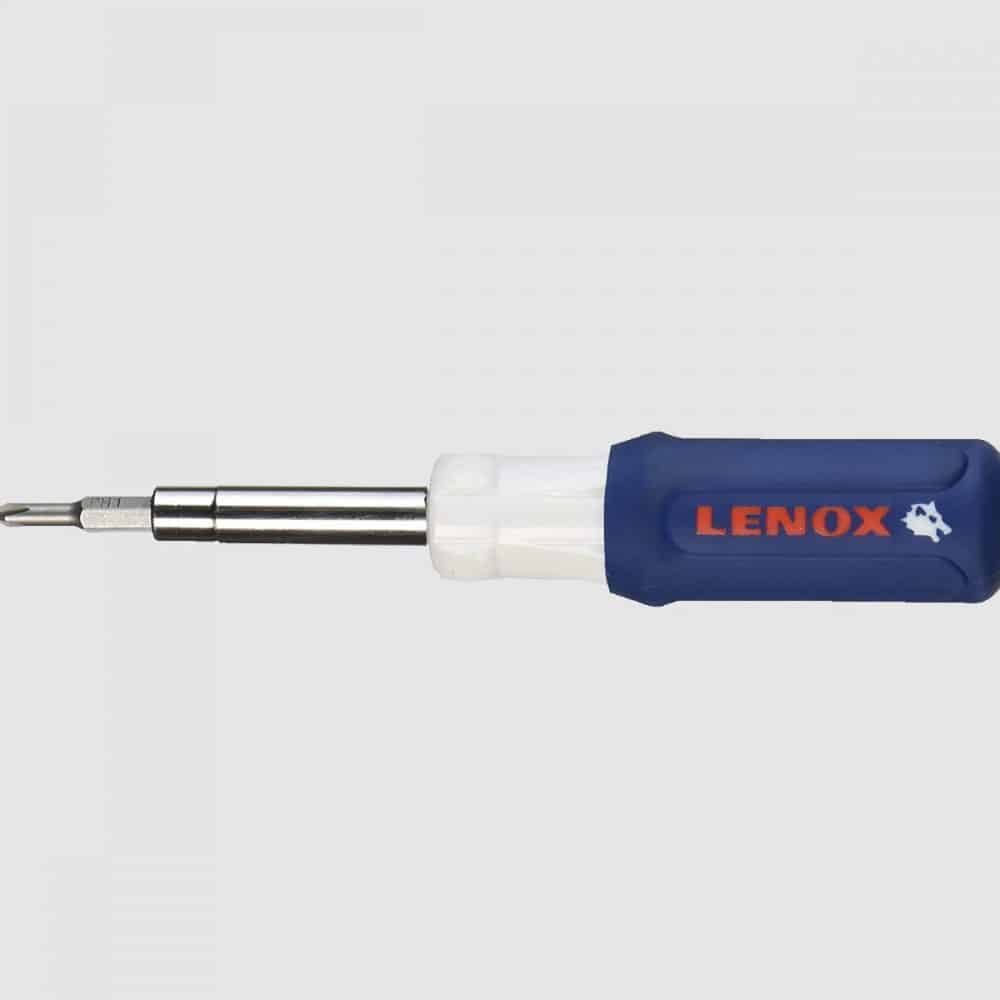
Best Tool for Building a PC: LENOX 6-in-1 Screwdriver

If there’s one item to add to your basket before your PC purchase, it’s this fantastically cheap multi-purpose screwdriver.

While I know there’s a lot of people out there looking for the best screwdriver set for computers and PC build, the truth is buying a full toolkit is overkill.

What kind of screwdriver do you need for PC building?

A no 2 Philips screwdriver will cover 90% of what most builds need.

That said, it’s helpful to have a no 1 (smaller head) variant for the occasional screws that are a little tighter.

I like the LENOX because it is (surprisingly) in the same price bracket as a single-type screwdriver, yet comes with 6 different heads (without a reduction in quality).

Overall, this one is a bit of a no-brainer.

Not only is it great to have the 2 Philips head types when setting up your PC, but getting the other 4 screwdriver types is a nice addition for future DIY projects given they come at no cost.

At its low price-point, this is without a doubt the best tool for PC building.

Best Anti-Static Wristband for PC Building: Rosewill Anti Static Wrist Strap

An anti-static wrist strap is a cheap, easy way to ground yourself and remove the risk of static interference when handling your pricey PC parts.

I recommend the Rosewill band – > The cheapest on the market that has widespread usage. There’s no need to overcomplicate a simple product, this is all you need.

Do you need an anti-static wristband to build a PC?

The short answer is no, but it’s recommended.

This is a popular product amongst tech builders for a reason: for a tiny price, you are avoiding the risk of static damage to items you spend big money on.

You’ll then have the band for all future upgrades/builds.

Alternatively, you can ground yourself manually every few minutes; which will cover most of the risk if you’re careful.

(There’s already good resources on how to ground yourself when PC building).

But as far as I’m concerned, the tiny spend is worth the ease of building and peace of mind.

Best Cable Ties for PC Building: Hmrope 100pcs Cable Zip Ties

Many PC parts come with cable ties (most often the PSU or PC case).

If you know for sure that some will be included for you, this may be unnecessary.

That said, you can never have too many cable ties for organization.

The various SATA/Power/Misc cables you’ll be working with will quickly disorganize your build if you don’t have these handy.

The Hmrope ties are the cheapest available online and still do the job as effectively as its pricier competitors for PC builds

Best Thermal Paste for PC Building: Noctua NT-H1

Thermal paste is an important part of the PC building process.

It is what allows the smooth transition of heat from the CPU to the accompanying CPU cooler. Do not start your PC without first having applied thermal paste.

Most CPUs or stock coolers usually come with enough paste for at least one application.

It’s worth checking what with the one you’re purchasing. If it is included then it will likely do the job just as well as Noctua so this is completely optional.

I (and many other builders) like to pick up some paste just in case:

  1. Thermal paste isn’t included with your CPU
  2. You need to re-apply the paste after a sub-par first attempt

You do not need to buy an expensive/high-volume tube of paste. 

The Noctua NT-H1 paste ticks the boxes perfectly and is, in our opinion, the best thermal paste for PC building today (being one of the cheapest on the market, with enough volume for a few applications and widely used/available).

Extras

The above 4 items are the best tools for building a PC. We’ve just included a couple of extra optional small items that we think may be valid for some of your setups.

Best USB Hub for PC: Anker 4-Port USB 3.0 Hub

I recommend a USB hub for two types of people:

  • Those with limited USB hubs on their PC (particularly likely for smaller form factor PC cases)
  • Those (like myself) who like to have more easily available ports on their desk – as it can be a pain to reach behind the PC if your front I/O ports are out.

This Anker offering is one of the best USB hubs for a PC setup.

It ticks all the right boxes: low in price, sturdy/attractive design, wide usage, and USB 3.0.

You can get a product with more ports if preferred, but we will need to fork out more for a good product (and larger numbers of USB ports demand more power, so are more often accompanied by a mains power requirement to allow you to use for charging also).

Best Headphone Stand for PC Users: NZXT Puck

Last but not least is a unique product from one of the best PC Case brands in the game.

The NZXT Puck is essentially a magnetic stand to stick to the side/front of your PC case (or another magnetic surface if your PC isn’t).

It sounds simple, but it’s a surprisingly effective/aesthetically pleasing way of storing your headphones.

And the puck is actually in two parts, so you can choose to separate them and use the other piece for say, a game controller.

The slight crevice around the side of the puck also allows you to have some neat cable management for your accessories on the front side of your PC (something that is usually lacking in setups).

It’s by no means required for your build, but neatly storing your expensive PC headphones is something that is often overlooked, so a product to do it stylishly is one we’d recommend.

What's Next?

About the author

Picture of Kaelum Ross
Kaelum Ross
Kaelum Ross, BSc is the Lead Writer at What in Tech and a leading authority in PC hardware and software. With a career as a senior IT professional, Kaelum has led multi-million dollar projects covering everything from bespoke software development to complex Windows hardware upgrades. Today, Kaelum uses his expertise to serve What in Tech's readers and has been featured in numerous global publications including New York Magazine and Lifewire.

Amazon Prime Day 2020 – Tech Deals Guide

Prime Day Tech Guide

Amazon Prime Day 2020 Tech Deals Guide

Well that was fun!

Thanks for checking in to our Prime Day 2020 guide. Prime Day is now over until 2021, so come back to this page then when we’ll update it with the best deals next year.

Best Prime Day Amazon tech deals

Prime Day is wrapped up now until 2021, we’ll see you then!

Do you need Amazon Prime to get Prime Day deals?

Yes, but in 2020, Amazon offers new users a 30-day free trial (check the links below to see if the offer is still available).

Should you wait for Black Friday/Cyber Monday for tech deals?

Although Black Friday and Cyber Monday are historically larger events, we don’t expect many tech users to gain enough of a discount to warrant waiting several more weeks.

When you read forums and listen to Reddit posts, there will always be someone to say “if you just wait X months, it will be cheaper”.

But this is always the case with every sale! You can always wait longer and get things cheaper.

But Prime Day will undoubtedly be a great chance to pick up good tech deals, so if you want something soon, we recommend making this your time to do it.

What's Next?

About the author

Picture of Kaelum Ross
Kaelum Ross
Kaelum Ross, BSc is the Lead Writer at What in Tech and a leading authority in PC hardware and software. With a career as a senior IT professional, Kaelum has led multi-million dollar projects covering everything from bespoke software development to complex Windows hardware upgrades. Today, Kaelum uses his expertise to serve What in Tech's readers and has been featured in numerous global publications including New York Magazine and Lifewire.

How to Limit or Turn Off Auto Updates on Steam – Quick Guide

Steam auto updates screenshot

How to Limit or Turn Off Auto Updates on Steam

Want to stop a Steam update that will inevitably slow your internet speed?

Perhaps a new “fix” is known to crash the game and you want to hold off until the devs resolve?

Whatever the reason, we’ve created a fast guide on the options you have to disable auto-updates on Steam.

Quick note before we start: Steam auto-updates by default for a reason. Which is why they make it close to impossible to fully stop.

For the most part, new versions will fix issues or add features, so only disable updates if you have a reason to (we only recommend this for single player games).

Table of Contents

How to Turn Off Auto Updates on Steam for Specific Games

To stop Steam from updating games one at a time, start at your Steam library and right-click the game in question and click “Properties”.

Once the window opens, go to the “Updates” tab and you’ll see an “Automatic updates” dropdown box.

Set it to “Only update this game when I launch it” as below.

Steam does not give you the option to completely disable auto-updates so this is the best you can do within the app.

If you want to then play a Steam game without updating, your best option is to play in offline mode.

How to Turn Off Auto Updates on Steam for All Games

Unfortunately, there isn’t a supported way to do this.

But below are the closest methods found.

Option 1 – Download Steam Games at Certain Times

If you’re doing this because you don’t want games downloads affecting your broadband speeds, you can schedule Steam updates.

Click “Steam” in the top left corner and then “Settings”

Then go to the “Downloads” tab and you will see an option to set a time window for Steam updates as below:

If you really want to ensure Steam doesn’t update games, you can set the schedule to something like 4-5am and then make sure Steam is off or in offline mode during that period/when you play games.

Option 2 – How to Limit Steam Download Speeds

Another effective way to deal with Steam slowing down your internet is to set a Steam Bandwidth Limit.

Going to the same settings menu as option 1 above (Steam – > Settings – > Downloads) you can easily set a download limit for Steam as below:

How to Access Previous Versions of a Steam Game

Some games allow you to play older versions on Steam.

To do this, once again right-click on a game in your Steam library and click “properties”.

Go to the “Betas” tab and click on the dropdown box.

If there are other versions available, simply click on the one you want and Steam will download that version.

(Our example uses Super Meat Boy, which uses an older version for speedrunners).

About the author

Picture of Kaelum Ross
Kaelum Ross
Kaelum Ross, BSc is the Lead Writer at What in Tech and a leading authority in PC hardware and software. With a career as a senior IT professional, Kaelum has led multi-million dollar projects covering everything from bespoke software development to complex Windows hardware upgrades. Today, Kaelum uses his expertise to serve What in Tech's readers and has been featured in numerous global publications including New York Magazine and Lifewire.

The 12 Best Motherboard CPU Combos of 2020

Motherboard CPU Combo Cover

The 12 Best Motherboard CPU Combos of 2020

Deciding what order to buy your gaming PC parts in is hard.

One of the worst offenders is choosing which CPU & motherboard you should pair.

With countless variations, the whole process is unnecessarily confusing.

Which is why we’ve collated the best CPU motherboard combinations available for all different sizes, purposes & budgets.

This is a long feature – we recommend scrolling to the headings you’re actually interested in instead of reading it top-to-bottom.

 Table of Contents
 

AMD vs Intel CPUs/Motherboards

No feature on this topic would be complete without a say on the “is AMD better than Intel?” battle.

We’ll keep it short as there’s already a lot of good info on this topic.

For this generation of CPUs, both flagship models from each manufacturer give great performance for gaming and other build purposes.

But if looking at the numerous benchmarks available for games/production for both brands with price in mind: AMD tends to have an edge.

Many of the current-gen Intel CPUs are fantastic.

But on average, you’re usually paying a little more for the performance you can get from the AMD alternative.

A lot of credit is given to Intel for its integrated graphics processors on many of their CPUs.

But really, we find this a borderline moot point.

Anybody seriously building for gaming/production/streaming is going to want a standalone graphics card.

For motherboards, the AMD versions tend to be cheaper also (with the exception of Mini-ITX).

Short answer: We’d push you towards an AMD build to get the highest value CPU motherboard combos.

But we do understand some people are just more comfortable with Intel.

Don’t fret – know that the Intel motherboard combos we’ve recommended below are still great for their respective price-points.

With that said, let’s get into it:

Overall Best AMD Motherboard CPU Combo:

AMD Ryzen 7 3700X with ASUS ROG Strix B450-F

To start off our list, we’ve chosen what we think is the best gaming CPU motherboard combo available for an “all-round”/mid-range build.

The AMD Ryzen 7 3700X is a fantastic accomplishment in CPU engineering.

Offering 8 threads and 16 cores with a max frequency of 4.4GHZ, this AMD processor packs an incredible punch for its competitive price.

Its utility will hit the sweet spot for what most gamers need.

You have a great basis here for a powerful gaming build that will accompany some intensive GPUs (including multi-crossfire builds).

Tied with some decent VGA hardware, this CPU is more than capable of running a 1440p/4k gaming PC.

The included stock cooler also performs decently and looks great with its color-controllable LED lighting.

Outside of games, the 3700x is very capable of general multi-purpose PC tasks (benchmarking well in tasks across the board, not just gaming fps tests).

Meaning it’s a great CPU for streaming, video editing, production, and more.

If this is the budget you have for a processor, we really can’t recommend it more.

The ASUS ROG Strix B450-F is a popular motherboard for a reason.

With its ATX form factor and B450 chipset, the ASUS mobo has pretty much everything we expect a majority of gamers to need.

You’ve got:

  • 3 PCI-e slots for a multi-GPU build (or integrated sound/network cards as required)
  • 4 x DDR4 RAM slots
  • Dual NVMe M.2 storage options
  • Great onboard sound
  • Gorgeous RGB lighting and 2 headers for a great RGB build.
  • Stylish and well-equipped I/O panel

It’s a great motherboard for overclocking, with lots of good onboard features as well as a great, user-friendly BIOs.

For the price, we really think the Strix B450-F hits the sweet spot between offering features without reaching “diminishing returns”.

If we had to choose one CPU/motherboard combo to recommend for the majority of gamer computers (and other production needs), this is it.

Overall Best Intel Motherboard CPU Combo:

Intel Core i7-9700K with MSI Z390-A PRO

Our top Intel picks are also a great hardware pairing.

They perform a tad better but cost a fair chunk more as we discuss below.

The i7-9700K is, with performance-per-$ in mind, the best Intel CPU for gaming today.

The processor packs 8 cores/threads and the very impressive capability to overclock up to 4.9Ghz.

It performs excellently across gaming tests and tied with a good GPU (or 3), will grant you excellent performance for games and other tasks.

Certainly more than capable of being the basis of a powerful 1440p/4k gaming build.

i7-9700K vs Ryzen 7 3700X

These frontline CPUs have faced off in loads of benchmarking tests.

The short answer?

They come out very close.

The i7-9700K performs slightly better in most gaming FPS tests, but not enough to be decisive.

The Ryzen 3700X tends to perform marginally better at other computational tasks (anything from unzipping files, to compression, to multi-tasking).

Because of this, we would certainly recommend the R3700X if you’re interested in also building a PC for streaming, video editing, and/or production work.

Now, you may think that makes the Intel CPU the best choice for gaming.

We’d agree if you happen to see them at the same price.

But nearly always, the 3700X (and accompanying motherboard) work out significantly cheaper.

That saved budget would be much better spent on buying a more expensive GPU, the AMD CPU will still be able to work with a very intensive VGA demand.

The MSI Z390-A PRO is one of the best value Intel motherboards on the market.

An ATX form factor mobo, it has excellent overclocking facilities (with some nice bells and whistles like an extended onboard heatsink).

The main features include:

  • 2 x PCI-e ports (1 with reinforcement to reduce GPU sag, though don’t read into this as a huge deal)
  • 4 x DDR4 / DIMM slots
  • NVMe support
  • Good onboard sound
  • I/O panel that includes USB 3.1 type C output

You’ll note it has 1 less PCI-e port than our top AMD offering.

While this would be a nice addition, we doubt many of you looking at a mid-range build will require more than 2 (if you do and want to stick to Intel, check out our high-end pick below).

It has everything you’d expect in a decent mid-range Z390 motherboard and works great alongside the 9700K.

Best Budget AMD Motherboard CPU Combo:

AMD Ryzen 5 3600 With ASUS TUF B450M-Plus Gaming

As far as cheap AMD CPUs/motherboards go, the below pair is the best value combo for gaming.

You can go cheaper, but these next AMD/Intel combos are the lowest we’d recommend for most gamer needs.

If however you just want a PC for general use/light gaming, see our “cheapest” picks further below.

The Ryzen 5 3600, as far as cheap gaming processors go, is our favorite.

Providing great performance for a 1080p/1440p gaming build, you’re still able to run some decent graphics hardware alongside this CPU.

Offering an impressive 6 cores, 12 threads, and max 4.2 GHz, it’s got an impressive spec for a budget processor.

The included Wraith Stealth cooler is not the best on the market but will get the job done for a budget gaming build if you don’t want to buy standalone.

You still have enough power in this processor to stream and perform other intensive tasks (respecting that they, of course, won’t be quite as fast as the more expensive builds).

Overall what you get for the price in this CPU is fantastic.

If it’s as far as your budget can stretch, you’re still going to be able to create a great PC for gaming.

The Asus TUF B450M-Plus Gaming is a great cheap AMD motherboard option that still offers everything you need for most games.

It’s a Micro ATX form factor, which is more cost-effective than their ATX counterparts (including cheaper cases).

The board includes:

On top of it still having reasonable overclocking capability, features like NVMe M.2 / RGB inclusions are really impressive for the low price point.

You’ll likely just be buying 1 GPU for a budget gaming build, but it’s nice to have the option to expand with the second PCI-e slot later on.

Overall, this cheap CPU motherboard combo still has everything you need to play the latest games at reasonable settings.

Best Budget Intel Motherboard CPU Combo:

Intel Core i5-9400F With Asus Prime Z370-P II

Our budget Intel combo is also worth your consideration, especially if they happen to be cheaper/on a deal whenever you’re browsing.

Note: it seems that manufacturers are fading out the Z370 chipset motherboards. 

We’ve included the best value one below but if made unavailable, your best bet will be to tie the i5-9400F with our best overall motherboard: The MSI Z390-A PRO

If you’re looking for a cheap Intel gaming CPU, The Core i5-9400F is the best option.

We’re specifically recommending the non-graphics integrated version because even in a budget gaming build, you want a standalone card.

With a clock speed of up to 4.1GHZ and 6 cores/threads, this Intel offering still packs a punch and can be paired with a decent GPU.

i5-9400F vs Ryzen 5 3600

At the time of writing this, the two budget CPU options are around the same price.

Originally the Ryzen 5 3600 was a more “premium” option, and it shows in the benchmarks.

The card tends to perform 10-20% better across the board, from games to general PC tasks.

If the Intel option happens to be significantly lower price at the time you’re looking, then, by all means, go for it.

But if the prices are what we expect, then the 3600 is the best value CPU for gaming available.

But the 9400-F will still get a lot done in a production/gaming/streaming build should you want to stick to Intel.

The Asus Prime Z370-P II is the best cheap gaming Intel motherboard available on the market today.

It may soon be discontinued as manufacturers move towards focussing on the Z390 chipset.

If you can’t get this motherboard, go for the MSI Z390-A PRO.

This ASUS offering is an ATX motherboard. It’s great that it retains the good value at this form factor, offering:

  • 2 x PCI-e slots
  • 4 x DIMM/DDR4 RAM slots
  • Dual NVMe M.2 Storage option

It won’t have as many bells and whistles as our mid-range picks (RGB headers, reduced overclocking facilities, no USB 3.1 type C, etc).

But as far as the utility you need from a budget gaming build?  This Asus motherboard has everything you need.

Cheapest AMD Motherboard CPU Combo:

AMD Ryzen 3 3200G With Asus Prime B450M-A

Let’s be clear:

If you’re serious about building a gaming PC, or one capable of decent production/streaming output, then the budget picks above should be the minimum.

That being said…

What if you’re happy with a PC that’s just for lightweight gaming (e.g. Fortnite on fairly low settings/older games) and general web browsing/Netflix etc?

We’ve included the cheapest CPU motherboard combos we’d recommend if this fits what you’re after.

For its low price point, the AMD Ryzen 3 3200G manages to pack an impressive amount and is the cheapest AMD CPU for gaming we’d recommend.

Still packing 4 cores/threads, max frequency of 4.0GHZ, and an included wraith stealth cooler (enough for a cheap setup).

With your budget in mind, AMD has included integrated graphics into this CPU.

But know for games, the performance will be pretty poor, you’d be playing games on low at best.

Therefore even if your budget is tight, try to stretch to a standalone card.

That being said, don’t be put off if you can’t afford some of the better picks on this list.

You can still play plenty of great modern games with this AM4 CPU when combined with a fair GPU (just not at crazy settings/resolutions!).

The Asus Prime B450M-A is definitely the cheapest AM4 motherboard we’d recommend.

At its Micro ATX form factor, you’re getting:

  • 1 x PCI-e slot
  • 4 x DDR4 compatible outputs
  • Surprisingly, an RGB header should you ever need
  • An NVMe M.2 storage option

As far as overclocking goes, you’ll be limited on this board.

But in a budget build, you’ll not want to spend lots on cooling anyway.

Put simply: this mobo and CPU combo is excellent for someone looking at the minimum for supporting a gaming PC.

Cheapest Intel Motherboard CPU Combo:

Intel Core i3-9100F With MSI H310M PRO-M2 Plus

When considering i3-9100F vs Ryzen 3 3200G, the performance in this category is actually quite comparable.

So if you’re looking for the cheapest Intel CPU motherboard combo, rest assured that this option is as good as AMD’s offering.

With that said, if you don’t have a brand allegiance, we’d recommend you just pick whichever of the two pairs happens to be cheaper at the time you’re looking.

The Intel Core i3-9100F is as cheap as you can get for an Intel gaming CPU.

With similar specs to the AMD offering, you’re looking at 4 cores/threads and clocks up to 4.2GHZ.

A basic cooler is included (all you’d want for a very low budget PC).

Integrated graphics are not included, but as always, you want to fork out for a standalone card if you’re interested in gaming anyway.

One of the cheapest Coffee Lake CPUs available, this offering isn’t really designed for gaming as you can expect from the price.

But if you’re happy with lower settings on less demanding games (or just want a PC for general purposes) this can still manage your needs just fine.

The MSI H310M PRO-M2 Plus, to put it simply, is the cheapest Coffee Lake motherboard that won’t bottleneck a basic gaming build.

Another mATX mobo (as expected for the budget), you have:

  • 1 x PCI-e slot
  • 2 x DDR4 compatible outputs
  • NVMe M.2 support
  • Acceptable onboard sound

Of course, at this very cheap price point, you’re not getting much more than the minimum.

But really in a budget build, you only need 1 PCI-e slot and 2 x RAM slots anyway.

Coming in at an exceptionally low price-point, this Intel CPU motherboard combo is perfect for anyone who really needs to make every $ count.

Best High-End AMD Motherboard CPU combo:

AMD Ryzen 9 3900X With Asus Prime X570-Pro

If price is not a concern, the next pair is the best CPU motherboard combination on the list.

Of course, at these prices, this is for a very powerful gaming build or someone after a high-end production/video editing/streaming PC.

For the average gaming PC, you’ll do well with the top picks above.

But if you’re more interested in power than budget, keep reading!

The AMD Ryzen 9 3900X is an incredible piece of hardware.

With a monstrous 12 cores, 24 threads, and overclockable up to 4.6GHZ, despite its high price-point, it still somehow manages to feel impressively valuable with all this included.

The processor will be more than capable of running a high-intensity multi-GPU build.

As far as gaming goes, provided you have the high-end VGAs to match, you can consider yourself future-proofed, 

This Ryzen 9 CPU will be capable of working alongside top-end graphics cards to act as a 4k gaming PC (with decent settings/fps to boot).

This AMD offering also performs excellently across benchmarks for pretty much all other major computational task tests.

Meaning its a perfect CPU for production, video editing, and the best streaming processors for absolute top quality/multi-tasking.

The processor also comes with a good quality LED cooler, good for the basis of an RGB build.

This cooler won’t compete with standalone heatsinks or CPU water coolers (that we expect most high-end builders to go for) but it’s a nice inclusion nonetheless.

It’s hard not to rave about the 3900X and its superb feature set, it’s one of the best CPUs for overclocking and if you’re looking for a top-quality gaming build, start here.

Ryzen 9 3900X vs 3950X

Some of you may be wondering why we chose the 3900x over its more powerful brother for our top-end pick.

With an additional 8 threads and higher overclocking potential, the 3950X is indisputably better.

But for around 50% extra cost, there are pretty huge diminishing returns.

If you also need your build to be state of the art for production purposes or want to ensure you can max out games like RDR 2 and Cyberpunk 2077 (when it comes out) at a very high resolution/FPS, then definitely go for the 3950X.

But otherwise, even for your high-demand gaming needs, we think the 3900X will match what you need (spend the delta on better GPUs).

The Asus Prime X570-Pro Ryzen 3 is one of the best AM4 motherboards available today.

With the X570 chipset, you’ll have access to not only the best processor power draw around today (to max out that expensive CPU), but also PCI-e 4.0.

The main utility here is for GPUs and NVMe storage performing at faster speeds.

This is great for top-end builds, and while you may not see the full capability of PCI-e 4.0 for another few years, it means you’re investing in a future-proof motherboard.

In terms of other features, oh boy, the list is plentiful and we won’t cover it all in the summary, but for the highlights:

  • ATX form factor with 3 x PCI-e slots
  • 4 x DDR4 slots
  • Dual NVMe M.2 support
  • Fantastic onboard sound (Realtek 8.1 S1220A)
  • Beautiful onboard RGB lighting, 2 addressable headers, and 1 standard RGB header, perfect for an RGB build.
  • Numerous other onboard BIOs features for overclocking & optimization

Yes, the board is expensive.

But for enthusiasts, the quality of life features you get for overclocking amongst all the points mentioned above really make it a gem.

You can go a lot more expensive with motherboards, but we’d say this is the sweet spot even for the most avid of power builders.

If we had to pick just one: this is the best gaming motherboard CPU combo we’d recommend in the entire list.

Best High-End Intel Motherboard CPU combo:

Intel Core i9-9900K With MSI MEG Z390 ACE

Our most expensive Intel CPU motherboard combo is a worthy competitor to AMD’s offering.

The Intel Core i9-9900K is one of the most popular CPUs of the current generation, and for good reasons!

With 8 cores, 16 threads, and up to 5.0GHZ clock speed, you can get amazing speeds out of this processor for a gaming computer.

As far as other tasks go, the CPU always perform excellently, benchmarking very well for the needs of a production or streaming PC

i9-9900K vs Ryzen 9 3900X

A battle of titans.

Both of these are amazing CPUs for gaming.

With that said, in all the benchmarking done for these 2, there is a slight edge to 3900X.

That is across lots of different factors, from gaming to various general PC task tests.

It isn’t completely unanimous, with the i9 recording some slightly better fps peaks in some 1080p tests.

But it’s clear that the Ryzen CPU tends to take the victory if we had to choose.

We also like that the AMD CPU comes with PCI-e express support, which future-proofs your next gaming setup when combined with our recommended motherboard.

If however, when you were browsing, the i9 CPU motherboard combo was >10% cheaper, it would likely be worth the savings as they are still close in performance.

One final thing to bear in mind: the 3900X includes a nice LED RGB cooler and the 9900K doesn’t include even a basic stock cooler.

Though we expect most of you will be going for a standalone option anyway.

Intel i9 9900K vs Intel 10900x
If you keep up with PC news, you’ll know the 10900x is the “new guy” in town.

The CPU is currently very hard to get hold of and quite pricey.

Although the architecture behind it is very impressive (as you’d expect from the next-gen comet lake CPUs), in real-world performance terms, it’s a tad underwhelming.

Benchmarks vs existing CPUs show only marginal improvements.

Even for enthusiast builds, we would stick with the 9900 or comparable AMD offerings for the time being.

The MSI MEG Z390 ACE is one of the best Z390 motherboards around if your wallet is thick.

Let’s start with the design.

We don’t often focus on style for motherboards…

But tied with a nice visible PC case, the Z390 AC will look fantastic with its slick RGB lighting and steel fixtures (on PCI-e slots, etc).

It’s an ATX motherboard which like our top AM4 motherboard, has too many features to list.

Including:

  • 3 x PCI-e slots
  • 4 x DDR4 slots
  • 3 x M.2 support (with 1 x integrated M.2 heatsink)
  • Very good integrated sound (Realtek 8.1 S1220A)
  • Excellent rear I/O panel including a USB type C port.
  • Also (rather uncommonly) includes potential inputs for 2 x USB type C ports for the front I/ O panel
  • Beautiful onboard RGB lighting and addressable headers for an RGB build.
  • Locks of overclocking utility within the BIOs/onboard heatsinks

If you’re looking for an Intel gaming motherboard CPU combo in the era of Coffee Lake/Z390 and you have the money, this is the pair you want.

Best Micro ATX AMD Motherboard CPU Combo:

AMD Ryzen 7 3700X With ASUS Prime B450M-A

For those of you looking for a Micro ATX AMD Gaming PC we’ve combined our best gaming CPU pick from the top of this list with a great, affordable mATX motherboard.

We’ve already been over the AMD Ryzen 7 3700X at the top of our list (where it belongs).

It has returned because it’s easily the best Ryzen CPU for gaming when considering a “mid-range” user.

The 3700X is a great choice for an mATX CPU Motherboard combo too because you’re still going to be looking for good processor power in a mini-tower gaming PC.

With its 8 cores / 16 threads, it will be very effective for single/dual GPU setup (2 is the most you’ll do with a Micro ATX mobo).

What else is there to say that we haven’t already?

This is the best value gaming CPU on the market today. If it fits into your budget, pick it up.

The Asus Prime B450M-A has an impressively dense feature-set for its mATX form factor and low price.

You’ll be getting:

  • 1 x PCI-e slots
  • 4 x DDR4 RAM slots
  • NVMe support

And solid onboard features/BIOs to enable customization/good performance.

We’ve recommended a board with 1 x PCI-e slots as imagine many of you looking at building a Micro ATX gamer computer will be focussing on single-GPU builds.

If you want a crossfire gaming PC (or the potential for one later), you can fork out more on the Gigabyte B450M DS3H (still compatible with the Ryzen 3700X).

You’ll note that there are some cheaper 2 x PCI-e AMD mobos floating around.

But some other features you lose out on (limited SATA availability/other power draw concerns around the board) are not worth it unless you’re sticking to a very cheap build.

Overall, this motherboard, combined with the most popular AMD gaming CPU on the market will make your setup a powerhouse when combined with a good GFX card.

Best Micro ATX Intel Motherboard CPU Combo:

Intel Core i7-9700K With ASRock Z390M PRO4

For the Micro ATX Intel CPU motherboard combo, we’ve also returned to our top CPU pick tied with an excellent value mobo.

The Intel Core i7-9700K is just as good a CPU for an mATX gaming PC as it is for our top (ATX) based combo.

The only extra thing to bear in mind for a smaller build is with the lack of stock cooler, you’ll be putting effort into buying a CPU cooler that’s compatible with a mini-tower case.

There’s usually enough room in this form factor for a majority of them though (just ensure you check dimensions).

The 9700K is more than capable of running greatly alongside a powerful GPU (or two), which is what you’d be looking at in an mATX PC.

What more is there to say?

This is the best Intel CPU for gaming today with the average budget in mind, and great for an mATX computer.

The ASRock Z390M PRO4 is such an impressive value-offering, for most mATX CPU motherboard combos, this is more than good enough.

You may not have heard of ASRock to the same extent as say, ASUS or MSI.

But rest assured they are an excellent motherboard manufacturer, especially in the affordable price ranges.

With this board, you’re getting:

  • 2 x PCI-e slots
  • 4 x DIMM outputs
  • Decent onboard sound

It’s a motherboard for a dual-GPU build should you need it in the future (unlike the AMD mATX ASRock board on Amazon, it doesn’t sacrifice as much on SATA/power draw to have that extra slot).

If you have the budget for a mobo with some more bells and whistles (better M.2/RGB capacity, slightly improved audio & integrated wi-fi) then you could also go with the excellent MSI MPG Z390M.

But the ASRock will give you everything you need for a “no-frills” base and is a perfect pair with the Ryzen for an mATX CPU motherboard combo.

Best Mini ITX AMD Motherboard CPU Combo:

AMD Ryzen 5 3600 With B450I GAMING PLUS AC

For the smallest form factor, we’ve chosen a pair of slightly more affordable options given you don’t need a CPU that powers a huge powerhouse in an mITX gaming PC.

We’ll discuss potential upgrades should you have the budget though.

The AMD Ryzen 5 3600 is another offering we’ve already raved about in our budget pick.

Easily the best Ryzen 5 CPU for gaming, the cores/threads you’re getting for the price is fantastic.

Why are we going for a “budget CPU” for the top Mini-ITX combination?

Well, in mITX builds and PC case sizes for the form factor, you’re going to be sticking to single GPU builds.

With this in mind, the 3600 is a good enough CPU to not bottleneck one graphics card for your gaming.

Don’t get us wrong, you’re still going to get some decent extra juice out of our favorite pick, the Ryzen 7 3700X, if you have the budget.

Especially if you want a mini-ITX streaming PC or a CPU for video editing/production.

But overall, we think this Ryzen 5 processor will cover what most of you will need.

So don’t fret if it’s the furthest your budget can stretch for your mITX gaming computer.

The MSI B450I GAMING PLUS AC is pricey, but also the best Mini ITX AM4 motherboard on the market.

Decent mITX AMD motherboards seem to be more expensive than the Intel category.

A tad unusual in this generation. We expect this is simply because of supply/demand.

That being said, if you’re looking at a mITX build, this is still a great option, with:

  • 1 x steel-plated PCI-e slot (standard for the form factor)
  • 2 x DDR4 RAM slots (also standard for mITX)
  • Decent onboard sound
  • Included wi-fi (recommended for mITX so you’re not relying on limited USB/PCI slots)
  • A well-featured I/O panel, considering the size

Combined with either the Ryzen 5 or Ryzen 7 CPUs above, you have a fantastic basis here for a gaming PC.

Remember with a ITX computer/ single GPU, you’re not going to get quite the same power as you would out of something larger.

But know that if that single GPU is a powerful one, you can still create a great portable gaming PC/something suitable for LAN parties or a VR demo build.

This small CPU motherboard combo will also still perform great with other general computational tasks too if you have video editing/streaming in mind.

Best Mini ITX Intel Motherboard CPU Combo:

Intel Core i5-9600K With ASRock Z390M-ITX/ac

When it came to confirming the best CPU motherboard combos for mITX, we actually found that Intel came out looking better than AMD.

Not something we saw in many of the other categories, so take this pair seriously!

Last but certainly not least on our list is the fantastic Intel Core i5-9600K CPU.

The smaller brother of the i7-9700K, the CPU still manages a decent 6 cores/threads and up to 4.6GHZ clock speed.

The base clock speed is also 3.7GHZ, which is nice for those worried about overclocking in such a tight form factor where cooling is often minimal.

Combined with the below Mini-ITX Z390 motherboard, you have a great combo here to tie with a single GPU for a powerful gaming build.

i5-9600K vs i7-9700K

Some users may wonder if it’s worth forking out more for the i7 CPU, which we consider the best Coffee Lake CPU for gaming with price in mind.

Well, while it’s great for ATX/mATX builds, it’s probably a tad overkill for ITX PCs.

If you’re looking to build the best mITX gaming computer you can, by all means go for the 9700K.

It will also open up more capability in the way of multi-tasking/other task speeds – whether that’s for a streaming setup, video editing, or a production rig.

But we expect most people looking at mITX are more interested in achieving a decent, but not “ultra-powerful” portable PC.

For you guys, be comfortable knowing the 9600K is enough alongside a great GPU.

i5-9600K vs Ryzen 5 3600 combo

When putting our smallest CPU motherboard combos head-to-head, we think in this case, Intel comes out on top.

When it comes to the CPU specifically, the 9600K performs slightly better in gaming.

The Ryzen 5 3600, with its increased threads, will be marginally better at multi-tasking.

But really, they’re in the same ballpark. 

The Ryzen 5 3600 is usually more valuable as it’s typically around 10-15% cheaper.

The reason we choose Intel here?

Because the mITX Intel motherboard options are better than AMD’s.

The value you’re getting from the cheaper motherboard outweighs what you get from the cheaper processor.

By all means, if you check the prices of our top picks on Amazon via the links and see the AMD combo at a lower price, go for it.

But chances are, the Intel offering is cheaper, and we think, your best choice for this form factor.

The ASRock Z390M-ITX/ac is what makes this pairing so valuable and in our view, the best Mini ITX CPU motherboard pairing for either Intel or AMD.

At a very impressive price-point, you’re getting.

  • 1 x PCI-e slot (the mITX standard)
  • 2 x DIMM slots (also the mITX standard and still gives you up to 32GB RAM)
  • Good quality onboard audio
  • Integrated Wi-FI
  • NVMe support

Again remembering that on a miTX motherboard you’re obviously limited compared to larger form factors, this is a fantastic value offering.

Having NVMe support is really nice for a tiny build where storage space matters.

Integrated Wi-Fi at the price point is very useful when you have limited USB/PCI slots too.

Simply put, if you add a decent graphics card, this Intel CPU motherboard combo will be fantastic for an mITX gaming computer.

Final Word

We appreciate how long this feature is and how much information you have just digested!

If you’re feeling overwhelmed, know that we only provided so many options to ensure every size, budget & requirement.

If you want the short answer for what suits most PCs for gaming, streaming, production, and general usage: go with our top AMD choice.

We put this combination at the top for the reason and really stands out as being perfect for most users.

But rest assured, whatever category you’re most focussed on, know that these options are all fantastic for their respective price-points and great basis’ for your next exciting build!

What's Next?

About the author
Picture of Kaelum Ross
Kaelum Ross
Kaelum Ross, BSc is the Lead Writer at What in Tech and a leading authority in PC hardware and software. With a career as a senior IT professional, Kaelum has led multi-million dollar projects covering everything from bespoke software development to complex Windows hardware upgrades. Today, Kaelum uses his expertise to serve What in Tech's readers and has been featured in numerous global publications including New York Magazine and Lifewire.

How to Check Your Steam Purchase History

Check Steam Purchase History

How to Check Your Steam Purchase History

“When did I buy that game?”

Whether you’re just curious or trying to find recent purchases for a refund, Steam has a very simple way to check when you purchased a game (and how much it cost).

Check Steam Purchase History Steps

Step 1 – Login to your account and wait for the main screen to pop up.

Once there, click on your profile name in the top right corner and a small drop-down box will open below it as per the screenshot. Click “Account details”.

Steam Purchase History 1

This will take you to your main account details page.

From here simply click “View purchase history”.

And that’s it! You should then see a list of your entire purchase history since the account started.

This will show you when you got a game, how much it was and any refund details if applicable (also covers Steam wallet purchase history).

Can’t view Steam purchase history?

You should be able to see every game attributed to your account no matter how old on this menu.

If that’s not the case and you need to know, your best bet is to contact Steam support.

See total amount spent on Steam

If you want to depress yourself by knowing how much money you’ve spent in total on Steam, they added a feature for this a little while ago.

Just go to this link and log in – don’t say we didn’t warn you!

What's Next?

About the author

Picture of Kaelum Ross
Kaelum Ross
Kaelum Ross, BSc is the Lead Writer at What in Tech and a leading authority in PC hardware and software. With a career as a senior IT professional, Kaelum has led multi-million dollar projects covering everything from bespoke software development to complex Windows hardware upgrades. Today, Kaelum uses his expertise to serve What in Tech's readers and has been featured in numerous global publications including New York Magazine and Lifewire.

Should You Buy or Build a Gaming PC in 2020?​

buy or build gaming PC

Should You Buy or Build a Gaming PC?

Oh boy, here we go!

A battle that has raged for decades. “Should I build a PC vs “should I buy a pre-built PC”, I hear you debating to yourself.

Trust me, we’ve all been there, and you’ll hear strong arguments on both sides of the fence; everyone has an opinion on this.

It may seem like a difficult decision to commit to when there are very contrasting views available. What’s more, if you’ve read/heard someone say there is a definitive answer to this question, they’re lying.

However:

We can easily find the answer that is right for your circumstances.

Today, we’re going to breakdown the build vs buy questions and get the answer right for you.

Let’s start with the obvious one:

Is it cheaper to build or buy a gaming PC?

Building is (usually) cheaper.

“How much cheaper is it?” I hear you ask: typically in the range of a 10-20%, sometimes more. Due to the lack of manufacturer assembling the PC parts, there is no “middle-man” trying to profit from the build service.

The cost savings become more impactful as you reach higher price points, in fact, if your budget is very limited (say a couple of hundred dollars) a pre-built will very likely work out similar in price. Here’s a graph to represent, because who doesn’t love a graph!

However:

It’s worth noting that this isn’t always the case. Companies can also get great wholesale discounts on PC components that drive their pre-build units down, you may also run into individual parts costing you more than they usually would during exceptional periods of certain low supply or high demand.

There are a bunch of articles titled “why buying a pre-built PC is cheaper than building one yourself”.

You should know nearly these of all originated in 2018 when GPU prices spiked dramatically due to cryptocurrency mining and that this information is outdated.

PC hardware manufacturers right now are healthily competitive and prices for components (particularly CPUs and GPUs, the two largest expenses) are looking a lot better than a couple of years ago.

By all means, compare the build you’re looking at if you want to be sure on which is better (if a pre-built option is available), but as a rule of thumb: self-built > pre-built for your wallet. If your principle concern is cost/maximizing a certain budget for the best performance, get building!

Time is money

Sure, you can probably save money by building a PC.

But what about the time spent?

It will likely take you 5-10 hours to put your first build together, you need to:

  1. Identify the parts you want.
  2. Confirm that they are all compatible/complementary (size, power, the motherboard isn’t going to bottleneck the CPU, etc.).
  3. Watch some build tutorials.
  4. And of course, the assembly itself (including OS installation).

If you value your time per hour at a certain monetary level, there will be a point where buying a pre-build becomes more “valuable” than a self-built PC.

Many who enjoy the build process would argue that this time isn’t work so it’s a false equivalency, but what do you think?

If this is a busy time in your life and you were looking for a gaming PC to use the few spare hours you do have for high-quality entertainment, then you should look at a pre-built.

After all, the cost you pay on top is for convenience. Similar to heading to your local coffee shop for that quick latte (where are the “self-built vs pre-built coffee” articles!?)

Perhaps the thought of doing the above task list is stressing you out (or not exciting you in the slightest). If that’s the case, look at a pre-built.

Your budget vs your expectations

Last point on the money topic, what are you looking to get out of your build for your budget?

Let’s say you have a strict limit of $700:

Do you want the PC to run Red Dead Redemption 2 and Far Cry 5 at an acceptable framerate/resolution?

Or are you looking for a computer that could manage Fortnite, League of Legends, Fallout 4, and other slightly older, less graphic-intensive games?

If the latter, you’ll have the flexibility to buy a pre-built if you prefer.

If the former, you need to squeeze your cash to its maximum potential and will likely need to build yourself.

Now that we have the money question out of the way, let’s look at some others:

Why you should build your own PC

The joy of the build

You’ve just finished putting all of your parts together after hours of assembly, you press the power button…

… and you hear the whir of the fans and the lights of the case come to life – Feels like magic!

Aside from the cost, this is what really motivates people to build – there is a certain rush to knowing you put the machine together yourself and for many (myself included) this alone is worth the additional time investment.

Hone your skills

It may not be hard to pick up, but building a PC is not something everyone knows how to do, and it’s very freeing knowing for yourself first hand that it’s not that hard.

Not only does building a PC now set you up for being able to do other builds further down the line, but once you know how everything fits together (how your RAM connects to your motherboard, how to screw your SSD into the case, etc.), you’ll be in a great position to upgrade parts in the future.

If you’re serious about gaming you’ll likely want to upgrade in 1-3 years time (e.g. GPU) so this will come in handy sooner than you think.

Not to mention the bragging rights of having a PC that you’ve built yourself. Just be careful not to be too proud of your accomplishment or you’ll end up being tech support for all of your friends and family!

Choose your destiny

When you think of your dream PC, do you have something very specific in mind?

Perhaps you want the pink darkFlash Micro ATX case combined with an RGB motherboard and a red XFX GPU.

Well, you might have a problem if you wanted to buy that pre-built (other than your brave design choices).

Pre-built PCs will usually have a limited amount of configurations available.

This isn’t just aesthetic, you’d be limited in what parts you want to pick in terms of specification too.

What about Operating System? Perhaps you want Linux or something less standard?

OS will nearly always be Windows for pre-builts (and may also come with undesired additional software (i.e. bloatware) that will slow your PC down).

There are some companies out there that will effectively build anything for you if you provide them the shopping list, but these services are going to come with a much higher premium.

In addition, if you’re the sort of person who likes to customize often, it’s worth bearing in mind that the warranty of a pre-built PC will likely be void if you tamper with anything (though I expect a majority of you would not upgrade your PC over the warranty period anyway).

If your heart is set on a unique configuration, I push you towards building yourself.

Why you should buy a pre-built PC

The pain of the build

You’ve just finished putting all of your parts together after hours of assembly, you press the power button and…

…you hear nothing.

This happened to me on my first ever build (many years ago…) it was an easy problem to fix but that pit-in-stomach sensation is not great!

If you want to build a PC, you should know it isn’t hard and you shouldn’t be intimidated, but it is certainly still possible to make mistakes.

If you’re buying a pre-built, there is a comfort knowing you’re purchasing a tried and tested product with no risk of incompatible parts or incorrect setup.

What’s more, building your own PC puts you at the risk of damaging the parts (perhaps you bend a motherboard pin or something is hit with static electricity), you’ll have a hard time getting any support/warranty claims if something like this happens (again, these things are unlikely if you’re careful, but they’re worth pointing out for those of you watching your blood pressure).

The warranty advantage

An often-overlooked factor is that your warranty for a pre-built PC is for the whole unit, not for individual parts.

Let’s say you’ve built your own computer:

6 months in, your PC starts to crash to the point where it’s unusable.

What do you do?

  1. Rummage through google to see if you can identify the common symptoms of the crashing (if you’re lucky, you’ll find out).
  2. If that doesn’t work, you’re going to have to obtain replacement parts to swap out one-by-one and identify which PC component is causing the issue.

Both of these take time (especially point 2) and aren’t fun.

On the other hand, your pre-built PC breakdown 6 months after purchase?

You send it back to the company and they’re obliged to take those steps for you.

Bear in mind that sometimes (but certainly not always), individual parts will have longer warranties, but don’t underestimate the convenience value of not having to troubleshoot the issues yourself. These problems can take a LOT of time to resolve.

Decision time

So, let’s summarize:

If you are not too interested in the process or are busy/value your time more than the cost savings you can get building yourself – then go and get yourself a shiny new pre-built PC!

Or:

If you are very keen on cost-saving and have a genuine interest in the process of building and developing a unique configuration, then look here everyone – we found ourselves a new PC builder!

Still on the fence? let me make one thing very clear:

Both options are great! Have you already spent multiple hours on this decision, anxious about making the wrong choice? If that’s the case: go with your gut.

Reading through the points here, which side aligns with you more? Does the thought of building fill you with excitement or dread?

My recommendation? This article likely comes across more in favor of building a PC, because it is.

I think if you’ve read this far, chances are you would probably get a kick out of the build process and have a skill you’ll take into the future, giving you more confidence for upgrades and troubleshooting problems (not to mention the joys of a more powerful PC for your budget!).

I’ll reiterate one last time: There is no “wrong choice”: pre-built or self-built, I promise you that you’ll have a great time investing in a new PC

What's Next?