EXPERT INSIGHT & TRUSTED REVIEWS

EXPERT INSIGHT & TRUSTED REVIEWS

What in Tech is a user-supported site. When you purchase through our links, we may earn an affiliate commission at no additional cost to you. Learn more

The 7 Best Clear PC Cases of 2026

Clear PC Case

The 8 Best Clear PC Cases of 2026

For those looking to show off their beautiful internal builds

Clear PC Case

After reviewing the latest options available in 2026, our top picks remain the same, but we’ve included a couple of decent alternatives where relevant.

Let’s look at a hypothetical:

You’ve dedicated loads of time and money into putting together your perfect build.

The hardware looks amazing and you plan to set it up as neatly as possible.

…but then most of the cases you’re looking at only have one small window showing the internals!

Thankfully, there’s been an emergence of beautiful, clear computer cases that give as much transparency to your build as possible.

I’ve reviewed all of the significant offerings and reviewed/ranked them below for a range of sizes/budgets.

1

thermaltake core p5 v2 2

Overall Best Clear PC Case

Thermaltake Core P5 V2

Our Rating: 9.75/10

2

Lian Li PC-011 Dynamic

Runner-Up Clear Case Pick

Lian Li PC-011 Dynamic

Our Rating: 10/10

3

Thermaltake Core P7

High-End Clear PC Case Pick

Thermaltake Core P7

Our Rating: 9/10

4

Thermaltake Level 20 VT

Best Clear Micro ATX Case

Thermaltake Level 20 VT

Our Rating: 9/10

5

Thermaltake Core P1

Best Clear Mini ITX Case

Thermaltake Core P1

Our Rating: 9.5/10

6

Thermaltake Tower 900

Best Clear EATX case

Thermaltake Tower 900

Our Rating: 9.25/10

7

Worth Considering

Thermaltake View 37

Our Rating: 8.5/10

Best Clear PC Case: Thermaltake Core P5 V2

The Thermaltake Core P series is the undisputed king of transparent computer cases.

The P5 is the best “all-around” pick.

A tempered-glass ATX case, it has a single window on the top and completely open sides, with its slim base being made up of SPCC steel.

The case can be orientated horizontally, vertically, or even wall-mounted.

So you’re well-positioned to ensure the non-transparent base is against a wall/your desk with the rest fully on display.

Inside room for:

  • 8 Expansion slots
  • VGA lengths up to 570mm (without drive reservoir)
  • 1 x accessible 2.5″/3.5 & 3 x hidden 2.5″/3.5″ drive bays

You’ll have plenty of space for a meaty GPU and good storage options for a gaming PC.

I really appreciate how most of the drives can be hidden in a case designed to be so exposed.

thermaltake core p5 v2 2

Some builders choose to keep the top glass panel off. Source: chief3630

The other impressive allotment is cooling. Despite not having a lot of fixtures, the case still manages to have room for either

  • 4 x 120mm fans
  • 1 x 480mm radiator

This may not seem like much for an ATX case.

But remember, this clear tower has excellent ventilation with airflow from 4 of its sides. Meaning you don’t need as much internal cooling (a nice value-add).

With some basic air/water cooling setup you have a chassis perfectly capable of decent overclocking. I was really pleased with the thermals I observed in a test build.

Don’t be intimidated by the lack of fixtures and mounts that you’d see in a traditional case. The P5 is actually quite beginner-friendly for building.

When taking off the glass panel during assembly, you have a lot of space to place around with and are not “reaching inside” plastic/metal casing like you are with other chassis.

Is there anything I don’t like about the P5? Honestly; not really.

It is pretty expensive considering its very bare-bones material. But what you do get is high quality and I have seen so many great looking builds inside that it feels worth the premium.

If you’re comfortable paying a bit of a premium for an amazing aesthetic, I can’t recommend the P5 (and the other P-series options) enough. I’ve not seen another fully visible case that better balances excellent build quality, style, and space.

2026 update: The P series is still the best choice for clear case builders. I think the P5 is still one of the better mid-range options, but you might want to consider the P3 if you have less of a budget or if the P5 is out of stock.

Our Rating: 9.75/10

Best Clear Case Runner-Up: Lian Li PC-011 Dynamic

One of the most renowned PC cases on the market, and for good reasons.

Lian Li’s flagship PC-011D model seems to tick every box most users need for a gaming ATX case and also ranks at the top of the list in our overall best PC case feature.

While a little more covered than the Core P5, I still think it warrants a good place on this list because of its full-length tempered glass panels on the side and front. It’s a lot more visible than a majority of options.

And with the rest of the exterior made between high-quality SECC steel and aluminum, even the non-clear sides look and feel excellent.

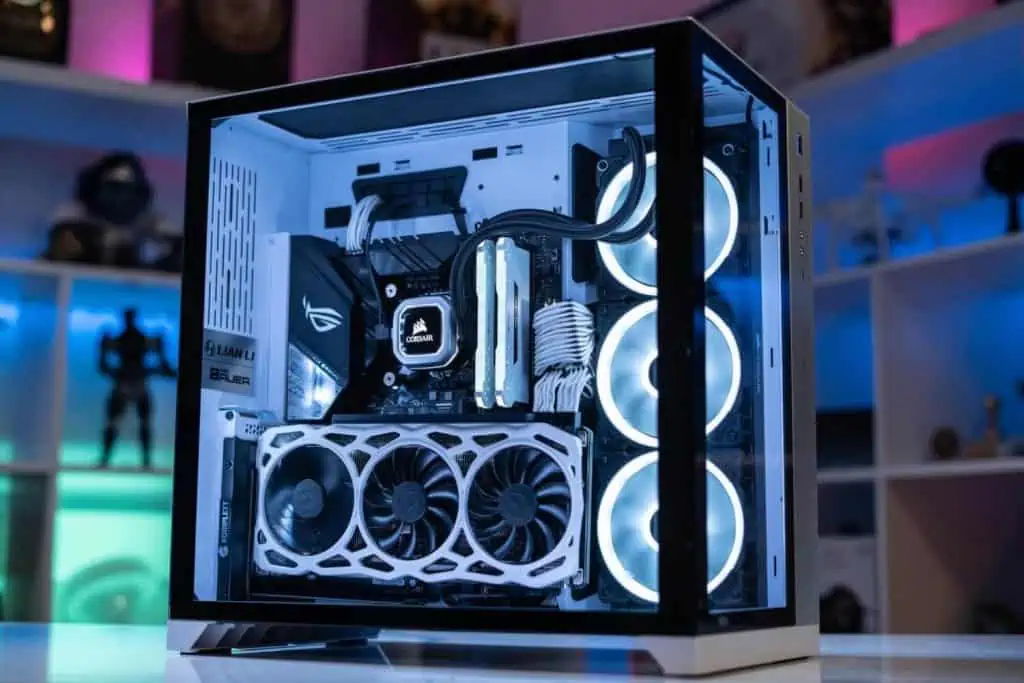
The case has great room for a mid-tower, with:

  • 8 expansion slots
  • VGA cards up to 420mm in length
  • 2 x 3.5″ & 4 x 2.5″ drive bays

There’s a very important USP over other chassis on this list: it’s a dual-chamber case.

This means it has a second compartment fully dedicated to hiding your “uglier” parts; think PSU, hard drives & cables.

I think this is a great bonus add for those after a clear case. It gives you the freedom to fine-tune how your build looks and make sure only the parts that you want on show are visible.

Lian Li Dynamic PC-O11

I’ve seen so many builds in the PC-011 and they never disappoint. Source: jerameyj

It also maximizes the airflow to your key components that need it (i.e. GPUs and CPU).

Despite the split compartments, the PC-011 still has room for:

  • Up to 9 x 120mm fans
  • Up to 1 x 360mm, 1 x 280mm & 1 x 240mm radiators

I’ve seen great thermal results in the case despite how much of it is covered. Both watercooling and air cooling builds have excelled in overclocking due to its great internal layout.

The reason I don’t give this case the top spot over the P5 is because it’s significantly more covered.

But if you prefer the 2-window approach of the PC-011 to the very transparent presentation of the P5, then I truly don’t think you can find a better case on the market.

Our Rating: 10/10

Best High-End Clear Case: Thermaltake Core P7 & Core P8

2026 update: The below focuses on the Core P7, our original high-end pick. However, Thermaltake has created another fantastic option in the Core P8 , check out our full review in our premium PC case feature.

For our most expensive case pick, we’re back to the P-series.

The premium model is an incredibly unique case and I’m sure you can tell why from its monolithic aesthetic.

The central body is similar to the Core P5 (just sized up for EATX motherboards / a full tower form factor).

But on top of that are two side panels on the left and right side designed to host and show off extra fans/radiators.

If you check out some of the build/stock photos on the product listing, you’ll see just how incredible this case can look, especially if you’re building an RGB setup.

The cooling potential is crazy for a see-through PC case with so much ventilation:

  • Up to 12 x 120mm fans
  • Up to 3 x 480mm radiators

The fact that there are so many cooling allotments despite the case also being large open-air is quite the achievement. I was really impressed by thermal benchmarks here. There’s capability here to run a very intensive build.

Thermaltake Core P7 2

Few cases offer more freedom of expression while building. Source: ittypartspicker

You have the room in the main case for a monstrous multi-GPU build too, with:

Between all the cooling options, space, and open-air case design, this is one of the best overclocking towers available today.

Let’s be real though; this is a very expensive choice.

And for many gaming builds, the Core P5 and others on this list are more than enough for what you’ll need and I recommend them more over the P7 for that reason.

But if budget isn’t a big concern and you want the most power/style you can possibly get, this is one of the best clear computer cases available.

Final note: If you like the look of this high-end chassis but it’s a little out of your price range, you can also consider the Core P90 as a great middle-ground option.

Our Rating: 9/10

Best Clear Micro ATX Case: Thermaltake Level 20 VT

This list may seem a little Thermaltake-heavy

But there simply isn’t any other manufacturer that has come out with clear chassis as good as them (in so many prices/size ranges).

This next offering is for those looking for the best clear mini-tower case.

The L20 VT is covered with 4 tempered glass panels: left, right, top, and front.

These exposed angles and the small form factor would make it fantastic for an on-desk setup.

Due to the solid build quality of the case overall (SPCC steel), it’s still more than sturdy enough to act as a portable/LAN Party case if needed.

Thermaltake Level 20 VT 2

The space is really excellent for Micro ATX too, with:

  • 5 expansion slots
  • VGA lengths up to 350mm (great for mATX)
  • Up to 7 x 120mm + 1 included high quality RGB 200m fan on the front
  • Up to 3 x 240mm & 1 x 120mm radiators

This case is also the smallest dual-chamber tower on the list.

With hidden compartments for PSUs, drives, and some of your cables.

There aren’t many see-through computer cases with full/open exposure for Micro ATX.

But fortunately, the Level 20 VT is such a good offering it hardly matters.

With excellent build quality, deceptive internal size, beautiful presentation/style, and unparalleled cooling options for a Micro ATX tower, this is an easy pick if you’re looking at this form factor.

Our Rating: 9/10

Best Clear Mini ITX Case: Thermaltake Core P1

The last Core P case on our list is the smallest one available – perfect for mITX builders.

What I really like about the P1 is that it manages to maintain the excellent build quality of its larger brothers.

With an SPCC steel base and the same signature open-air setup (+ a thick tempered glass top).

Stock pictures really don’t do the P1 justice; with its compact size and high visibility, I’ve never seen a build completed and powered on that doesn’t look beautiful.

Note also, that even in this tiny option, the Core P1 still has dedicated wall mounting support and looks great in this format.

Thermaltake Core P1

The tiny case still manages full-sized GPUs. Source: Flyinlow23

You’ll be getting good space for mITX, with:

  • 5 expansion slots
  • VGA lengths up to 380mm
  • 2 x 2.5″ accessible & 1 x 3.5″ / 2.5″ hidden bays

Obviously, this is much more limited than a mid/full tower.

But if your focus is on the smallest build possible, you have more options here for a portable gaming build than a lot of other similarly sized chassis.

Cooling-wise, you’ll be looking at either 2 x 140mm fans or 1 x 280mm radiator.

Alongside the open-air case design, this is more than enough for a single-GPU build.

The case is the cheapest of the P series, but it shares the premium price tag relative to other ITX options (which are usually cheaper due to their smaller size). My same point applies to this version; I think the premium is worth it if you’re really after a gorgeous aesthetic.

With excellent build quality, deceptive internal size, beautiful presentation/style, and unparalleled cooling options for a Mini ITX case. The P1 is unmatched in its form factor for a high-visibility build.

Our Rating: 9.5/10

Best Clear EATX case: Thermaltake Tower 900

So what if you’re looking for the most space possible?

The Tower 900 is a fantastic option for Extended-ATX motherboard builds.

Dubbed “the fish tank PC case”, the Tower 900 has 3 full-length thick, tinted tempered-glass windows.

They provide an excellent presentation for a monstrous build alongside the rest of its rock-solid SGCC steel exterior.

Speaking of monstrous builds, you can certainly create one here, with:

  • 8 Expansion slots
  • VGA lengths up to 400mm
  • 1 x 5.25 “, 6 x 3.5″ / 2.5 ” & 2 x 2.5″ drive bays

Note this is in a case that is extra-long. If tied with an appropriate motherboard, these space provisions will give you room for a Quad-GPU build.

You’ll be able to overclock them well with the incredible cooling on the Tower 900 too.

Thermaltake Tower 900

Trust me; it’s larger than it looks. Source: Jaz11

It’s the largest dual-chamber case we recommend. With space to hide all your storage drives, PSU, and cables.

This gives maximum airflow to your GPUs/CPU in the main chamber (and makes them look as neat as possible).

That great airflow can then be combined with:

  • 13 x 120mm fans
  • 1 x 480mm & 1 x 560mm radiators

You can add air cooling to your water cooling build too if you prefer. If you install both of these radiators, there will still be room for 5 further 120mm fans on the top, rear & HDD cage.

The Tower 900, simply put, is one of the best cases for cooling and overclocking available today.

You will get diminishing returns compared to an ATX/Micro ATX case as we detail in our complete case size guide. These form factors are suitable for most builds.

But if your concern is less on budget and more on asking “how do I make the most powerful PC possible?”, here’s your answer.

Our Rating: 9.25/10

Worth Considering: Thermaltake View 37

While not taking one of our top picks, the View 37 has some great factors going for it.

The biggest one by far is style.

The design is very unique; with a curved window covering the full length of the left side/top.

Paired alongside its included addressable RGB fans, it’s one of the coolest-looking cases in its price point.

For a mid-tower chassis, you’re getting excellent room too, with:

  • 8 + 2 (vertical mount) expansion slots
  • VGA cards up to 410mm (without front fans)
  • 3 x 2.5″ / 3.5″ accessible & 8 x 2.5 /4 x  3.5″ hidden drive bays
  • Up to 8 x 120mm fans
  • Up to 1 x 420mm, 1 x 360mm & 1 x 120mm radiators
Thermaltake View 37 2

The lack of an edge between the top/side glass looks very slick. Source: JTricky

The storage capability in this case is a particular standout.

With the drive bays here, you have room for an HTPC, server, production, and/or video editing build.

Note the airflow design of this case isn’t quite up to the standards of some of the other options on this list.

But there’s still great cable management utility and it’s good enough to achieve decent overclocking on a multi-GPU build.

The case even claims to support E-ATX motherboards. Though this may be a tight squeeze and we’d recommend the larger options above if you were looking at a huge build.

One important note: the View 37 is a clear plastic PC case.

It still has a sturdy SPCC steel exterior but the window is not tempered glass like the rest of our picks.

But if its curved window design, excellent space, or decent price-point appeal to you, know we’ve included it for a reason and would still highly recommend for a clear PC case RGB build.

2026 update: Hopefully you’ve found what you’re looking for in the picks above, but one more fresher case that is worth a quick shout-out is the HYTE Y60 – it offers a great single-glass, dual chamber aesthetic at a good mid-range price.

Our Rating: 8.5/10

What's Next?

About the author

Picture of Kaelum Ross
Kaelum Ross
Kaelum Ross, BSc is the Lead Writer at What in Tech and a leading authority in PC hardware and software. With a career as a senior IT professional, Kaelum has led multi-million dollar projects covering everything from bespoke software development to complex Windows hardware upgrades. Today, Kaelum uses his expertise to serve What in Tech's readers and has been featured in numerous global publications including New York Magazine and Lifewire.

The 6 Best Lian Li Cases of 2026

Best Lian Li Case

The 6 Best Lian Li Cases in 2026

We’ve updated this feature in 2026 to cover recent Lian Li releases. Our top picks remain the same this time around.

Lian Li is arguably the best PC case brand in the business today.

While there are plenty of other great companies offering towers to consider, this manufacturing beast seems to balance price, quality, and features like no other.

What in Tech’s latest feature is here to guide you through the best Lian Li computer cases for gaming, streaming, editing/production usage, and more.

Top Picks

Best of the Rest – Alternative Choices

Source: jerameyj

Overall Best Lian Li Case: PC-011 Dynamic

The PC-011DX isn’t just the best Lian Li PC case, but our choice for the best PC case available today for any mid-range build.

There is simply so much to praise with this chassis.

To start: stock photos do not do its aesthetic justice (check out the cover photo of our best PC case feature to see what this case can look like in practice).

The build quality is the best you’ll find in its price range.

With an exterior (and most of the interior) made with high-quality SECC steel and a beautiful finish, the case feels as good as it looks.

Then there are the thick tempered glass panels that fall down the full length of both the front and the side of the chassis (with the rest of the front boasting a sleek aluminum).

This is perhaps what gives the case such a beautiful presentation.

You’ll notice most cases have a partial side window and nothing else.

And while there are some great cases that do have a front window (like say, the NZXT 510 Elite), they’ll often also be partially covered at the bottom.

You may realize that a lot of cases do this because it hides the “uglier” parts (like the PSU).

Well, Lian Li completes the same task in a much better way by operating as a dual-chamber PC case.

This means it has a dedicated compartment on the non-window side to install your PSU/drives and give you significantly better cable management/airflow than your average tower.

Having a case that reveals the full length of your PC really makes it the perfect case for showing off your awesome internal components (especially if any RGB elements are present).

We gave the PC-011DX the top spot in our “Best Looking PC Case” feature due to all of these fantastic elements.

But enough on the design, because the tower excels in size too.

This Lian Li tower is an ATX PC case with room for:

  • 8 x expansion slots
  • 2 x 3.5″ + 4 x 2.5″ drive bays
  • VGA card length up to 420mm (enough for pretty much all mainstream cards)
  • Front I/O panel that includes a USB3.1 Type-C port

With the large dimensions, you’ll have great potential here for a multi-GPU gaming PC (or plenty of space for ventilation if not).

The drive bay allowance is quite standard, and more than enough for most (especially a PC case for gamers, streamers, and normal usage).

What’s more, all of the bays are hidden in the second hidden chamber.

And finally, there’s cooling.

This Lian Li mid-tower is one of the best PC cases for overclocking and cooling around, with:

  • Up to 9 x 120mm fans
  • Up to 1 x 360mm, 1 x 280mm & 1 x 240mm radiators

This is a really great capability for an ATX PC chassis.

But what makes it even better is the incredible ventilation achieved by the large internal space and hidden components in the second chamber not interfering with the airflow.

By now, you can probably understand why we love this case so much.

It’s really hard to believe you get all the build quality and features in its mid-range price.

Simply put, this is the best Lian Li PC case available bar none – and possibly the best by any brand.

If you’re building for gaming, production, or general usage, you’ll be hard-pressed to find better than the Lian Li PC-011 Dynamic.

2026 update: The PC-011 remains my top Lian Li case pick (and the best PC case in any category) for 5 years running – I’ve not seen anything enter the market that manages to match it in the quality it offers across the board.

Source: Lian Li

Best Budget Lian Li Case: LANCOOL II

While you can go even cheaper with our pick lower down, the LANCOOL 2 is easily the best choice for someone who wants the great quality LianLi is known or on a budget.

With a solid SGCC exterior build quality and tempered glass on both of its size, you’ll be hard-pressed to find a case that feels as high-quality at its price point.

The most striking visual features however are the two RGB strips running up the front of the case – This case would be a great start to an RGB build.

You have decent space in here too, with:

  • 7 x expansion slots
  • 4 x 2.5″ & 3 x 3.5″ / 2.5″ drive bays
  • VGA lengths up to 384mm

There is still enough size in here for a multi-GPU gaming setup should you wish to upgrade your budget setup later.

The storage capability, in particular, is excellent, this is easily one of the best budget PC cases for video editing, media center, and other PC setups that demand lots of drive space.

You’ll have more than enough cooling for a budget build too, with:

  • Up to 8 x 120mm fans
  • Or up to 1 x 360mm & 1 x 240mm radiators

While the internal design and cooling availability doesn’t reach the highs of the PC-011, this case still performs great and very impressively at its price-point.

While we would push you to pick up the dynamic if you can afford it, know that this is still a fantastic option.

If your wallet is tight, rest assured this is the best budget Lian Li PC case available.

2026 update: Although I still highly rate the LANCOOL II, I’ve seen it run into some stock issues occasionally over the last several months (or price hiked where the case is being sold for $200+). If you liked the look of it but this is the case, the LANCOOL 205 MESH is an ideal replacement, and arguably a little better if you are airflow focussed due to its front mesh panel.

Source: Lian Li

Best High-End / E-ATX Lian Li Case: PC – O11 Dynamic XL

If you’re looking to go all out, this is the case for you.

Sharing many of the fantastic qualities as its smaller PC-011 brother, the XL is made for those creating the biggest gaming/production beast they can.

With a similar fantastic design to the PC-011, you’re also getting a full aluminum exterior and a tastefully subtle RGB strip running down the front.

But space is where the XL really shines, with

  • 8 expansions slots (and options to upgrade to vertical installs)
  • 6 x 2.5″ & 4 x 2.5″ / 3.5″ drive bays
  • Graphics card lengths up to 446mm

With even more space in this case, if you’re building a crossfire/SLI GPU setup, you’re going to have so much room to play with here.

And the storage allotment speaks for itself, this is easily one of the best PC cases for video editing and other utilities that demand high bay space.

The XL is also a great option if you’re looking at building an E-ATX motherboard PC.

While the top two picks above do support E-ATX, we’d recommend picking this case up over them if that’s your inclination.

Cooling wise, the XL is clearly designed to overclock and cool some meaty components, with:

  • Up to 10 x 120mm fans
  • Up to 3 x 360mm radiators

Even in a multi-GPU build, it’s really hard to imagine needing more availability for your air or water cooling solution.

PC-011 Dynamic vs XL

The key difference between the two is the XL having an improved exterior material/RGB strip and the upped space requirements.

We will say that the PC-011D will satisfy a large majority of gaming & other PC build needs.

But if you’re trying to build the best PC you can then here’s the one.

If budget isn’t a consideration for you, the PC-011 Dynamic XL is the best of the best Lian Li computer cases.

Source: Lian Li

Best Lian Li Mini ITX Case: TU-150

If you’re looking for a portable PC case or simply trying to build the smallest PC possible, our last top recommendation is for you.

The TU-150 is one of the best looking mITX PC cases around with a full aluminum exterior and tempered glass window.

The finish on the case is gorgeous and it has a quality of life feature we’re surprised we don’t see more on a mini-ITX case: a retractable handle.

The handle, size, and sturdiness make this ideal for a LAN party PC case or even if you’re looking for something console-sized.

Despite the small space, you’ll still have room for:

  • 3 x expansion slots
  • GPUs up to 320mm in length
  • 1 x 2.5″ & 1 x 2.5″ / 3.5″ drive bays
  • A front I/O panel that includes a USB3.1 Type C port
  • Air cooling: Up to 4 x 120mm fans (one could be replaced for a 120m radiators to add water cooling)

Of course, this availability isn’t impressive compared to our other top picks.

But for its form factor? The TU-150 excels in offering what most tiny builders will need.

And the cooling on offer ties in perfectly with a well-built internal design that doesn’t just look great but offers decent airflow for the size.

Simply put, if you’re looking for a tower as small and portable as possible that still performs, know this is easily the best Lian Li Mini ITX PC case for it.

Best Lian Li Micro ATX Case?

Unfortunatley at the time of writing this feature, there is no Lian Li mATX case option we would recommend.

We would suggest picking up the PC-011D if your build is demanding, or pushing down your requirements to a m-ITX build and picking up the TU-150 if small form factor is your main focus.

Best of the Rest – Alternative Choices

While the 4 chassis’ above are easily our top picks for the best Lian Li PC cases, we’ve recommended a couple of alternative options for very specific needs.

Best PC-011 Alternative: O11D Mini

PC-011 Dynamic vs O11D Mini: The Mini was developed as an option to be very similar to the PC-011 but those happy to sacrifice some spec/airflow space with a more compact build.

We prefer the all-round capabilities of the full-size dynamic, but if you want something smaller, the Mini is a fantastic choice.

Cheapest Lian Li PC Case: LANCOOL 205

While we’d stick to the LANCOOL II for your budget build if possible, we wanted to include the cheapest option Lian Li provides because its still a decent case.

You’ll be losing out on some aesthetic, build quality and cooling potential compared to the II, but on a budget, it’s still a great option.

What's Next?

About the author

Picture of Kaelum Ross
Kaelum Ross
Kaelum Ross, BSc is the Lead Writer at What in Tech and a leading authority in PC hardware and software. With a career as a senior IT professional, Kaelum has led multi-million dollar projects covering everything from bespoke software development to complex Windows hardware upgrades. Today, Kaelum uses his expertise to serve What in Tech's readers and has been featured in numerous global publications including New York Magazine and Lifewire.

The 8 Best PC Cases with Fans Included in 2026

PC Case with Fans

The 8 Best PC Cases With Fans Included in 2026

We've narrowed down the best value picks with cooling covered

PC Case with Fans

We updated this feature to cover the options available in 2026. None of our top picks have changed, but we have added a couple of decent alternatives where relevant.

Why settle for a PC case that doesn’t include your cooling off the bat?

While many options include fans nowadays, it can be hard to know when the quality and quantity are decent for the price of the case in question.

After 100s of chassis reviews, I’ve put today’s features together to guide you through the best PC cases with fans included.

These picks will focus on value. We’ll look at cheaper cases including 1-2 fans/decent ventilation perfect for a budget builder, and also slightly more expensive choices that still offer an excellent deal by including a more extensive RGB fan/cooling setup.

1

Cooler Master N200

Best PC Case with Fans Under $50

Cooler Master N200

Our Rating: 9.5/10

2

MUSETEX T400-MN8 1

Best Case With RGB Fans

MUSETEX T400-MN8

Our Rating: 9/10

3

Thermaltake Core V1

Best ITX Case With Fan Included

Thermaltake Core V1

Our Rating: 9/10

4

Fractal Design Focus G 1

Best ATX Case With Fans

Fractal Design Focus G

Our Rating: 8.5/10

Best PC Case with Fans Under $50: Cooler Master N200

The top pick was a bit of a no-brainer for this feature.

The N200, from one of the best PC case manufacturers in the game, is an absolutely incredible value purchase. Of course, you’re not going to get the same level of product as some more expensive options, but it’s still well ahead of its similarly-priced counterparts.

The build quality is a nice mix of steel, plastic, and metal for the mesh (again, great for the price). I like the choice of mesh in this case. Alongside the vents on the sides, top, and rear, Cooler Master has clearly recognized that purchasers of the N200 don’t want to then spend lots more on expensive fans. So the cooling out of the box is already suitable for your budget gaming PC build (or something for general work).

This case comes with a very generous 2 x 120mm fans installed (1 on the rear & 1 on the front). You could install up to 3 more if you wish to later. But between the mesh and surrounding ventilators, you have all the cooling you need out of the box here. I was pleased with the thermal benchmarking I saw on a test budget build.

Cooler Master N200

Source: jnanof

This is a Micro ATX case, the perfect form factor for a budget builder (not too big that you’re paying for unnecessary material, not too small you’re worried about specialist parts), with room inside for:

  • 4 expansion slots
  • 4 x 3.5″, 3 x 2.5″ & 1 x 5.25″ (optical) drive bays
  • Graphics card clearance up to 355mm in length (more than enough for most mainstream cards)
  • 1 x USB 3.0 & 2 x USB 2.0 on the front I/O panel (many cases this cheap will have fewer ports)

We can’t reiterate enough what an impressive budget offering this is.

The fact that you get a case from one of the most reliable brands with a slick design, build quality, 2 120mm fans, decent ventilation, and enough space for a great gaming build is really impressive.

This isn’t just the best micro ATX case with fans, but the best cheap choice across any form factor I’ve found by a notable margin.

2026 update: The N200 remains my top pick for 4 years running! There’s been some other compelling fan-included offerings, but nothing that quite matches the incredible value that the N200 boasts. The only reason not to enjoy it is style or if you have a larger wallet for something fancier.

Our Rating: 9.5/10

Best PC Case with RGB Fans: MUSETEX T400-MN8

For those with a slightly larger budget who want to build something with a more eye-catching aesthetic, MUSETEX’s T400-MN8 is a very impressive value offering.

If you told me you could get a decent quality mid-tower with 8 addressable RGB fans & 2 sides of tempered glass at this price before I saw this? I would have thought you were lying!

But that’s exactly what you get with the MN8. RGB fans that are addressable can be customized in a huge variety of ways to behave as you want. This can mean anything from what color each light is, to how the lights are animated (they can fade on and off at various speeds or even flare up in sync with your music). The system includes a remote control to change the lights easily (a nice touch, as this can get tiresome if going through software).

The tempered glass windows are full-length, which we always appreciate in showing off a great aesthetic (especially one focussed on RGBs). There is enough room in here for:

  • 7 x expansion slots
  • Up to 380mm GPU lengths (all you’ll need for nearly every card)
  • 3 x 2.5″ & 2 x 3.5″ drive bays
MUSETEX T400 MN8

Source: MUSETEX

There’s all the space you need for a full size card. The ridiculous inclusion of cooling inside the case gives you a great basis for overclocking if you desire. Between these factors, it’s often my top answer when readers ask what the best gaming PC with fans included is on a budget.

Cooler Master N200 vs MUSETEX T440-MN8

MUSETEX isn’t as big and reputable of a brand as Cooler Master, but we still consider them worthy of inclusion, with their various flagship cases being well-received for quite a while now.

The N200 is a little more practical of a choice than the MN8 with far more ventilation surrounding the case. Even though the cooling on the MN8 is very capable with its fans, it’s slightly hampered by the choice to g for a tempered glass front panel. This is clearly an aesthetic-focussed decision and you’ll have to ask yourself if you prefer a more reliable consistent airflow (N200) or a beautifully transparent case that overcompensated for its ventilation issues with plenty of fans (MN8).

As insane as the N200 offer may be, the MN8, with its dual tempered glass and ARGB fans, is the most value I see in the list’s options. Yes, it costs more, but the extra inclusions are even crazier for the price.

If you want an RGB aesthetic, this is a fantastic budget choice.

2026 update: I still recommend the T400, but I’ve seen it run into several availability issues over the last several months. If you catch it out of stock, MUSETEX does some similar models that offer a ton of RGB fan inclusions at a reasonable price, like the Phantom.

Our Rating: 9/10

Best ITX Case with Fan Included: Thermaltake Core V1

If you were looking for a small pc case with good fan inclusion, I have good news.

One of the most popular ITX cases on the market, the Core V1, is a fantastic value offering. At its low price, it only includes 1 fan, but that is a 200mm fan that is as nearly as large as the case and combined with the great ventilation and mesh design, is enough to cool your ITX build on its own (with an option for 2 x 80mm fans in future if you do want to upgrade).

The V1 has a deceptively high-quality build for its price, with SPCC steel and tempered glass surrounding its exterior (not to mention its incredibly unique cube tower design).

Thermaltake Core V1

Source: Seiren2112

Quite largely considered one of the best budget ITX cases for gaming, there’s space inside for:

  • GPUs up to 285mm in length
  • 2 x 2.5″ & 2 x 3.5″ drive bays (both hidden)

The storage space, in particular, is really impressive for a case of its size (with many similar cases only having 1-2 2.5″ drive bays). You of course won’t get the cooling that you would in our larger choices, but still more than enough for a budget gaming PC.

We’re a little disappointed by the GPU length. It’s not uncommon to see this kind of clearance in ITX, but for a case that has gaming in mind, pushing to 295-300mm would’ve been nice to see. With that said, that’s often the sacrifice of getting a great compact aesthetic. It will still accommodate many mainstream GPUs. Just be sure to check your dimensions before you buy (and if this is too small, many of the other options on this list are larger).

NOTE: If you’re looking at the Amazon reviews for this case, know that a majority of the very low ratings are for a different Thermaltake Core series cases (the V200), if you specifically look for the V1 reception, you’ll see that it’s largely very positive for all the reason’s we’ve discussed.

This isn’t just one of the best mini ITX cases with fans, but one of my most common recommendations to budget builders looking for a nice compact case that still packs a punch.

Our Rating: 9/10

Best ATX Case With Fans: Fractal Design Focus G

I know that not everyone is into the big “flashy” aesthetic that a case like our MUSETEX pick above provides. I want to also offer a gaming PC case with fan inclusion that’s a little more traditional (and also from one of the best chassis brands in the business).

Fractal cases are always top quality. The Focus G, despite its lower price tag, is no exception. Featured several times on What in Tech previously, this mid-tower includes a pair of high-quality Silent LL Series 120mm case fans. I’m really pleased by this, as it would’ve been easy to cheap out and offer some very basic fans at this price point. Fractal is known for silent builds, and while this budget offering isn’t as quiet as its flagship choices, it will still be the quietest option on the list.

Inside is room for:

  • 7 x expansion slots
  • GPU clearance up to 380mm (more than enough for most cards)
  • 2 x 2.5″ / 3.5″, 1 x 2.5″ & 2 x 5.25″ drive bays
Fractal Design Focus G

Source: MrThreePik

There’s plenty of graphic card/storage room in here for either a gaming pc or someone looking for more of an enthusiast work build.

There are lots of smaller “quality of life” features in the case too. Including decent cable management and airflow (nicely aided by the mesh front plate). The inclusion of optical drives is great for anyone still using older media (if not, they can easily be converted into more storage space).

Alongside the decent ventilation and included cooling is the option to add up to 4 more 120mm fans (not that you’ll need these on a budget setup, but it’s a nice option for later if you want to consider overclocking).

If the other cases don’t hit the mark for you (perhaps you want more of a minimalist choice from a big brand, and your budget is a little above the N200), this Fractal offering is a great choice.

Our Rating: 8.5/10

Quick-Fire Picks (Best of the Rest)

While the top 4 choices are what we consider the best budget PC cases with fans included, there are a few extra options worth considering in certain situations that we thought worth adding (and are still worth considering if they more comfortably match your requirements).

montech x1

Best Budget Case With RGB Fans: Montech X1

If you want a cheap PC case with RGB fans and the MUSETEX top pick is outside of your price bracket, the Montech X1 will be the best model for you.

Our Rating: 8/10

DEEPCOOL MATREXX 30

Cheapest PC Case With Fan Included: DEEPCOOL MATREXX 30

Although we would recommend pushing you to purchase the N200 model if you can stretch your budget a tiny bit further (with the higher quality/reputable manufacturer behind it), we respect some builders will literally be looking for the cheapest PC case with fans that will get their build up and running. The MATREXX is the choice we’d recommend for just that (only 1 fan included but with enough ventilation for a budget build, though we’d highly recommend adding 1-2 more when possible).

Our Rating: 8/10

DEEPCOOL MATREXX 50

Cheapest ATX PC Case With Fan: DEEPCOOL MATREXX 50

The larger brother of the pick directly above, if you are after the cheapest ATX PC case that also has that classic, tempered glass look, this is it (we would recommend purchasing a cheap second 120mm fan with this as a minimum, however). We would still recommend our top Fractal pick vs this if you have the extra budget for its superior build quality and airflow.

Our Rating: 8/10

Thermaltake V250

Best ATX Case With RGB Fans Alternative Pick: Thermaltake V250

If you prefer an RGB case to be with one of the larger brands as opposed to the MUSETEX offering we present above, this is your best value option. One of Thermaltake’s flagship budget models includes a beautiful tempered glass design and 3 high-quality RGB fans.

We also like the quantity of cooling built-in as we know many readers are after a PC case with 3 fans included.

Our Rating: 8/10

What's Next?

About the author

Picture of Kaelum Ross
Kaelum Ross
Kaelum Ross, BSc is the Lead Writer at What in Tech and a leading authority in PC hardware and software. With a career as a senior IT professional, Kaelum has led multi-million dollar projects covering everything from bespoke software development to complex Windows hardware upgrades. Today, Kaelum uses his expertise to serve What in Tech's readers and has been featured in numerous global publications including New York Magazine and Lifewire.

The 12 Best Video Game Shelves & Storage Cabinets in 2026

Best Video Game Shelves

The 12 Best Video Game Shelves & Storage Cabinets in 2026

Guiding you through the best storage solutions for your gaming collection

Best Video Game Shelves

We updated this feature for 2026, updating some of the picks with alternatives and better pricing options.

Creating the perfect gaming room can feel like a monumental task.

One of the biggest factors in the quality of a setup is how you choose to organize your gaming collection (be it games console storage, cases, or peripherals).

Deciding on the best shelves for video gaming storage with your setup demands balancing between price, build quality, functionality, and a few other areas.

We’ve put together this featured guide to help you through the best video game shelves available today with consideration for different styles, budgets, and requirements.

Note: We know readers will be looking for different types of storage for their gaming collections.

This is why the article covers multiple types: Gaming shelves, TV stands, floating gaming shelves, & games console charging cabinets.

Skip to the section relevant to you if you know what you’re looking for.

Top Picks

Atlantic Oskar 464

Overall Best Video Game Shelves

SPECIFICATIONS

Material: Wood | Dimensions: 25.13″ W x 7.25″ D x 54.00″H | Rows: 12 (Adjustable) | Weight: 33.8lbs | Game Storage: Up to 276

REASONS TO BUY

+ Decent quality

+ Best value

+ Great look

+ High storage capability

REASONS TO AVOID
 − Slightly heavy for size
 
 − Self-assembly

The top pick comes from Atlantic, a brand that offers a huge array of gaming shelves.

The one that stands out most is the Oskar 464 media cabinet.

Boasting an incredible size for the price range ( 25.13″ W x 7.25″ D x 54.00″H), you will be able to store up to 276 video game cases in here.

The cabinet includes 12 adjustable rows which are an awesome feature for gaming shelves.

This customizability will give you the freedom to store more depending on what you have (e.g. controllers, memorabilia, or a DVD/media cabinet hybrid).

We expect the Oskar 464 to accommodate the majority of your gaming collection (or if not, most of it alongside a tv stand/secondary option below).

The unit looks sleek and modern; perfect for a cool gaming room setup with multiple decent color options available.

Despite this value offering, the Oskar does not feel cheap.

With a solid wood composite build and plenty of fixtures to keep it firmly in place, the build quality is fantastic for the price (self-assembly).

The unit weighs 33.8lbs which puts it in comfortably in the “mid-tier” range – > not too heavy to adjust position if needed, but not so light it cannot support your requirements.

The one thing that can let some of the Atlantic shelves down is the slight lack of stabilization on the thinner cabinets they create.

However, with the 464, you’re getting the best of both worlds: wide enough (double cabinet) that it is stable and hosts an amazing space for gaming storage, but not so wide it demands more space in your room than your collection needs.

If you’re looking for a sharp balance between style, affordability, size, and quality, then these units are easily the best video game shelves available for you.

Best Budget Video Game Shelves: Atlantic Drawbridge

For the best budget gaming storage pick, we return to Atlantic for a smaller product.

The Drawbridge is a cheap gaming shelf option with 36″ L X 19″ W X 7″ D dimensions and space for up to 132 games.

This is still a decent size and a sensible pick for smaller collections (you could also buy a second one at a later date to up-scale).

The 4 included shelves are all adjustable which will allow you to make the most of smaller dimensions.

The unit looks sleek and modern, perfect for a cool gaming room setup with multiple decent color options available.

While not quite the same build quality as the Oskar, the Drawbridge still feels and looks great with a sleek matte black finish.

We’ve chosen the drawbridge over other single-column Atlantic (or other manufacturers) offerings for the budget pick as it is still wide enough to avoid stabilization issues seen in many of the slimmer shelving units.

If your budget is tight or you simply have a smaller collection/space available, know that we put the Drawbridge so highly on the list for a reason.

With it managing to retain great style, quality, and space in its price point, we’re confident these units are the best cheap video game shelves available today.

Best Premium Video Game Shelves: Homissue Industrial Open Bookcase 7-Tier

The Homissue IOB7 is not advertised as a “video game shelf” unit.

However, if you’re looking for something higher-end, we’d recommend this over the expensive storage cabinets “marketed” for games.

This is because the Homissue really stands out in build quality, design, and space – way more than other units in its price range.

Built with high-quality MDF and a rich steel tube frame, the unit is very sturdy which is especially impressive considering its monumental size.

Speaking of size…

The unit has an 84.4″ H x 23.3″ W x 11.8″ D dimensions across 7 shelves.

The space between its shelves is more than enough for your video game collection.

We like this because for a higher-end pick, presentation-wise you want your collection to have room to “breathe”.

Dedicated “video game shelves” can often feel a bit cramped in comparison (but if you have a massive collection, check out the pick directly below).

The other added bonus to the immense build quality is the 32kg carrying capability on each shelf.

This makes it one of the best video game console storage tower options on the list if you wanted to use your shelving for more than just game cases.

(Looking for more of a traditional high-end video game shelf unit? The best we would recommend is the Atlantic 4-tier rotating cube unit.)

The final plus of the Homissue is the MDF and steel tubing both have beautiful finishes giving the shelves a very high-quality presentation.

Some shelves for gaming storage look a little outdated.

But the Homissue fits in perfectly with more modern aesthetic if you’re looking for a sleek gaming room setup.

We’d argue that this unit doesn’t just have amazing build quality and space, but is also the best looking video game storage option available.

Best Video Game Shelves for Large Collections: Revolving Media Tower 1600

If you have a large collection, an obvious option is to buy multiple units of the other shelving on this list.

But for the best video game storage organizer, we’d recommend a resolving shelf option.

These storage cabinets resolve 360 degrees and have 4 sides of storage shelving for your media.

The Media Tower 1600 specifically stands out here, with the capacity to hold up to 960 video games.

This is an incredible amount, and being able to achieve it in the space of a normal shelving unit due to the revolving setup is fantastic.

The 1600 is also well built, with a fiberglass swivel plate designed to endure the immense weight such a collection could result in.

Additionally, the base weight of the unit is sturdy at 125 lbs and is made of wood composite (with some MDF inclusion for reinforcement).

The unit looks sharp (with multiple color options available) and gives off a strong aesthetic if a collection is filling its visible sides.

There is one downside to this item: the included Lazy Susan (required during assembly to allow the case to spin smoothly) is not high quality.

While it will work; to ensure you can easily spin through your collection, we’d highly recommend just adding this superior Lazy Susan to your basket when purchasing.

Regardless, the Media Tower 1600 is an absolute beast, and easily the best media cabinet for large collections available for video games and movies alike.

Best TV Stand for Gaming Storage: WE Furniture Universal Stand

We simply love this cabinet and are not surprised it’s one of the most popular storage options on Amazon.

We’ve included a couple of TV stand choices appreciating that some readers will be looking for a single unit for their TV and also something more accommodating to gaming console storage.

 This cabinet excels across the board.

Build and presentation-wise, the Universal Stand is a decent 70-pound MDF-based unit.

Not only is the MDF accompanied by a beautiful finish, but the stand offers great cable management facilities.

This will be perfect if you’re looking to keep things clean even when running multiple consoles/devices to your TV.

The stand is able to hold up to 250lbs.

This capability, alongside the impressive 24 H x 58 L x 16 W dimensions, means you should have no trouble fitting your core consoles/gaming collection here.

We also give this our top pick due to its open layout.

Not only does this look great, but is essential when wanting to set up console gaming storage (to avoid overheating).

We’ve included a budget option below if this is outside of your price range.

However, if you have the budget available, we can’t recommend this unit highly enough.

Between the quality, size, and presentation, it comfortably holds the best video game TV stand accolade.

Best Budget TV Stand for Gaming Storage: Furinno Turn-N-Tube

If you’re looking for a TV stand/gaming storage hybrid and don’t have the budget (or space requirements) of the top pick, this second option is still an awesome choice.

The Turn-N-Tube is a more “traditional” TV stand with a build from E1 grade composite wood and tighter dimensions at 23.7 W x 23.2 H x 14.6 D.

With this size, you’re of course not getting the space for a large collection or wide TV.

But if your core build is small with only 2-3 consoles, the unit is still perfectly viable.

The unit would also make a great secondary storage unit if you ever get a larger TV and want to fork out on a more premium stand.

If your requirements are basic, this Furinno offering is a very impressive cheap TV stand for gaming storage. 

Best Floating Shelves for Video Game Storage: WALI Floating Shelf

Our next category for gaming storage is those looking for floating fixtures.

These are ideal if you have either a smaller collection or want to neatly display/have easy access to your main games console/gaming library.

Our top pick from WALI is perfect for the task, with 3 shelves of high quality tinted tempered glass.

Not only does this build material choice look great, but they stand strong and can easily support any major gaming console.

The 3 shelves are adjustable (and even separable into a 1 x 2 shelf setup) so you have the customization you need depending on the size requirements.

Routed through the back of the shelf connector is a decent cable management system.

This is what gives the WALI shelves our top pick in the floating category, as you’ll likely be using these for consoles in a highly visible part of your setup.

While the build quality is superb, we like that WALI tops include a 10-year warranty which provides some further confidence in the ability of the cabinet.

Simply put, if you’re looking for wall-mounting storage for your gaming consoles and/or collection, this is a fantastic option.

Best Floating Shelves for Gaming Storage Runner-Up: BAYKA Floating Shelves

Coming in a close second place for the floating shelves category is the fantastic BAYKA offering.

These shelves are closer to traditional wooden shelving, made with high-quality Paulownia wood and metal fixtures.

If you’re after a more “chic” look, these shelves will do well, while still having the sturdiness to accommodate gaming consoles.

The units are of 3 different sizes, with the larger 2 being suitable for consoles and the smaller being more valid for video game case storage.

The build quality and design are really impressive for the price of the units.

The only reason these didn’t get the “top” floating shelf spot is due to the lack of cable management compared to the WALI shelves.

That being said, if you prefer the style, know we’ve included these for a reason.

This BAYKA offering is easily one of the best floating video game shelf units available.

Console-Specific Storage Towers

Last but not least is a selection of video game storage units dedicated to each mainline console: Playstation 4, Nintendo Switch, and Xbox One.

These are a great option if you’re looking for dedicated charging, a tight presentation specifically designed for the console, and other unique features.

Best PS4 Video Game Storage Tower: OIVO 4-in-1 Stand

2024 update: OIVO has also released some excellent stands for the PS5, such as this model which includes 3-level cooling.

This OIVO offering is the most popular PS4 charging station for a reason.

With an incredible amount of utility for the price, the 4-in-1 stand acts as:

  1. A vertical stand for the main console, whether PS4, PS4 Slim or PS4 Pro
  2. Dual charging station for 2 PS4 controllers (with LED status indicators)
  3. Cooling system to work alongside the PS4 heatsink to ensure no overheating issues
  4. Storage of up to 12 PS4 games.

The unit is very well built, looks great (particularly with the LED controller lighting) yet still remains compact and not overbearing.

Even if you have a PS4 games collection larger than 12, we think this is such a fantastic functional setup for your core library and console.

If you’re looking for the best PS4 charging station that also offers great storage and cooling, you’ve found it.

Best Nintendo Switch Video Game Storage Tower: FYOUNG Charging Dock

Next up is the very multi-functional FYOUNG storage unit for switch games storage.

As you can see from the product photo, the dock doesn’t just neatly tie up to 27 Switch games (15 boxes, 12 carts) and your console together in a compact space…

…but also offers a really impressive amount of charging utility all clearly indicated through an LED indicator.

With the ability to charge 8 Joy-cons and 2 Pro controllers at once (even accommodation for poke ball controller charging should you need it).

There isn’t the same level of dedicated cooling as the PS4/XBox One units, but this is not as necessary for the Switch console.

With a solid build quality tying this compact unit together, this is the definitive base for the newest Nintendo console and the best Switch video game storage tower available.

Best Xbox One Video Game Storage Tower: OVIO All-in-One Vertical Stand

Last but not least is the Xbox One equivalent of OVIO’s fantastic PS4 charging station/gaming storage hybrid.

With a very similar set of storage features, great build quality, and cooling, the Xbox One version is just as good for your games console.

The obvious addition here is the inclusion of 2 battery packs to ensure you can charge your Xbox One controllers.

Also similarly, this storage tower supports all types of Xbox One consoles (be it regular, Xbox One S, or Xbox One X).

OVIO’s offering excels for Xbox just as much as PS4 and there is no better alternative.

If you’re looking for the best Xbox charging station that offers great game storage, this is for you.

What's Next?

About the author

Picture of Kaelum Ross

Kaelum Ross

Kaelum Ross, BSc is the Lead Writer at What in Tech and a leading authority in PC hardware and software. With a career as a senior IT professional, Kaelum has led multi-million dollar projects covering everything from bespoke software development to complex Windows hardware upgrades. Today, Kaelum uses his expertise to serve What in Tech's readers and has been featured in numerous global publications including New York Magazine and Lifewire.
Slide 1 Heading
Lorem ipsum dolor sit amet consectetur adipiscing elit dolor
Click Here
Slide 2 Heading
Lorem ipsum dolor sit amet consectetur adipiscing elit dolor
Click Here
Slide 3 Heading
Lorem ipsum dolor sit amet consectetur adipiscing elit dolor
Click Here
Slide 1 Heading
Lorem ipsum dolor sit amet consectetur adipiscing elit dolor
Click Here
Slide 2 Heading
Lorem ipsum dolor sit amet consectetur adipiscing elit dolor
Click Here
Slide 3 Heading
Lorem ipsum dolor sit amet consectetur adipiscing elit dolor
Click Here

The 5 Highest Resolution Monitors of 2026

Highest Resolution Monitor

The 5 Highest Resolution Monitors in 2026

Reviewing the sharpest screens for high-quality setups

Highest Resolution Monitor

We updated this article to cover new (and upcoming) options up to 2026. The Dell UltraSharp UP3218K is still the highest-resolution monitor widely available and with no 16K monitor on the horizon, we don’t see anything topping it any time soon.

We’ve included some additional high-res options throughout the feature for different categories/aspect ratios.

Whether you’re a gamer, creative or general user, resolution can be one of the most impactful stats in defining your display’s quality.

Thankfully, in today’s market options like 5K & 8K monitors are no longer a pipe-dream, but readily available.

But they’re not all necessarily worth purchasing.

This is why today’s feature is focused not just on the highest resolution monitors available in the world, but the best choices that are actually worth buying for various needs.

1

Dell UltraSharp UP3218K

Highest Resolution Monitor

Dell UltraSharp UP3218K

Our Rating: 9/10

2

Samsung CRG9

Highest Resolution Ultrawide Monitor

Samsung CRG9

Our Rating: 10/10

3

LG 27MD5KL-B

High Res Runner-Up

LG 27MD5KL-B

Our Rating: 9/10

4

AOC U2790VQ

Cheap High-Resolution Pick

AOC U2790VQ

Our Rating: 9/10

5

Samsung 8k Q800T

Highest Resolution TV

Samsung 8k Q800T

Our Rating: 9.25/10

Highest Resolution Monitor: Dell UltraSharp UP3218K

Not only is this Dell offering the highest res monitor on the market, but it’s also one of the only innovations that meet the incredible 7690×4320 resolution.

Whether you’re an 8k video editor, someone who wants content to be crisp even at the closest of glances, or are looking for something as close to a future-proof resolution as you can get, the Dell UltraSharp is rivaled by little else.

Alongside the startling 8k, the monitor boasts some fantastic color specifications.

Implementing Dell PremierColor, the UP3218k offers 100% AdobeRGB, 100% sRGB, 100% Rec. 709 & 98% DCI-P3.

Along with these impressive specs is an IPS panel, decent 400-nits brightness, and great contrast capability.

For high-end video/photo editors or those serious about achieving the best content viewing experience (e.g. an HTPC monitor), it’s hard to describe how great 8k content can look alongside the premium picture quality.

It’s worth pointing out though, that while this is the highest resolution monitor in the world that’s readily available, that doesn’t mean it’s the right pick for every setup.

Firstly, for content-focused users, as amazing as 8k content looks; there is a limited amount of it.

We expect UHD/4k to be the leading choice for high-end producers for the foreseeable future. A monitor of this caliber may be overkill unless you are happy to pay the premium. This is why I’ve highlighted some more grounded choices below for mid-range users.

Impressively, it still manages a 6ms GTG response time. We would expect something higher for a screen of this resolution, making it suitable for 8k gaming.

That said, the amount of 8k gaming content available right now isn’t particularly high. And even if it was, you’d only be able to fully utilize the resolution for games if you had the most powerful build possible (even then, it’s a stretch).

Then there’s the fact that you won’t have an 8k 144hz monitor (or any refresh rate above 60fps) for a long time (let alone a PC that can support it). I would say for every gamer, you would prefer a higher refresh rate than 60Hz over the jump from 1440p/4K to 8K.

Yes, 8k gaming will probably be around en-mass one day.

But for today? We strongly recommend focussing your budget on a premium screen with 1440p 240hz, 4k 144hz, or the excellent next pick below that I tailored for gamers.

Gaming aside, if you are a serious production user that demands 8k, then this Dell offering is the best choice for you.

It’s worth pointing out that the screen requires 2 DisplayPort connections to run at 8k.

Finally, I need to touch on the build quality/design.

Somehow both as sturdy as you would hope for in a premium offering, while also offering fantastic slim bezels, a gorgeous aesthetic, and great adjustability (including a 90-degree rotation), I was pleased to see the UP3218K doesn’t compromise on physical longevity.

Although it’s worth noting our cautions and checking out our other picks if you think 4K/5K screens could suit you, we are comfortable in naming this Dell offering the highest resolution monitor worth buying today.

If you demand 8K with fantastic picture quality, it’s the best choice for you.

2026 update: This Dell offering still remains the best 8k monitor with no other worthy competitor in the space. With that said our point still stands; if you don’t need 8K, you (and your wallet) will likely appreciate some of the other options below.

Our Rating: 9/10

Highest Resolution Ultrawide Monitor: Samsung CRG9 / Odyssey G9

Our next choice is one of the most featured monitors on What in Tech, excelling at being both being widest monitor worth buying and a screen excellently suited for gaming.

With a mouth-watering 5120 x 14405k resolution, this Samsung monitor instead chooses to use its 49-inch large pixel count to create a super ultrawide display that is effectively 2 1440p 27-inch screens in one monitor.

Not only do we love this from a perspective of productivity and multitasking, but we also think that Samsung’s approach to exploiting DPI in a 49-inch 32:9 aspect ratio is far more practical than the current 8k monitor on the market.

In other words: although this 5k display is lower resolution, we think many users will appreciate the premium feel of a double-width 27″ 1440p screen more than a 16:9 8k monitor.

This is true most of all for gamers.

With 120Hz, QLED, a fantastic color gamut capability, up to 1000-nits brightness / HDR1000, 4ms GTG response time & FreeSync Premium Pro support, the specs on this machine are incredible.

Not only is the picture quality fantastic, but the low latency, high refresh rate, and capability to avoid ghosting/tearing issues with FreeSync are all utilities that point to what a fantastic premium gaming display this is, whether you’re into single-player titles or competitive esports.

With a decent availability of gaming content supporting 32:9 (or the option to focus on a 16:9 game with things like Discord/Skype and other second-screen visuals), it’s hard to describe just how stunning and immersive content looks on this monitor.

Speaking of immersive, the CRG9 is also the highest resolution curved monitor available.

Boasting a 1800R curve that engulfs games/content around your vision to match the curvature of your eyes more ergonomically/naturally than a flat-screen (the G9 model takes this further and boasts a 1000R curve, the strongest one available in mainstream monitors if you think this would suit you).

Although marketed as a gaming monitor, we think the excellent picture quality, refresh rate, and latency will provide a premium experience to many other types of users; especially considering the price of the CRG9 is in many cases cheaper than “work-orientated” options of similar specs (but if you want other alternatives, our largest monitor feature has them).

Remember that if gaming isn’t on the menu, this is still 2 screens in one. With excellent productivity capability (including the option to connect 2 PCs/laptops at once and display them side-by-side).

If you are a gamer and can stretch your budget further, we highly recommend the other version on the Amazon listing; the Odyssey G9.

Not only is this the highest resolution gaming monitor, but one of the best for gamers in any category. It boasts a 240hz refresh rate & an even faster latency – it’s worth the additional price if you can afford it (but the CRG9 is still an excellent alternative if not).

Finally, I was pretty floored by the gorgeous aesthetic of both models in person. Looking like they could be part of a spaceship, their designs complement the unique innovation behind them, and what’s more; they’re sturdy enough to support real longevity. I’ve been disappointed previously in how some premium ultrawide choices seem to skimp out a little in this area so it’s nice to see these Samsung offerings feel like the full package.

All-in-all, if you’re interested in the unparalleled experience a super ultrawide display can offer, the CRG9 (or OG9) are the best 5K monitors, with incredible quality across the board.

Our Rating: 10/10

Second Highest Resolution 16:9 Monitor: LG 27MD5KL-B

The last of my main 3 picks are for those who think a 5k resolution would be more suited for their needs over 8k, but also want to keep to the traditional 16:9 form factor over our ultrawide pick above.

The 27MD5KL is a fantastic premium monitor. Boasting an IPS panel with 99% DCI-P3 color, a typical brightness rating of 500 nits & a 1100:1 contrast ratio all alongside its 5120 x 2880 setup (the largest resolution monitor outside of 8k), the picture is stunning and for a majority of content, going to look as sharp as that of our top 8k choice.

Important note: The LG UltraFine display runs via USB-C; making it largely positioned as a MacBook/Mac high-resolution monitor. It is compatible with PC usage, however, but make sure you have a graphics card that can support the bandwidth necessary via USB Type-C instead of the usual HDMI/DisplayPort (I’ve still highlighted this for Windows users because the options for 16:9 5k are surprisingly slim, as most manufacturers instead produce ultrawide offerings at this res).

I wouldn’t recommend this pick (or any choices with 16:9 5k) for gaming. With a 16ms GTG response time and specs that are generally not as aligned for games (if you are focussed on a 16:9 screen over the Odyssey G9 above, we would push you towards a 4k 144hz display instead).

The monitor is slick, minimalist, and very aesthetically pleasing, as you would expect from LG, with no qualms about the build quality (and some basic adjustability options for ergonomics).

If 8k feels like overkill for your needs, the 27MD5KL is the best 5k monitor available.

Our Rating: 9/10

Alternative Picks – Best of the Rest

The top 3 picks are the highest resolution displays today (and the best models in their respective categories).

That said, we wanted to include a couple of quick-fire additional options that may suit different lower budgets.

AOC U2790VQ

Best Cheap High-Resolution Monitor: AOC U2790VQ

If you are looking at our picks and salivating, but also tearing up at the price tags, don’t worry; we appreciate these are some very expensive monitor options.

If you can’t stretch to a premium offering, we highly recommend this AOC monitor, that still boasts stunning picture quality with 4K, which for budget users, will still provide incredibly gorgeous content.

Our Rating: 9/10

Samsung 8k Q800T

Highest Resolution TV: Samsung 8k Q800T 

If you are a user that is open to using a TV as their monitor, the Q800T is an excellent choice; boasting 8K at an incredible price given the size of the screen, media, in particular, will look stunning on this offering.

Our Rating: 9.25/10

What's Next?

About the author

Picture of Kaelum Ross
Kaelum Ross
Kaelum Ross, BSc is the Lead Writer at What in Tech and a leading authority in PC hardware and software. With a career as a senior IT professional, Kaelum has led multi-million dollar projects covering everything from bespoke software development to complex Windows hardware upgrades. Today, Kaelum uses his expertise to serve What in Tech's readers and has been featured in numerous global publications including New York Magazine and Lifewire.

The 8 Best Dual Chamber PC Cases of 2026

Dual Chamber PC Case

The 8 Best Dual Chamber PC Cases of 2026

An amazing case type for enthusiast builds: here are the best ones

Dual Chamber PC Case

We’ve updated this feature to cover 2026 releases. A couple of alternatives have been added, but most of our top picks remain the same this year.

What is a dual-chamber case anyway?

Let’s take some of the main criteria when looking for your perfect chassis:

  1. Plenty of space for hardware
  2. Good ventilation/airflow
  3. Stylish/made for showing off beautiful components.

A dual-chamber case excels at providing all of these things by essentially having a second “hidden area” for some of your less attractive parts.

Sure, most mid-range cases have some small cable management compartments.

But having a dedicated full chamber gives room for the other “ugly” parts. Think PSUs, hard drives, etc.

This then isolates your GPU/CPU in the “main” chamber, giving you a cleaner presentation and space/airflow for the parts that need it most.

They’re a fantastic innovation for PC builders, I’ve really enjoyed my time working in this format. Which is why I’ve put together this guide on the best PC cases with 2 chambers.

1

Best Dual Chamber PC Case

Lian Li PC-011 Dynamic

Our Rating: 10/10

2

Best Dual Chamber Case for Airflow

Corsair Series Air 540

Our Rating: 9.5/10

3

High-End Pick

Corsair Crystal Series 680X

Our Rating: 9/10

4

Best Dual Chamber Micro ATX Case

Corsair Crystal Series 280X

Our Rating: 9/10

5

Best EATX / Largest Pick

Thermaltake Tower 900

Our Rating: 8.5/10

6

Worth Considering

Thermaltake Level 20 HT

Our Rating: 8.5/10

Best Dual Chamber PC Case: Lian Li PC-011 Dynamic

This really is a fantastic tower.

From one of the greatest chassis manufacturers today, the PC-011 Dynamic has been featured many times on What in Tech. It’s also my top choice for the overall best PC case in any category.

The PC-011 is beautiful. Boasting a very thick (0.8-1mm) SECC steel body, aluminum front, and dual-tempered glass layout.

The look and feel are simply fantastic for its price point. With the extra window on the front, you’ll have great visibility for your internal build.

Photos do not do it justice. I’ve built some nice setups in this case and seen many more. What gets me every time is how even something quite basic ends up looking stunning.

Lian Li PC-011 Dynamic

Source: Jinair

There’s plenty of room too, with:

  1. 8 expansion slots
  2. GPU cards of up to 420mm
  3. 2 x 3.5″ / 4 x 2.5″ drive bays (all hidden in the second chamber)
  4. Air cooling: Up to 9 x 120mm fans
  5. Or water cooling: Up to 1 x 360mm, 1 x 280mm & 1 x 240mm

These specs are great for the dimensions. The PC-011 is quite large with fantastic cooling capability.

With more room than our runner-up pick, it’s a good choice if you want to fit very large GPUs.

It’s officially a mid-tower case but would likely manage an E-ATX motherboard if that’s your goal (just check dimensions – we’ve got larger options below).

The second chamber on the PC-011 is wonderfully discrete and has room for all of the cable management and drives/PSUs we expect you’ll need in any kind of build, meaning you can establish a really neat main chamber with great airflow for your intensive hardware.

Speaking of power supplies, this is a great option if you’re after a dual PSU case. The hidden drive caddy in the second chamber can be removed for a second power supply.

Is there anything I don’t like about the case? Honestly…not really.

You could argue that in a feature focused on dual chambers, the second chamber is a little smaller than some of the other picks below. But I think this is a credit to the PC-011. It still includes enough space for PSUs, drives, and cables, without making the separate area look unnecessarily bulky or wasteful.

It is a little expensive. But really, it’s at the mid-range price point that many top-quality cases live in. You absolutely can go cheaper if you like, but I don’t fault the case’s price because I think the value on offer is great.

The fact that you’re getting such a wonderful build quality, aesthetic, space, cooling potential and a perfect internal layout to empower neatness/airflow all at a great mid-range price is simply incredible.

Yes, this is my pick for the best dual-chamber ATX case on the market, but to reiterate, it’s the chassis I think excels the most in any category, and frequently recommend it to my readers if you have the budget.

2026 update: The PC-011 remains our top dual chamber chassis pick for 5 years running! Despite some decent new offerings, nothing overtakes the great balance between features, aesthetics, and price. I also still rank it as the best overall case of the year.

Our Rating: 10/10

Best Dual Chamber Case for Airflow: Corsair Series Air 540

The PC-O11 has fantastic airflow that we think will meet an overwhelming majority of needs.

But if you’re someone who really prefers taking advantage of mesh layouts that ensure ventilation from all angles, you may want to consider the Air 540.

This Corsair offering somehow manages to offer a fantastic set of features/quality while also being one of the cheaper options on the list

Boasting great space in both of its chambers, you’ll have room for:

  1. 8 expansion slots
  2. GPU lengths up to 320mm
  3. Up to 2 x 5.25″, 2 x 3.5″ and/or 6 x 2.5″ drives, more than enough for gamers

It’s nice to see options for optical drive bays here too (even though a majority of people no longer use them, you can still convert 5.25″ bays into more SSD/HDD drive bays if desired).

Corsair Series Air 540

Source: Markill-UK

But it’s cooling where a dual-chamber tower really shines. In the Air 540’s case, there’s space for:

  1. 6 x 120mm / 5 x 140mm fans (including 2 pre-installed Corsair Air Series AF140L fans ideal for a quiet build)
  2. 280mm top & 360mm front radiators

Now that may not sound too impressive for an ATX case.

But remember: with your PSU/drives out of the way, these fans/water coolers are dedicated to cooling your GPU and CPU.

Tie that with the fantastic airflow design and you have a really high-value case for overclocking.

Style-wise, the Air 540 has a unique wide form factor.

With a steel exterior, the cube tower boasts a simplistic, high-quality build. In person, it appears minimalist and monolithic.

This simplicity is perfect because when you’re creating a dual-chamber computer, you want the attention to be on the neat internal parts in the main chamber.

Through its tempered glass, the case beautifully presents the main hardware and gives you more than enough space to cleanly build.

We love the PC-O11D and made it our top choice for a reason. But if you’re looking for something that balances unique style, fantastic features, cooling capability, and value; the Air 540 is also well worth considering.

Our Rating: 9.5/10

Best High-End Dual Chamber Case: Corsair Crystal Series 680X

Having been featured multiple times previously on What in Tech, there are so many amazing qualities to the 680X if you can afford its price tag.

The 680X has some of the best build quality I’ve seen in any case.

With a thick steel exterior, and tempered glass covering its front, top, and hinged side window, the case looks incredible even before you add your hardware.

The RGB version we recommend includes 3 beautiful & addressable Corsair LL120 fans which are some of the best on the market and very expensive if bought solo.

Alongside these is a pre-installed Corsair Lighting Node Pro. One of the best RGB controllers available today, making this a perfect base for an RGB build.

The 2 chamber case offers good internal space too. With:

  • 10 expansion slots (2 for a vertical GPU mount)
  • GPUs up to 330mm
  • 3 x 3.5″ & 4 x 2.5″ drive bays (hidden in second chamber)

The GPU length may seem low compared to the Lian Li, but it’s still more than enough for nearly all mainstream cards. There are also enough storage options if you’re looking for a video editing or server PC case.

Corsair Crystal Series 680X

Source: jjzeng21

What’s even more impressive is the cooling potential:

  • Up to 8 120mm fans
  • 360mm front, 280mm top, 140mm rear & 280mm bottom radiator support

Bearing in mind this is all part of a case with a large secondary chamber where you’re already maximizing airflow to your GPUs/CPU.

Adding this incredible cooling utility on top makes this one of the best ATX cases for overclocking. I’ve been super pleased with the thermal benchmarks from the case during test builds.

Yes, it is pricey.

But you’re getting so much for your money.

From the excellent build quality to the RGB capability, to the fantastic space and airflow design.

If you have the budget, it’s one of the best premium cases available (not just in the dual-chamber category).

Our Rating: 9/10

Best Dual Chamber Micro ATX Case: Corsair Crystal Series 280X

What about those looking for a small PC case?

Well, thankfully, Corsair’s fantastic 680X has a little brother.

And despite the lower price-point/size, it still manages to retain so much of what makes the ATX version great.

The design is essentially the same (but more of a cube shape) with the high-quality steel exterior and triple-tempered glass setup.

The space is great for its Micro ATX form factor, with:

  • 4 expansion slots
  • VGAs up to 300mm
  • 2 x 3.5″ & 3 x 2.5″ drive bays hidden in the second chamber
Corsair Crystal Series 280X

Source: PTjutsu

I would’ve liked to have seen an extra 5-10mm clearance for GPUs, but you should still manage to fit most cards (just please check dimensions before buying your card!).

The dual-chamber is still (impressively) large enough to hide your cables, PSU, and drives despite the smaller case size.

Between the room and cooling, the 280x is a fantastic case for Micro ATX gaming, with:

  • Up to 6 120mm fans
  • 1 x 280mm top & 2 x 240mm front/bottom radiators

Most in this form factor will not perform as well for cooling & overclocking your GPU/s.

It’s pricey for a smaller build, but I think it’s a great example of getting what you pay for.

I’d also argue with the 2 included RGB fans/Lighting Node controller, the price is actually very decent.

If you’re building a mini-tower and want an RGB aesthetic, you really can’t get much better (or more stylish) than the 280X.

Our Rating: 9/10

Best Dual Chamber EATX Case: Thermaltake Tower 900

So what if you’re less constrained by budget and want something extra large and powerful?

Whether for a high-end gaming build, production rig, or server PC, an E-ATX case is a great option.

If you combine such a huge size with a dual-chamber layout, you’ve got some real monstrous capability.

The Tower 900 is one of the best examples, with:

  • 8 expansion slots
  • GPUs up to 400mm (including vertical mount option)
  • Up to 1 x 5.25″, 6 x 2.5″/3.5″ & 2 x 2.5″ drives

You have room in this huge case to host a quad-GPU build if tied with an accommodating motherboard.

The case also offers the most cooling on the list and some of the most out of any Extended-ATX case we’ve seen, with:

  • Up to 13 x 120mm fans
  • 1 x 480mm & 1 x 560mm radiators

The radiators are installed on the left and right sides, meaning if you wanted to make a liquid/air cooling hybrid, you could also still include 5 x 120mm fans.

Thermaltake Tower 900

Source: dogmatic1723

As you can imagine, between this cooling and the very spacious dual chamber, you have one of the best water cooling cases in the Tower 900.

Another factor it excels in is the modularity/customization available.

This means that so much of what is included (anything from drive bays to dust filters) is completely detachable.

Minimizing parts you don’t need will give you more space for parts/airflow, a cleaner presentation, and reduce vibration (great for a quiet PC build).

Last but by no means least is the design and quality.

Rivaled on this list only by the 680x, the Tower 900 looks and feels fantastic.

With an SGCC steel exterior and 3 full-size windows, it’s somewhere in-between a tempered glass chassis and a sturdy fish tank!

Needless to say, it looks fantastic displaying your main components while the dual-chamber is more than enough to hide what you don’t want to show.

It was really a toss-up between this and the Corsair 680X for the best high-end pick.

The reason we gave it to 680X is that an E-ATX case can be a little too large for many builders and I think the Corsair ATX offering has what most of you would need.

But if you’re drawn to the Tower 900’s monumental capability, or simply want the most powerful dual-chamber computer case you can possibly find, then you can’t go wrong here.

2026 update: If you like the look of the Tower 900 but don’t necessarily need something quite so monolithic, Thermaltake has released the Tower 500, which includes a similar build quality and feature set to the 900 (including EATX motherboard capacity) within some smaller mid-tower dimensions.

Our Rating: 8.5/10

Worth Considering: Thermaltake Level 20 HT

Last but by no means least.

While not getting one of our top dual-chamber chassis picks, we’ve included the 20 HT for a reason.

You’ll notice it’s similar to our above Thermaltake EATX choice.

When considering the Level 20 HT vs Tower 900, this case seems to be, in many ways, a slightly smaller version of the 900.

That’s not to say it doesn’t have a ton of room for your parts though, with:

  • 8 Expansion slots
  • VGA length up to 400mm
  • 4 x 3.5″ / 2.5″ & 1 x 2.5″ drive bays

It’s still very much a great fit for a large gaming chassis, with enough room for plenty of GPUs and an ATX/EATX build.

Thermaltake Level 20 HT

Source: BoiOnTheGeetar

The same can be said for the cooling, with space for:

  • Up to 10 x 120mm fans – 2 high-quality 140mm fans are included
  • 2 x 360mm & 1 x 280mm radiators

So there’s slightly less space capability compared to the Tower 900. But let’s be real; that’s still a lot of air/water cooling potential.

Not to mention your PSU/drives/cables are suitably hidden in the spacious second chamber.

This is still most definitely an overclocking-capable choice ideal for gamers/multi-GPU builds.

The build quality is as fantastic as you’d expect for a high-end Thermaltake case.

With an SPCC steel exterior and thick tempered glass windows surrounding the left, right, and front. A nice touch is the addition of a glass panel to the top of the chassis, it’s a clear PC case made to show off your hardware.

With the included fans and the slightly lower price point than the Tower 900, we’ve included this as it’s a great option for someone who likes the look of the 900, but doesn’t need quite the space and wanted to save a little money.

Our Rating: 8.5/10

Quick-Fire Picks

While the top 6 are the best dual-chamber cases for a large majority of users, we wanted to throw in another couple of worthy considerations if your needs are more specific.

Rosewill CULLINAN PX 1

Cheapest Dual Chamber PC Case: Rosewill CULLINAN PX

While we consider the top 2 options cheap dual chamber pc cases for what you’re getting, this Rosewill offering is the cheapest available that we could still recommend (and impressively includes 3 fans).

You won’t get the same build quality, cooling, or feature set, but as far as budget options go, this is a great pick.

Our Rating: 7.5/10

Anidees AI Crystal V3

Best RGB Dual Chamber Case: Anidees AI Crystal Cube

A great case in its own right (especially for RGB lovers), the Anidees Crystal Cube is perfect for someone after a unique aesthetic.

A little more expensive and from a lesser-known manufacturer than our top picks, but you are also getting 5 addressable RGB fans and 2 RGB headers. So if you’re more focused on aesthetics, this isn’t a bad option at all.

Our Rating: 8/10

Best Dual Chamber ITX Case?

You may have noticed we haven’t included a Mini ITX dual-chamber PC case.

Unfortunately, there isn’t one on the market that we’d recommend for enthusiast builds.

Your best option to get the best out of a dual-chamber gaming PC case is the Corsair 280X discussed above.

This case still has a great small form factor and is light enough that is can act as a portable PC case/perfect for an on-desk setup.

Remember that although it’s a Micro ATX case, you can still fit a Mini-ITX motherboard on it if that’s how you want to build.

You may also appreciate the smaller version of our top pick, the O11D  Mini-X. While technically still an ATX case, it has an impressively tight form factor, an ITX build would operate great inside.

2026 update: The Lian Li O11 AIR MINI has entered the market and is another excellent option. Like the 011D Mini-X, it’s ATX case, but its dimensions feel closer to a smaller form factor and would be great for a more portably-inclined build.

What's Next?

About the author

Picture of Kaelum Ross
Kaelum Ross
Kaelum Ross, BSc is the Lead Writer at What in Tech and a leading authority in PC hardware and software. With a career as a senior IT professional, Kaelum has led multi-million dollar projects covering everything from bespoke software development to complex Windows hardware upgrades. Today, Kaelum uses his expertise to serve What in Tech's readers and has been featured in numerous global publications including New York Magazine and Lifewire.

The 15 Most Expensive PC Cases You Can Actually Buy in 2026

Most Expensive PC Case

The 15 Most Expensive PC Cases You Can Buy in 2026

We’ve updated this feature after reviewing the latest (and upcoming) options for 2026. Most of our top picks remain the same, but we’ve changed a couple and added some decent alternatives where relevant.

Your eyes don’t deceive you, the cover photo is in fact a computer chassis!

At the highest price range, many of the best PC case brands have created some of the most fantastic offerings on the market.

Some of these are perfect for a high-end desktop (be it gaming or production work).

And some of them are, well…overkill in every sense of the word.

Today’s feature is about highlighting the most expensive PC cases worth buying for those after the best tower money can buy.

But we’ve also included the craziest cases at high budgets too, just for fun.

Top Picks

Quick-Fire Picks

Source: Corsair

Most Expensive PC Case Worth Buying: Corsair Obsidian Series 1000D

While we delve into some crazier options on the list, our top pick is focussing on the most expensive chassis worth buying for someone who’s looking to build the most powerful system possible.

The 1000D is simply a masterpiece as far as PC cases go.

Featured many times on What in Tech previously, the 1000D is a super tower PC case. While this term is often a bit of a “gimmick”, the 1000D lives up to the name as one of the largest cases on the market capable of hosting a dual-system chassis build.

This means you can host two independent PCs in one chassis (one Mini-ITX and one motherboard of any size up to E-ATX).

This utility is perfect for high-end streaming or other users who can take advantage of a secondary PC while their main setup does the heavy lifting in gaming/production.

With that said, the beauty of the 1000D is that you don’t need to run 2 systems to make this high-end computer case worth the money, it has a lot more going for it.

To start, the build quality is some of the best we’ve seen in any case. 

With some of the thickest aluminum and smoked tempered glass side panels (without compromising on cooling), the case is not only incredibly durable but also looks fantastic.

Stock photos don’t do this case justice – When powered on with some bright internal components shining through its tinted glass windows, the aesthetic is really a sight to behold and worthy of its high price-tag.

Inside the premium chassis is room for:

  • 10 x expansion slots
  • Graphics card lengths up to 400mm (more than enough for all mainstream cards and one of the best PC cases for RTX 3090 setups)
  • A very well-equipped front I/O panel, with 2 x USB 3.1 gen-2 type C USB inputs alongside the other expected ports (all with beautiful RGB backlighting)
  • Hidden drive bays for up to 5 x 3.5″ & 6 x 3.5″ storage
  • Air cooling: Up to 18 x 120mm fans (base configuration up to 10 x 120mm + 3 x 140mm)
  • Or liquid cooling: Up to 4 x 480mm + 1 x 240mm radiators (base configuration up to 2 x 480mm, 1 x 420mm + 1 x 240mm)
  • Triple-chamber layout to maximize cable management and airflow of both the main and secondary systems (as well as room to hide “uglier” components like PSUs and the aforementioned drive bays)
  • Decent inbuild smart fan controls which, alongside the fan allotment, makes this the best expensive RGB PC Case

These specs speak for themselves; the 1000D is a powerhouse in pretty much every sense of the word.

With its dual-system capability, superb build quality/aesthetic, triple-chamber layout for maximum airflow/clean internals & unmatched cooling capacity, it’s clear to us that no offering better encapsulates what we’d hope for in the most expensive PC case worth buying than the 1000D.

Whether you are building a high-end desktop for gaming/overclocking, stream, editing, or other production, this case ticks all the boxes and has everything we think you’ll need plus more. 

2026 update: As much as I still love the 1000D and recommend it if you can still get your hands on it, it has largely been succeeded by the 9000D. The 9000D is also an excellent case and boasts nearly everything that makes the 1000D great. My only gripe is that there were some minor aesthetic changes in the later model (namely, plastic feet and a slightly powdery paint finish). These are very minor, but given that this feature is about a premium feel, the 1000D still edges that out from my perspective.

Source: Antec

Best Looking Expensive PC Case: Antec Torque

Next up is another offering featured countless times on What in Tech for its incredible aesthetic and performance.

For the design, we’re sure the stock photo speaks for itself; the Torque is a wonderfully unique chassis.

With its build based on 14 uniquely-curved aluminum panels and dual tempered glass, the case doesn’t just look great, it feels durable and made to last.

As beautiful as the stock photos of the Torque are, it’s another example of a case that is only done justice by a fully powered-on rig in person.

What we like most about the Torque (aside from its mouth-watering looks) is its ability to still host a powerful build despite its focus on a design so far gone from traditional cuboid PC cases.

With room for:

  • 7 x expansion slots
  • GPU clearance lengths of up to 450mm
  • Bays for 1 x 2.5″ & 1 x 3.5″ drives
  • E-ATX motherboard compatibility up to 12″ x 11″

You’ll notice the drive allotment is the spec at play that will be a bit disappointing for some high-end desktop builds.

With Antec’s focus on aesthetics, the storage bays have been minimized to ensure the available drives are only in hidden places (as there is no part more capable of looking ugly even in the neatest of builds).

With that said, a single high-capacity 2.5″ SSD and 3.5″ HDD (alongside whatever NVMe your motherboard supports) is still more than enough for a gaming PC case/most other users (unless you’re looking at building a high-end server or production rig).

Where the Torque really shines spec-wise is in cooling; hosting up to 6 120mm fans or 2 360mm radiators.

You may think this isn’t that impressive for an expensive ATX case, but the Torque’s design is completely open-air.

Because your PC isn’t isolated in a completely covered box like traditional cases, even significantly powerful hardware can be cooled with way less air/liquid cooling in place.

If you want to stand out from the crowd but don’t want to compromise on fantastic capability for overclocking/cooling, the Antec Torque is the best expensive PC case for the job.

Source: InWin

The Most Expensive PC Case Ever: InWin WINBOT

You knew it was coming…

We’ll be clear from the start; we’ve included this pick for fun and don’t recommend this case to anyone with the slightest concern about their budget!

While we’ve focussed on cases worth buying for the most part; a list of the most expensive computer cases wouldn’t be complete without the WINBOT.

InWin is known for being the best chassis brand for creating promotional/limited-run cases. The WINBOT is the grandest example of this style, with a very limited quantity existing worldwide.

It’s one of the rarest PC cases still in the market, usually selling for around $3,000 to $5,000.

With its unique 360 degrees/sphere PC case design, the WINBOT is made up of thick aluminum and plexiglass capable of handling its unique curvature, this chassis is full of unique case innovations like a motorized window opening, 360 degrees rotation that can be aligned with motion detection, and hand gesture operation.

It’s easy to forget this is a PC tower! But it does have plenty of utility for that too, with room for:

  • E-ATX motherboards up to 12″ x 13″
  • 8 x expansion slots
  • GPUs up to 340mm length (still enough for nearly every card available today)
  • Up to 4 x 3.5″ & 8 x 2.5″ drives
  • Up to 5 x 120mm fans or 1 x 360mm radiator + 2 x 120mm fans

Despite its incredibly unique shape, the WINBOT still manages to live up to its expensive full tower title with decent hardware space and airflow inside for a high-end build.

Is the WINBOT worth the money on a practical level? Not in the slightest.

If you’re one of the lucky people who can spend several thousand dollars without batting an eyelid, then the WINBOT is a lot of fun and is the closest to a spaceship PC case we see on the market today (it can’t fly to the moon though).

Source: ASUS

Most Expensive Mini-ITX Case: ASUS ROG Z11

For those building a premium desktop in the smallest possible form factor, ASUS has recently introduced a fantastic offering for Mini-ITX users.

The ASUS ROG Z11 boasts a design that is not only beautiful but also highly capable of hosting powerful gaming, streaming, or production setups (something that can’t be said for every case in the ITX form factor).

Starting with its build quality; the unit is made with a combination of beautiful thick aluminum, tinted tempered glass, and subtle ARGB lighting controllable by a front I/O panel button and ASUS’s signature Aura Sync software.

It’s important for an ITX case to be durable when many users like to build these setups with some portability in mind; which is why we love how ASUS has managed to build something sturdy and beautiful.

Where the real challenge is for even the most expensive mini-tower is the cooling/spec availability, which the Z11 also excels at for its size, with:

  • Support for 3-expansion slot GPUs up to 320mm
  • Up to 4 x 2.5″ & 1 x 2.5″ / 3.5″ drive bays
  • Up to 2 x 120mm & 2 x 140mm fans
  • Support for ATX PSUs up to 160mm

These may not sound very impressive compared to the other expensive mid towers we’ve been looking at. But as far as ITX chassis go, these specs are fantastic.

With plenty of fan cooling to support even a powerful build, the Z11 takes its airflow design one step further with an 11 degree tilted setup; pushing the motherboard to a slight diagonal angle, this layout means the underside of the motherboard/GPU both receive some room for airflow which is a huge plus for a tiny case where every degree of cooling matters tremendously.

With all of this in mind, the ROG Z11 is one of the best ITX cases for gaming with a powerful GPU like the RTX 3090 (just be sure to check the model you’re looking at is less than 320mm wide, which a large majority are).

Asus has created something truly special here. With fantastic GPU space, drive allotments, and cooling for an ITX build all housed in a gorgeous, durable & well-thought-out design; the Z11 is easily our top pick for the most expensive ITX PC case worth buying.

Source: Thermaltake

Most Expensive Micro ATX Case: Thermaltake AH T200

Is it a helicopter?

Is it a spaceship?

No! It’s a PC case!

Thermaltake is another fantastic tower brand and arguably the best at providing a variety of high-quality premium offerings.

Standing at the best for those after an expensive mATX PC case worth buying is the AH T200.

With its open-frame design that rivals our Antec Torque pick, this chassis is built with thick dual tempered glass windows and SPCC steel. This latter material won’t be quite as nice as the Torque’s aluminum finish but is to be expected at a notably lower price and is still very durable/beautiful when compared to nearly every other mATX chassis on the market.

Inside, the T200 has room for:

  • 5 x expansion slots
  • VGA lengths up to 320mm
  • Hidden bays for up to 2 x 3.5″ or 2.5″ drives
  • Cooling: up to 4 x 140mm fans or 1 x 280mm radiator & 2 x 140mm fans

With a similar approach to the Torque, the AH T200 comes with slightly less spec availability (particularly drives and fans) than other comparable mATX cases in order to keep its unique design as clean as possible.

And like the Torque, the lower fan availability is completely offset by the open-air design (in other words, you have a PC case here capable of high-end setup cooling/overclocking even with low fans – a great perk).

Price-wise, although it’s undoubtedly a premium case, it’s one of the cheapest options on the list.

This is often the case with the micro ATX form factor, which is the leading choice for budget cases that still provide expansive space for mainstream builds.

So if you’re after a case that provides a comparable capability to our more pricey offerings like design, build quality and space, while coming in at a lower price-tag, the AH T200 is a great option and one of the best mATX cases on the market.

Source: Azza

Most Unique Expensive PC Case: Azza CSAZ-804V

Azza specializes in some of the craziest designs possible at the premium price-range, and leading them is the 804V pyramid PC case.

Made with very high-quality aluminum, thick SPCC steel, and tempered glass, its build adds up to one of the most durable expensive towers around.

The metal finish and sleek, sharp corners make this offering incredibly striking.

We appreciate the 804V isn’t just form over function though, with room for:

  • 2 x expansion slots with vertical GPU installation option
  • Graphics cards up to 295mm in length (lower than other picks but still capable of many mainstream cards, just be sure to check the width of your choice)
  • Bays for up to 2 x 2.5″ & 1 x 3.5″ drives
  • Air: up to 4 x 120mm fans with 1 x Hurricane II Digital RGB Fan included on the case ceiling 
  • Liquid Cooling: up to 1 x 360mm radiator

Of course, compared to the other most expensive ATX cases worth buying on the list, the hardware space is notably lower.

But this is to be expected with such a unique pyramid design; with its layout designed to accommodate a single-GPU build, and with the RTX 3070, 3080, or 3090 leading the market, a one graphics card is all you need for a powerful gaming PC case today.

The internal cooling of the case is well-equipped for a powerhouse build too, with subtle gaps in the glass to work alongside the fans/radiators for decent airflow.

We appreciate the layout of the case also lends itself well to a clean build, with the drives hidden in the bottom and all the visual attention on the main compartment (this unit will look fantastic with some RGB hardware should you look to go down that route).

The one layout issue we’d call out is cable management; some users have cited some slightly clunky accessibility to the hidden spaces available for routing. The 804V is very capable of hiding your cables, it’s just worth pointing out you will have a bit of a challenge putting it together.

What we like about the 804V is it represents a truly crazy design, but its price range isn’t nonsensical like InWin’s sphere PC case.

In other words; it’s a chassis that is still clearly made for mainstream consumption and is worth buying if you’re after a unique build that can perform.

2026 update: For serious PC builders after a unique design, we still love the Azza 804V. That said, in the last year, a literal tank PC case has emerged with all the base needs of a serious build covered; if you’re after a unique aesthetic, these are the 2 best choices available today.

Quick-Fire Picks

The above cases are our top picks are the most expensive CPU cases worth buying (or wanted to highlight for hilarity, in the WINBOT’s case).

However, there’s a bunch of other worthy contenders for those after the best premium offering/someone with more specific requirements or a different aesthetic; and we’ve covered them below!

Thermaltake Core P8

Best Expensive Clear PC Case: Thermaltake Core P8

With cooling to rival the 1000D and one of the most beautiful aesthetics to show off an internal build, we love the Core P8 and talk about it more in our premium feature.

Fractal Design Define R7 XL

Most Expensive Case for Quiet Builds: Fractal Design Define 7 XL

One of our favorite cases of all time in any category, the Define 7 XL is a masterpiece from the brand king of quiet cases; if you want the perfect chassis for a silent build, you don’t need to go any more expensive than this. Read our review here.

Cooler Master Cosmos C700M

Most Expensive E-ATX Case Runner-Up: Cooler Master Cosmos C700M

While we think the 1000D does what C700M does a little better, it’s still a great choice if you prefer its aesthetic or specs on offer and is still one of the largest chassis on the market for a high-end PC.

FSP CMT710

Most Expensive Dual Chamber Case: FSP CMT710

This is a “for fun” pick as there are cheaper dual-chamber cases that perform better for a high-end setup.

But there’s no denying this FSP case has a wonderful, crazy aesthetic and is still decent enough to host expensive hardware if you’re in love with its design (and have big pockets).

AZZA CSAZ-802F

Beautiful Expensive PC Case Alternative: AZZA CSAZ-802F

Azza likes to work in unique shapes; while it doesn’t stand out quite as much as a pyramid, the 802F looks stunning and its cube shape is more naturally suited to the requirements of a PC. This is one of the best expensive desktop cases available for someone wanted to balance a unique shape with capability.

Cougar Conquer 2

Craziest PC Case: Cougar Conquer 2

This case speaks for itself! If you want something extra large with more curvature, edges, and crazy colors than any other option on the market, the Conquer 2 is for you and comes with a layout and accessibility features design for a high-end gaming build. Check our review here.

iBUYPOWER Snowblind S

Best PC Case with In-Built Screen: iBUYPOWER Snowblind S

While not as pricey or impressive for high-end overclocking/cooling as some of our other picks, a mid-tower with a screen built into the side panel window will be the kind of extravagance a lot of people have in mind when looking at the most expensive PC cases.

It’s a great mid-range case and is still capable of decent performance alongside it’s screen aesthetic.

InWin A1 Plus

Most Expensive ITX Case Alternative: InWin A1 Plus

As much as we love our top ASUS ITX case pick, if you’re after something even smaller, the A1 Plus is the best premium option.

With wonderfully tight dimensions, a unique ARGB light base, and included PSU, there’s a lot going for it which is why we’ve featured it many times.

MSI MPG SEKIRA 500X

Striking Expensive PC Case: MSI MPG SEKIRA 500X

Last but not least is an offering from PC gaming giant MSI.

While not as big in the case manufacturer space, they’ve managed to put together a really beautiful option with the 500X capable of hosting a powerful gaming build.

Our only trepidation is the cooling is not quite up to par with other full tower options, but if you’re in love with the aesthetic, it’s still worth considering. 

The most expensive PC cases missing from the list?

If you look around the web, you’ll undoubtedly come across other offerings which are very pricey but not on this list.

We reviewed many more of the most expensive computer cases while writing this feature, but we wanted to focus more on highlighting products that actually offer something for their expensive price-tag.

Take, for example, the JONSBO MechWarrior, which offers similar utility/aesthetic to the Antec Torque at double the price (and from a less reputable brand), or the Thermaltake Core W200 which has a significant history of difficult customization.

So if you don’t see an expensive chassis on this list, know we likely haven’t included it for a reason!

What's Next?

About the author

Picture of Kaelum Ross
Kaelum Ross
Kaelum Ross, BSc is the Lead Writer at What in Tech and a leading authority in PC hardware and software. With a career as a senior IT professional, Kaelum has led multi-million dollar projects covering everything from bespoke software development to complex Windows hardware upgrades. Today, Kaelum uses his expertise to serve What in Tech's readers and has been featured in numerous global publications including New York Magazine and Lifewire.

The 8 Best EATX Cases of 2026

Best EATX Case Cover

The 8 Best E-ATX Cases of 2026

Extra large options for serious enthusiast builds

Best EATX Case Cover

We updated this article in June to cover the latest options from 2026. After reviewing new and upcoming releases, most of our top picks remain the same, but we’ve included some additional options where relevant.

There’s no tower like a full tower.

As we’ve seen in recent years, ATX and mATX form factors have become more popular for your average gaming build.

But if you are looking for the most powerful PC possible, there’s no beating an E-ATX computer case.

These monoliths offer incredible features across the board.

Whether it’s gaming, production, server builds, or streaming; I’ve reviewed and ranked the popular options (and some smaller cases that can handle EATX) for your next powerhouse PC.

1

Fractal Design Define R7 XL

Overall Best EATX Case 

Fractal Design Define R7 XL

Our Rating: 9.75/10

2

Thermaltake View 71

Runner-Up EATX Case

Thermaltake View 71

Our Rating: 9.5/10

3

ASUS TUF Gaming GT501

Best Budget EATX Case

ASUS TUF Gaming GT501

Our Rating: 9.25/10

4

Corsair Obsidian 1000D

Best High-End EATX Case

Corsair Obsidian 1000D

Our Rating: 9.5/10

5

be quiet! Dark Base Pro 900

Best Quiet EATX Case

be quiet! Dark Base Pro 900

Our Rating: 9/10

6

Corsair 680X

Best Dual Chamber EATX PC Case

Corsair 680X

Our Rating: 8.5/10

7

Thermaltake AH T600 Snow Helicopter

Wildcard Pick

Thermaltake AH T600 Snow Helicopter

Our Rating: 9.25/10

8

Phanteks Enthoo Primo

Honorable Mention

Phanteks Enthoo Primo

Our Rating: 9/10


Fractal Design Define R7 XL

Best EATX Case Overall: Fractal Design Define 7 XL

This case is simply fantastic.

It’s no secret that I rate Fractal highly for their work on creating the best silent PC cases.

But the new 7 XL model isn’t just great for noise reduction, it excels across the board as a premium chassis.

Let’s start with space.

The 7 XL is huge. For storage, it supports up to:

  • 18 x 3.5″/2.5″ drive brackets
  • 5 x 2.5″ dedicated positions
  • 2 x 5.25″ optical bays

You will not need more storage than this case can host (unless you’re building a house).

This utility would also make it an incredible option for video editing/production/server builds.

So what if you’re like most gamers and don’t need that many drives?

That’s the beauty of Fractal’s high-end cases, they offer great modularity/customization.

This means you’ll be able to remove any unnecessary drive brackets and free up more space for a multi-GPU build and/or better airflow.

That includes GPUs up to 359 mm in length (549mm in an expandable open layout it needed) alongside 9 + 3 expansion slots.

You have the freedom here to install the best graphics card setup possible.

Fractal Design Define 7 XL

Source: JrRay25

Now how are you going to cool/overclock all of this hardware? Well, you have:

  • 13 fan mounts across the case (120-140mm) with 3 high-quality quiet fans included.
  • Great radiator support: up to 420mm top, 360mm front, 280mm bottom & 120mm rear.

Whether you’re looking for a water cooling case, air-cooling build, or a hybrid; the utility you get here for the price is incredible.

The 7’s internal size is so impressive it can act as an EE-ATX motherboard (but check dimensions beforehand for such models).

The front I/O panel is great. With 2 x USB 3.0, 2 x USB 2.0, 1 x USB 3.01 Type C, and the usual HD audio ports (all very stylishly integrated).

Finally, there is the build quality; with a large steel base and a slick, monolithic design, the 7 XL is gorgeous.

I’ve been consistently impressed with the sound-dampening panels on Fractal’s premium units and this offering is no exception. They seemed to have outdone themselves here.

There isn’t much we dislike about the 7 XL other than the price tag. There’s no denying it’s an expensive chassis and with all of the storage space, it might be more than some of you need. But for what’s on offer, it’s not out of a respectable range (even the cheapest cases on this list are in the same ballpark, it’s to be expected with E-ATX enthusiast builds).

If you prefer a transparent side panel, the window variation will still offer great sound reduction compared to other extended-ATX cases, with nothing sacrificed in the way of cooling or hardware space.

Simply put, the 7 XL is a brilliant high-value pick from a manufacturer on the top of their game.

If you’re looking for the all-around best E ATX case, this is my pick for you.

2026 update: While some enticing new E-ATX cases have come into the market, the Define R7 XL is still the best all-rounder and our top pick for over 3 years. No other chassis has come close to the fantastic balance between storage, aesthetic, sound & price of this Fractal offering.

Our Rating: 9.75/10

Thermaltake View 71

Best E-ATX Case Runner-Up: Thermaltake View 71

We’ve raved about the 7 XL above, but the second-place option by Thermaltake is still a fantastic offering.

It’s hard not to talk about the design of the View 71 first.

With 4 beautiful, high-quality tempered glass windows surrounding the front, top, left and right sides, the case looks incredible.

Not to mention the 3 high-quality LED fans included in the RGB model. This would be a perfect basis for an RGB build or if you’re looking for something a little more flashy.

The build process and customization of this case are also top-tier.

Offering wonderful modularity for bays/other parts and a (largely) tool-free design, you’ll be well placed to get exactly what you want out of the case.

There are few storage bays here compared to the 7 XL, but still more than enough for most builds with up to 10 2.5″ / 7 3.5″ drives (or a mix).

The case does a great job in the rest of the size department too, with:

  • Huge space for an SLI/crossfire PC build if desired (including vertical GPU install options).
  • Up to 9 overall decent-sized fans (120mm-140mm).
  • Good room to spare for decent ventilation and airflow.
Thermaltake View 71

Source: demoante

The View 71’s crowning feature for gaming, however, is its fantastic radiator compatibility, with:

  • Front: up to 420mm
  • Top: up to 420mm
  • Right-side: up to 420mm
  • Rear: up to 140mm
  • Bottom: up to 240mm

It’s the best water cooling EATX case available in its price range.

Fractal Design Define 7 XL vs Thermaltake View 71

There is not much separating these cases in terms of quality, what will be best for you will likely come down to what your needs are.

I ranked the 7 XL in first place as I’ve had a lot of experience with both the case and the brand’s fantastic long-term quality. I also love the extent to which it excels at noise reduction despite the enormous size. The tempered glass of the View 71 is gorgeous, but it also makes the case a little fragile compared to many of the other picks here built to be somewhat sturdier at their enormous sizes.

But I’ll reiterate: it’s a very close race, which is why we rate the cases so closely overall.

If you happen to like the design more than the 7, aren’t as bothered about maximizing silence, or want to focus on water cooling, this is perfect for you.

Our Rating: 9.5/10

ASUS TUF Gaming GT501

Best Budget EATX PC Case: ASUS TUF Gaming GT501

The GT501 is very popular for a reason (many reasons, in fact!).

We appreciate this may not be quite as cheap as you’d hope for a budget pick, but we have to caution that if you’re looking at an extended ATX build, you’re going to want to spend more than you would on smaller form factors.

That being said, this offering is fantastic and the cheapest PC case we would recommend for a large build.

Despite officially being a mid-tower, you’re still getting great space for:

  • GPUs up to 420mm long (with 7 PCI-e slots and an extra 2 for vertical installs)
  • Up to 7 120mm fans or 2 x 360mm, 1 x 140mm radiator support
  • 3 x 2.5″ drive bays & 4 x 3.5″/2.5″ bays
ASUS TUF Gaming GT501

Source: ASUSTECHMKTJJ

What really gives this case incredible value though, is the 1 included 140mm rear fan and 3 pre-installed RGB fans which you can use alongside your other compatible RGB parts with Asus’s fantastic light control software (Aura Sync).

Despite the price and inclusions, the GT501 still manages to have great build quality and plenty of features to make the build process smooth.

The carry straps on the top are a nice extra perk. Don’t underestimate how convenient these will be when you’re building in such a large tower, they’re heavy to move!

We’re really impressed by what Asus has achieved here in the price range. There isn’t really much separating it in terms of quality from our top picks. I do prefer the View 71/ Define 7 XL’s designs though, and if you’re in this category of an enthusiast setup, I think considering aesthetic is a worthwhile venture!

If you can’t afford our other top choices or prefer the design of the GT501, then know it’s a fantastic chassis and more than capable of building a gaming monster.

2026 update: I’d still highly recommend the GT501 if this fits within your idea of a budget pick. That said, if you really need to be tighter on cost, Corsair’s 4000D case is one of the most formidable new offerings on the market. It’s technically a mid-tower, but still manages to boast E-ATX support at around the $100 mark, very impressive!

Our Rating: 9.25/10

Corsair Obsidian 1000D

Best EATX Case for Airflow: Corsair Obsidian 1000D

Now let’s be real. This is a lot of money to spend on a PC case.

And you can accomplish a lot with the other options available on this list.

But, if you’re one of the lucky ones that can afford this and want nothing but the best super tower for as much power as possible, this is it.

Let’s start with the crowning feature for high-end builds: dual system PC support.

What is a dual system PC?

It’s the ability to have a secondary Mini ITX motherboard (with its own dedicated parts) on top of your main E-ATX motherboard.

That means you can have another PC operating in your machine doing secondary tasks.

On top of the obvious production/gaming uses, this is one of the best streaming PC cases if you can afford it. Allowing you to play games on your main mobo, and stream with the secondary one.

Corsair Obsidian 1000D

Source: six60six

With VGA card support of up to 400mm, 5 x 3.5″ / 6 x 2.5″ drive positions, and an overall huge size allotment in the case,  you’ll have more than you need to create the best multi-GPU PC you can.

So how can you overclock and cool all of this?

The case offers fantastic air/water cooling options with:

  • Front: 8 x 120mm fans or 2 x 480mm radiator (the best we’ve ever seen on a front panel).
  • Top: 3 x 140mm fans or 1 x 420mm radiator
  • Rear: 2 x 140mm fans or 1 x 240mm radiator

It’s really hard to imagine needing more cooling even for the most expensive gaming PC.

The 1000D also has one of the best front I/O panels in any case. With 2 x USB 3.1 type C ports (on top of 4 x USB 3.0 & 2 HD audio ports). All topped off with very stylish RGB backlighting.

There are more perks to talk about in this case, from amazing build quality to great ease-of-use build features. But you’d be here all day reading if we went through each one!

The only real downside (and the reason we won’t give this case a straight 10/10 rating) is that we expect many users simply won’t need what’s on offer here. The extras included in the 1000D vs the Define 7 XL & View 71 are only for the absolute most powerful PC builds.

That said, not only is it one of the best dual system PC cases money can buy, but its utility would be incredible even for a standard one-motherboard setup.

If you can afford its hefty price tag, boy are you in for a treat.

Our Rating: 9.5/10

be quiet! Dark Base Pro 900

Best Quiet EATX Case: be quiet! Dark Base Pro 900

While the Corsair 1000D is the undisputed powerhouse for expensive gaming builds, and we love our top Fractal pick for quiet builds, we’ve included this option for anyone focusing on a silent PC with a higher budget.

We’ve written previously on the quietest cases available and the Pro 900 was our pick for the top high-end option.

The internal dimensions are fantastic. Suitable as an XL-ATX case, you have room for 2 x 5.25″, 10 x 2.5″, and 5 x 3.5″ drives (with options to extend further with additional bays if needed).

Similar to the 7 Xl, this space is made more valuable by the very high level of modularity available. With multiple ways to remove unused bays/other components to maximize airflow and space for parts.

This comes in handy, for example, if you want to install very large GPUs. Up to 470mm if the HDD bracket is removed.

The Pro 900 supports up to 9 fans with 3 silence-focussed 140mm ones pre-installed.

be quiet! Dark Base Pro 900

For water cooling, you can get up to 2 x 420mm and 1 x 140mm radiators in here, offering plenty of potential for overclocking.

With thick SECC/aluminum surrounding much of the case and a great tempered glass window should you choose the transparent option, I was really impressed with the sturdy build quality.

To top it off is a feature-rich front I/O panel. In addition to the usual USB 3.0/audio inputs, you’re getting a USB 3.1 type C port, a universal fan controller, and (on the Rev. 2 version) a wireless QI charger.

Define 7 XL vs Dark Base Pro 900

Both cases perform similarly in terms of decibel-level tests, so you’re not really getting an improvement in noise reduction with the extra cost of the Pro 900.

What you’re really paying for is to have even more space on offer for certain hardware, the largest we’ve seen in any silence-focused built.

I think the 7 XL will satisfy even the most significant of requirements, but if you see the dimensions/layout of the Pro 900 as a bonus, then by all means go for it.

If you liked the look of the 1000D but it was perhaps out of your price range, or you were keen on still building a quiet gaming PC, you can’t go wrong with the Pro 900.

Our Rating: 9/10

Corsair 680X

Best Dual Chamber EATX PC Case: Corsair 680X

I love the 680X. It’s not the first time it’s been highlighted on What in Tech.

What is a Dual Chamber PC Case?

Nearly all (decent) cases come with “compartments” behind the motherboard for cable management and (sometimes) SSD placement.

Dual chambers take this one step further and have a dedicated “mini-case” in the back to not only offer you ample room for cables, but also the space to hide your other “uglier” components (PSU, HDDs, etc).

This is great for making the build process super easy and maximizing ventilation on your best-looking hardware. Allowing you to show them off clutter-free.

Speaking of showing off, this case’s build quality and design are top-tier.

With 3 tempered glass panels, a high-quality steel/plastic construction mix. In the RGB version, you’re also getting 3 included controllable RGB fans.

Corsair Crystal Series 680X

Source: jjzeng21

Note: This is a bit of a rogue pick as the 680X, officially, is an ATX case.

However, there are multiple examples of users who have installed an E-ATX mobo here and its dimensions do seem suitable for such a build.

I wanted to include it as a dual-chamber setup would be great for the very demanding builds you tend to get when building a huge, E-ATX desktop.

But sadly there aren’t any great dual-chamber full towers I can recommend (a great option is the Corsair Air 540, but despite supporting E-ATX officially, it is smaller than the 680X).

Just check the size requirements of your desired mobo before you purchase.

With that said, although you’re not getting the size of a super/full tower, you can still:

  • Fit 3 x 3.5″ HDDs and 4 x 2.5″ SSDs in the hidden chamber
  • Support multiple GPUs up to 330mm (with vertical install capability)
  • Install a good number of cooling options:
    • Up to 8 x 120mm / 7 x 140mm fans
    • 4 water cooling radiators up to 280mm, 360mm, 280mm & 140mm for top, front, bottom, and rear respectively

If you’ve got the size requirements figured out, the Corsair 680X is a fantastic case for those looking for a special aesthetic and would be great for a large RGB PC build.

Our Rating: 8.5/10

Thermaltake AH T600 Snow Helicopter

Best Looking EATX PC Case (Wildcard): Thermaltake AH T600 Snow Helicopter

OK, look at this thing.

This may not be to everyone’s taste, but I simply had to feature it as a great E-ATX open-frame case option.

Looking like a transformer halfway through turning into a chassis, the design is simply incredible and perfect if you’re craving a unique build.

The build quality is what you’d hope for at the price tag. From a brilliant case manufacturer, the entire exterior is made of high-quality steel, tempered glass, and has great removable/modular options to make your build process easier. I was really pleased with how easy it was to work in this case, you don’t always get this for unique-looking cases.

Thermaltake AH T600 Snow

Source: RoyalDovahKiing

The T600 isn’t just about the exterior though. You’re still going to be able to create a powerhouse, with:

  • GPUs of up to 440mm (if water pump removed, 300mm while installed)
  • Up to 10 x 120mm or 7 x 140mm fans
  • Up to 1 x 480mm and 2 x 320mm liquid cooling radiators

The biggest spec weakness is the drive availability, only offering space for 2 x 3.5″ or 3 x 2.5″.

This is very low. I expect because they wanted to only included spaces where they can be hidden given the case’s focus on design.

With that being said, even for an expensive gaming pc, you can easily manage with this amount (installation of M2 storage is also an option with the right motherboard).

You’re of course paying a premium for the cases’s aesthetic.

But wow, it looks fantastic! And it still has everything you need to create a well-cooled, overclocked, multi-GPU machine.

Our Rating: 9.25/10

Phanteks Enthoo Primo

Honorable Mention: Phanteks Enthoo Primo

Don’t be deceived by this pick being so low down the list.

The Primo was very close in the consideration for runner-up and deserves nearly as much attention as much as the Thermaltake View 71.

The case seems deceptively large due to how slim it is, there’s a lot of space to play around with here:

  • Up to 5 x 5.25″ and 6 x 3.5″ / 12 x 2.5″ drives
  • Up to 10 140mm fans with 5 pre-installed (including 2 LED ones on the front)
  • GPU size allowances up to 515mm (just note this is if the reservoir bracket and HDD cages are removed)
  • A 30mm cable management area in the back of the case

And finally, the Primo is a beast of a liquid cooling case.

Phanteks Enthoo Primo

Source: FastRedPonyCar

With 5 separate spaces for decent-sized radiators (1 being a side installation with an HDD cage removed), it’s one of the best water cooling options in today’s market.

The manufacturing quality is fantastic. Largely made of a mix between steel and aluminum.

You’ll have plenty of modular capability during your build. I had a easy enough time removing unneeded elements and once done, really felt like it offered great additional airflow for the slim form factor.

Reading this, you’ll see why I’ve still included it despite not getting the runner-up spot.

The only reason we didn’t rank this above the View 71 is the slightly higher price point.

But if this is in your range and you like the design/features, you won’t be disappointed.

2026 update: If you’re still looking for more options, a couple of other new great E-ATX cases on the market are the LIAN LI V3000 & the ASUS ROG Hyperion GR701. Although I think these are fantastic options, I haven’t added them to the main picks as I feel like the above offerings are better value for what they offer in their respective categories. But if you particularly like the aesthetic or feature-set of either one and don’t mind the premium, they’re both great choices. 

Our Rating: 9/10

What's Next?

About the author

Picture of Kaelum Ross
Kaelum Ross
Kaelum Ross, BSc is the Lead Writer at What in Tech and a leading authority in PC hardware and software. With a career as a senior IT professional, Kaelum has led multi-million dollar projects covering everything from bespoke software development to complex Windows hardware upgrades. Today, Kaelum uses his expertise to serve What in Tech's readers and has been featured in numerous global publications including New York Magazine and Lifewire.

The 8 Best 8TB SSDs in 2026 (2.5″, M.2 & External)

8tb SSD

The 8 Best 8TB SSDs in 2026

We've reviewed the top picks for serious data users

8tb SSD

We have updated this feature for 2026. There’s also nothing game-changing on the horizon, so it’s a good time to pick up an 8TB SSD from our current selection.

It’s crazy to think how far we’ve come since the days of marveling at 20MB drives & even smaller portable storage.

Who knew 30 years later, we’d be enjoying 8TB solid-state drives!

There are now some very decent high-capacity offerings available from leading storage manufacturers. They still, however, vary heavily in type, quality & price.

So today’s feature is here to guide you through the best 8TB solid-state drives. We’ve reviewed the main market options  and ranked them with different budgets and requirements in mind.

1

Best 2.5″ 8TB SSD

SAMSUNG 870 QVO

Our Rating: 10/10

2

Best M.2 8TB SSD

Corsair MP400

Our Rating: 9.75/10

3

Best External 8TB SSD

Glyph Atom Pro

Our Rating: 9.5/10

4

Cheapest External 8TB SSD

VectoTech Rapid

Our Rating: 9.25/10

5

Runner-Up Best NVMe 8TB SSD

Sabrent Rocket Q

Our Rating: 9.25/10

6

Best Enteprise 2.5″ 8TB SSD

Intel SSD DC P4510

Our Rating: 8.5/10

7

Alternative Cheap External 8TB SSD

U32 Shadow

Our Rating: 8.5/10

8

Best Cheap 2.5″ SSD

Micron 5210 Ion

Our Rating: 8.5/10

Quick word on where to buy 8TB SSDs

If you’ve already looked at 8TB SSDs online, you may have run into some products that are 80-90% cheaper than the reputable options we recommend below.

How is that possible?

As you may have guessed, I’m here to tell you these cheap listings are fake 8TB SSDs. They’re usually made using a smaller drive with data re-writes to make them “appear” like they are 8 terabytes (but will quickly stop working when pushed above their original spec).

You have to be very wary of such listings, they often still come with a host of good reviews by using an old product page (e.g. a well-rated 1TB SSD) and then updating it to an 8TB fake.

We’d recommend sticking to the options on this list that represent the best value for authentic 8 TB solid states, and even when buying our recommendations, remember to purchase from Amazon directly (or one of their third parties with excellent customer feedback).

If you still want to look at other options, we strongly suggest sticking to reputable brands like Samsung & Corsair.

Best 2.5″ 8TB SSD: SAMSUNG 870 QVO

What a fantastic offering this is.

From one of the kings of flash memory, Samsung’s 870 QVO product line doesn’t just offer enormous size options but does so with great technology to ensure decent longevity while still managing to be the cheapest 2.5-inch 8TB SSD we’ve come across.

Not only does the 870 QVO boast read speeds up to 560 MB/s & write speeds up to 530 MB/s, but benchmarks also suggest that speeds get close to these numbers in real-world performance. This isn’t always the case, with “maximums” provided by manufacturers occasionally not mirroring reality.

Having excellent speeds is integral for many people with larger drives when considering the significant data transfer that can take place between your various storage units.

The specs also make the 870 QVO a fantastic 8TB SSD for PC gaming (if you’re buying for a console like the PS5/Xbox Series X, be sure 8TB is supported – if not, the 2/4TB versions are also well worth their smaller price-tags).

Based on QLC technology to achieve its excellent price-point, Samsung works around the usual limitations of a QLC SSD setup by implementing an Intelligent TurboWrite & a stability-focused ECC algorithm to ensure terabytes written (TBW) up to 2800 (twice that of the previous iteration, which was already a well-received, stable product by QLC standards).

Whether you’re after an 8TB SSD for video editing, general storage, or other average user needs, we really appreciate the longevity on offer here (if your requirements are for your OS running as fast as possible, the 870 QVO is still a decent choice, but you may want to consider the M.2 picks below).

While it’s nothing to go crazy for, we appreciate the decent design and build quality of the 870 QVO too; balancing minimalism and sturdiness in its tiny package.

Another nice-to-have is software capability; the utility for data migration/cloning, Samsung Magician speed optimization, and general drive management are fantastic additions and all easily available.

Finally, it’s worth noting the incredible value of the 870 QVO. It has little diminishing returns price-wise, with the 8TB SATA SSD version (usually) costing around double a 4TB SSD. This is a great feat, with larger drives often coming with a premium for their utility in only taking a single output.

Ticking practically all the boxes we think most users are looking for in a serious storage solution for their computers while maintaining a fantastic price, the 870 QVO is easily our overall top pick for the best 8TB solid-state drive today.

2026 update: The 870 QVO remains our top choice for 4 years running! We’ve not seen another offering balance quality, reliability and price at the same level.

Our Rating: 10/10

Best M.2 8TB SSD: Corsair MP400

If you’re after the fastest 8TB solid-state drive possible for a PC setup, power-house brand Corsair has a brilliant offering for M.2 NVMe users.

With read speeds up to 3400 MB/s & write speeds up to 3000 MB/s, we’re pleased to say that, like the Samsung 870 QVO, the benchmarks and user reception demonstrate that these speeds are attainable in real-world performance.

Not only is this the fastest 8TB SSD worth buying in today’s market, but its 3d QLC NAND architecture still boasts up to 1,600 TBW, a great balance between longevity and the cheaper utility of QLC.

The great differentiation between the MP400 and the 870 QVC (other than port requirements) is the price.

As fast as the MP400 is, it comes at over 50% more expensive than the 870 QVC.

Would we recommend it as one of the best SSDs for your operating system and intensive read/write requirements? Absolutely.

But appreciating the high cost, it’s worth point out that while the MP400 is 6x faster than nearly all of its 8TB SATA SSD competitors, that does not translate to anything close to 6x operational performance.

In other words, while it’s a great investment if you can afford it, running your system from the 870 QVO would still provide decent speeds (you could also combine it with a smaller MP400 M.2 drive running your OS/main software and an 870 QVO 8TB for your general storage/media if you want to optimize cost and speed).

If you’re running cloud storage, or an intensive virtual machine setup, investing in MP400s will be fantastic if you have a motherboard with decent M.2 capability.

Unlike traditional SATA solid-state drives, it’s a little more common to see larger NVMe 8TB SSDs cost more per byte for their additional size.

In other words, for the MP400 8TB, you can expect to pay around 5-10% more than 2 MP400 4TBs. But with M.2 slots usually more limited than SATA outputs, we think the extra price is more than worth it for users serious about maximizing their storage.

With unrivaled speeds, size, and great compatibility across PCIe, the MP400 may be expensive, but considering you’re getting one of the best M.2 drives in any category, we think it’s more than worth its hefty price tag.

Our Rating: 9.75/10

Best External 8TB SSD: Glyph Atom Pro

While Glyph may not be a household name like Samsung and Corsair, they’re a reputable manufacturer, especially in the premium SSD space.

One of the best examples of their accomplishments is the Atom Pro, which doesn’t just provide a portable, rugged 8TB external SSD, but also one that operates on an NVMe interface to reach speeds comparable to some of the best M.2 drives.

With read speeds of up to 2800 MB/s and write speeds up to 2600 MB/s (that are actually attainable in real-world performance based on benchmarks and user hands-on), they may be a tad lower than our top M.2 above, but to achieve these speeds for an external solution that needs to also balance portability/durability? The Atom Pro’s specs are very impressive.

There are a few reasons we consider it better than the competition, but the main one is that we think the type of users after an 8TB external drive will more likely be those looking for significant transfer speeds and/or read speeds.

Whether you’re a 4k 60FPS video editor, production users, or someone who wants to use this enormous space for a dedicated portable PC storage with OS/Games/media, the NVMe specification and speed of the Atom Pro poses a lot of value to you.

Its capability as a powerful portable storage solution is really solidified by its build quality; not only is it deceptively small (with a nice crevice around the sides to fit the cable through during travel), but it’s one of the most durable SSDs we’ve come across, even boasting 810F military standard grading to endure intensive conditions.

With all that said, while we do rank this as the best external 8TB solid-state drive, we appreciate that it is a very expensive offering.

As stunning as the read/write speeds are on a portable solution, if you don’t see yourself using them to their full effect (e.g. running an OS from an external SSD or transferring large files with a focus on haste) then you may be better off looking at our cheaper external pick below.

It’s worth adding that you need a device that supports Thunderbolt 3/4 to achieve the specified speeds (formatted as a Mac SSD, but easily changed to a Windows drive with a simple reformat at the point of install). We would have liked to see an in-built USB-C.

That said, with an adapter, it would undoubtedly still reach decent speeds on another connection, but if you’d prefer a built-in solution (or don’t need to pay extra for the additional speed), our cheap external SSD choice below will better suit you.

We’re floored by what Glyph has put together with the Atom Pro; with unparalleled durability, portability, speed, and storage size.

If you have the budget, know that you’re not just getting one of the best 8TB external solid-state drives, but one of the great portable storage solutions in any category.

Our Rating: 9.5/10

Cheapest External 8TB SSD: VectoTech Rapid

In the world of 8TB SSDs, cheap is a relative term.

While still expensive, the VectoTech Rapid offers fantastic value when compared to some of its closest competitors and will likely be the better answer for many external drive users who don’t need the immense NVMe speeds of our pick above.

Led by a 3d NAND setup, we appreciate the Rapid running on a USB 3.1 Gen 2 Type-C connector which, in our opinion, is the best input today with great balance between speed and compatibility.

With speeds up to 540MB/s (reflected largely in benchmarking), the Rapid may be slower than the Atom Pro, but at its price-point, it offers great value for less average users.

As nice as it is to use an NVMe setup for anyone who has demanding read/write needs, it’s worth point out that the capability of the VectoTech SSD is still great for those who prefer the cost savings over the change in spec.

With speeds akin to our top 2.5-inch SATA Samsung pick, the VectoTech is still perfectly capable of running an OS, 4K video editing (@30FPS), and other demanding activities.

Despite being a cheap external 8TB SSD (relatively!), we appreciate the decent demonstrations of longevity for the Rapid. Its smaller brothers were introduced on the market several years ago, with many long-term users citing a persistence of great performance.

When you tie that in with the 3-year warranty and durable aluminum frame, it’s nice to see no compromise made on ensuring the lifespan of the Rapid considering the investment.

Yes, it may not reach the heights of the Atom Pro, but for around half the price? It’s undoubtedly the best external 8TB drive with value in mind.

2026 update: There have been a handful of other external 8TB SSDs entering the market in the Rapid’s price range. I still rank the Rapid at the top with its decent benchmark speeds, value, and longevity. That said, if you are very budget focussed, I’d recommend viewing the options and checking if another happens to be on sale. The Rapid is good, but if there’s another option with similar speeds from a reliable manufacturer at a decent price, I would say go for it.

Our Rating: 9.25/10

Runner-Up Best NVMe 8TB SSD: Sabrent Rocket Q

Of all of the head-to-heads that were considered here, nothing was as close as Corsair MP400 vs Sabrent Rocket Q 8TB.

Both from 2 power-house storage manufacturers boasting 5-year warranties as a testament to their longevity (with up to 1,800 TBW on the Rocket Q, it comfortably gets around the limitations of QLC compared to lesser SSDs).

Both 8000GB SSDs also sell for close-to-identical pricing, so the value isn’t a competitive difference either.

The main reason we rank MP400 as number #1 is purely down to its slightly superior speeds, up to 3400MB/s read & 3000MB/s write vs Sabrent’s 3300MB/s read & 2900/s write.

Benchmarks also suggest that the Rocket Q runs slightly hotter than the MP400, but not to the points of concern (i.e. a decent cooling solution/M.2 heatsink should be suitable for operation).

These are negligible differences, but with both SSDs representing excellent specs across the board, they’re the only real separators.

We would take this as a good thing, as it means anyone in the market has 2 fantastic options; if this Rocket Q offering is cheaper or available when the MP400 isn’t, then by all means go for it.

The Rocket Q is comfortably in the same league and very close to equally worthy of the best 8TB M.2 NVMe SSD title.

Our Rating: 9.25/10

Best Enteprise 2.5″ 8TB SSD: Intel SSD DC P4510

If you are looking for a solution for serious business-grade storage (or simply want the highest-end 8TB SSD for general consumption) this Intel SSD is your best choice.

The P4510 series stands out by fitting the 2.5″ form factor while utilizing a U.2 PCIe connection to achieve 3200 MB/s read & 3000 MB/s write speeds (reflected in hands-on benchmarks).

Not only are the read/write speeds almost comparable to our top M.2 pick, but the P4510 series boasts excellent secondary specs that promote it as a great tool for business-level storage (virtual machines and other high-grade needs), with very low latency and fantastic read/write IOPS ratings.

Important note: To be clear as above; this drive does not operate on a SATA connection like a traditional 2.5″ SSD. You need a U.2 output on your motherboard (needed to reach the speeds that SATA cannot provide), so ensure your motherboard has this available before purchasing.

The other standout point where the P4510 earns its price tag is its TLC-based lithography.

Intel, who is one of the most reputable brands for enterprise-tier storage, manage to use this TLC setup to achieve a mean time between failure (MTBF) of 1.5 million hours.

The drive is also optimized compared to many higher-end SSDs for great temperature ranges and low vibration ratings (again, clearly a focus for critical enterprise server usage in mind with this level of quality).

There’s no denying that this longevity is a stunning offering and we know that some users will specifically be looking for an 8TB TLC drive, but the idea that QLC is always a big problem is a bit of an over-simplification.

Yes, drives use QLC architecture to meet mainstream prices, but stand-out choices like our top Samsung QVO pick dramatically increase the TBW to double that of the previous iteration/many competitors.

And when considering QLC vs TLC, yes, the latter has a lower risk of issues, but a high-quality QLC drive also has great longevity, the difference between the two comes at a dramatic cost.

While the P4510 is the better drive (if you have a U.2 connection), it costs nearly twice the price! For most users, we’re not sure if it’s worth the extra. Drives with significantly less TBW than the Samsung 870 are used by millions of people for operating systems, games, and more.

For this very reason, the P4510 and its specs are designed for enterprise/server usage, which almost feels like an acknowledgment from Intel themselves that the mainstream QLC drives are a worthy option for the average consumer.

If however, you’re working in a demanding environment that will require lots of data overwriting and the lowest risk possible for an 8TB SSD (production users, business-critical infrastructure/VMs, etc.) or you simply want the best 8TB drive regardless of cost, then the P4510 8TB is absolutely the best option for you.

Our Rating: 8.5/10

Alternative Cheap External 8TB SSD: U32 Shadow

If the VectoTech Rapid is not available, the U32 Shadow from Oyen Digital is a fantastic external SSD alternative.

There isn’t much separating the Rapid vs the Shadow, with identical warranties, similar temperature maintenance, sizes, and durable aluminum bodies; despite not coming from household names like Samsung & Intel, they are decent USB-C gen2 SSDs (both with Thunderbolt 3 capability).

So why do we think the Rapid is better? Well, speed-wise, benchmarks seem to suggest the Rapid can performance slightly faster (in the region of +2.5%, like we said, not much difference!).

Additionally, and perhaps more importantly for most, the Rapid has been on the park for longer, with a larger user base citing its longevity than the U32 Shadow’s limited (but positive) reception.

Given that, at the time of reviewing, the SSDs are identical in price, we think these fine-tuned differences are significant enough that it’s worth going for the Rapid.

But as a second option, whether the Rapid is sold out or temporarily price-gouged, we still highly recommend the U32 shadow as an alternative budget external 8TB SSD.

Our Rating: 8.5/10

Best Cheap Enterprise 2.5″ SSD: Micron 5210 Ion

As far as consumer-grade SSDs go, we think the Samsung QVO fits the bill perfectly for all 2.5″ SATA users.

If however, you’re building a large-scale enterprise solution but don’t need the incredible speeds and rewriting capacity of the premium Intel offering above, the Micron 5210 Ion fits the gap nicely.

With up to 540 MB/s read & 360 MB/s write speeds, the 5210 is a decent runner for many operational environments as far as SATA drives go.

You’ll notice the write speeds are significantly lower than our top Samsung SATA SSD, this is because the Ion is designed for a balance between value and endurance by not just basing itself on QLC and the notion of low re-write expectations (i.e. this isn’t the best drive to do tons of writing on, and is instead better for static data where possible).

With that in mind, the 5210 Ion achieves a mean time to failure of 2,000,000 hours, a great feat that wouldn’t be possible without its low write-focus setup.

While we wouldn’t recommend the drive over the 870 QVO for mainstream users & gamers, if you’re building a server farm that will include storage for needs of low re-writes like long-term documentation, static and static VMs, you will likely appreciate the excellent value of this cheap 8TB SATA SSD.

Our Rating: 8.5/10

What's Next?

About the author

Picture of Kaelum Ross
Kaelum Ross
Kaelum Ross, BSc is the Lead Writer at What in Tech and a leading authority in PC hardware and software. With a career as a senior IT professional, Kaelum has led multi-million dollar projects covering everything from bespoke software development to complex Windows hardware upgrades. Today, Kaelum uses his expertise to serve What in Tech's readers and has been featured in numerous global publications including New York Magazine and Lifewire.

The 10 Cheapest PC Cases Worth Buying in 2026

Cheapest PC Case

The 10 Cheapest PC Cases Worth Buying in 2026

This feature has been updated to cover cases new (and upcoming) for 2026. Our main picks are the same this time, but we’ve added some relevant alternatives.

Though we love to recommend cases in all shapes, sizes, and price-ranges, we know that some readers are on very tight budgets.

That’s why today’s feature will take you through the Cheapest PC cases for gaming, work, and more.

We’ve specifically chosen very cheap PC cases that are still worth purchasing, and some options are on the list may cost a tiny bit more for having great extras for a budget build (e.g. fans included) so read each one before you judge on price alone!

Top Picks

Best of the Rest: Quick-Fire Picks

Source: Cooler Master

Overall Best Cheap PC Case: Cooler Master N200

Now yes, there are some cheaper towers around (we go over them further below).

But if you’re looking for the best value cheap PC case, and especially the cheapest PC case for gaming we would recommend, the N200 is your best choice.

Why? Well, you’re not just getting a very cheap Micro ATX Case, but also:

  • Decent build quality for the price from one of the best PC case brands, with extra ventilation and mesh panels to maximize airflow.
  • 2 x 120mm included fans (fantastic for the price) which combined with the airflow design, will be enough to get a build up and running
  • Perfect space for a budget gaming PC case with 4 x expansion slots and GPU lengths up to 355mm (more than enough)
  • Great storage space with up to 3 x 2.5″ & 4 x 3.5″ drive bays (more than enough for budget builds)
  • 5.25″ optical drive bay space if you require a DVD/CD drive.

This really is an excellent package. We really appreciate the inclusion of the 2 fans at this price-point (pretty unheard of, especially from a large manufacturer). Assuming you’re looking at purchasing a graphics card in the low to mid-range price point; then all of the included cooling will likely suffice, but you have options to expand with up to 2 further 120mm fans in the future if needed.

If you’re a non-gamer looking for something without a GPU, then this will handle your needs without spending any more money on additional fans.

There are other features in this case that we’re shocked to see at this price point: decent cable management, USB 3.0 port on the front I/O panel, and an all-around decent layout to work in as you’re building.

There’s a reason we’ve featured the N200 multiple times before. When we think of the cheapest PC case worth buyingthere really is no greater contender.

2026 update: For 5 years running, the N200 remains my top pick for the cheapest PC case worth buying. No other chassis has managed to retain the balance between quality and price displayed here for ultra-cheap builds.

Source: Fractal Design

Cheapest PC Case for Quiet Build: Fractal Design Core 1100

Another surprisingly cheap PC case from one of the best manufacturers in the chassis space (and the best for silent builds), the Core 1100 is the cheapest Fractal Design case around, but still retains some of the company’s signature features.

The build-quality is simple as you’d expect for the price, but the front of the case has a nice aluminum-brush finish to give this case a deceptively slick aesthetic.

The 1100 has been designed to provide a reduction in noise through its build, with a vibration dampening setup on the 3.5″ drive bays (a common noisy part) and the included high-quality Fractal 120mm fan. 

You’re of course not going to get the same silent PC as you would with the mid/premium-tier choices, but at this price range? You can’t expect much more (if you’re really dedicated to a silent PC, there are some excellent choices if you can consider a larger budget).

This is one of the cheapest mini-tower cases around (which is the most common form factor for budget builds), with room inside for:

  • 4 x expansion slots
  • GPU length clearance up to 350mm (enough for any budget card)
  • 2 x 3.5″ HDD or 3x 2.5″ HDD/SSD or 1x 2.5″ HDD/SSD or 1x 3.5″ HDD bays
  • 2 x 5.25″ optical drive bays
  • Room for additional 1 x 120mm & 1 x 92mm fans

As you can see, the specs aren’t quite up to speed for gaming with the N200. We’d definitely recommend our top pick over this for that purpose.

But if you’re looking for the cheapest HTPC case or something for office work? This would be a decent quiet runner.

Source: Zalman

Cheapest PC Case for Airflow: Zalman S2

Now, as capable as the N200 is for a cheap gaming PC case, if you’re looking to purchase a premium GPU, or you simply like to have a windowed PC case, the Zalman S2 will likely be your better choice.

The first ATX case on the list, this is one of the cheapest mid towers available. What makes that more impressive is that the S2 comes with 3 pre-installed fans. Simply unheard of for an ATX case at this price.

The GPU clearance length is actually a tad less at 330mm; but this will still be more than enough for nearly every card (just check length before purchasing). The reason we like this case for airflow (other than its incredibly valuable 3 fan inclusion) is its:

  • Decent ventilation setup, with mesh and other vents surrounding most sides of the case
  • ATX form factor, meaning there’s a little more room to breathe within the case (you can still set up an mATX motherboard within it if you wish)
  • Room to install an additional 5 x 120mm fans in the future (not necessary for a budget build, but nice to have the option for overclocking/dual-GPU setups at a later date)

The build quality is perfectly serviceable for the price range, with the option to pay a tiny bit more for a tempered glass side (but an acrylic window is fine if you’re on a tight budget).

This cheap ATX case also has room for:

  • 7 x expansion slots
  • 2 x 2.5″ & 2 x 2.5″/3.5″ drive bays (perfectly decent for a budget setup)
  • Front I/O panel that includes a USB 3.0 port

What else is there to say, if you want an incredible deal on a larger chassis for a gaming build, the S2 is the cheapest ATX case with the level of airflow it offers.

Source: MUSETEX

Cheapest PC case with RGB Fans: MUSETEX 903-N4

Our next option is for those after something a little flashier.

Of course, with the introduction of RGB fans, comes a slightly higher price-tag, but the 903-N4 is still a very cheap deal for what you are getting. On top of the 4 included RGB fans (with front I/O light controller), you’re also getting a case with a decent build quality that includes 2 x tempered glass windows (many non-RGB cases at this price don’t even include one!)

This is certainly the best looking PC case on the list; and what’s more, with its included fans and decent internal ventilation, you’re still getting one of the cheapest gaming PC cases with good cooling out of the box.

This ATX tower has room for:

  • 7 x expansion slots
  • GPU lengths up to 380mm (this will almost certainly be enough for you).
  • E-ATX motherboard support (unlikely suitable for a budget build but a nice option nonetheless)
  • 3 x 2.5″ & 3 x 3.5″ drive bays – more than enough for gaming, also great for a budget media PC case
  • Option to add an additional 2 x 140mm fans (but not required)

As you can see, excellent specs for a cheap gaming PC case, or simply someone looking for a chassis for non-gaming that’s a little head-turning.

Yes, there is a slightly cheaper option for a case with LED fans.

But this cheaper choice only offers fans that output static colors, not RGB. The 903-N4 is, by far, the cheapest RGB PC case. The difference is that you can actually customize and change the colors of the RGB lights. In cheaper cases, they are usually a static rainbow-color, which isn’t nearly as good for creating your own style/aesthetic.

If you can’t afford the more luxurious light-focussed PC cases, the MUSETEX 903-N4 is the best cheap PC case with RGB fans without question.

Quick-Fire Picks (Best of the Rest)

While the top 4 picks are what we consider the cheapest PC cases worth buying for a majority of gaming or budget work needs, we appreciate there will be some users with more specific requirements, and perhaps some more who are looking specifically for a case as cheap as possible regardless of value inclusions like fans. The picks below are worthy for you to consider if you fall into one of these camps.

HEC HX210

Cheapest PC Case (Under $30): HEC HX210

The cheapest PC case we can find that is suitable for a “traditional” build. There are some quality drops here compared to the above picks that we don’t think is worth the saving (with significantly less value when you consider fans), but you could certainly still build a budget setup with this.

Zalman T4

Cheapest ATX Case with Fan: Zalman T4

If you want an ATX case, but don’t feel the need to have 3 fans like the Zalman S2 (2 is still enough for a beginner budget build), the T4 is another great value pick.

DEEPCOOL MATREXX 30

Cheapest Tempered Glass PC Case: DEEPCOOL MATREXX 30

This isn’t just the cheapest Micro ATX case with tempered glass, but the cheapest in any form factor. With a fan and decent mesh layout, this would be good for a budget build (but if you’re looking at gaming, you’ll want to add at least 1 more fan, ideally 2).

Thermaltake Core V1

Cheapest Gaming ITX Case: Thermaltake Core V1

For those after a cheap ITX case for a gaming build, one of the best Mini ITX cases happens to be a very cheap offering, read more about it here.


Goodisory 05

Cheapest Non-Gaming PC Case: Goodisory 05

The cheapest PC case on the list (and the cheapest we could find). This could only be recommended to someone with very basic needs (e.g. a budget HTPC case) due to its tiny size (no room for GPU). If you have even remotely serious non-gaming requirements, we’d recommend the N200 or Core 1100 over this.

Rosewill SRM-01B

Cheapest Micro ATX Case Alternative: Rosewill SRM-01B

One of the most popular cheap PC cases, we don’t think this option is as good as the other Micro ATX choices on the list, but it’s still not a bad deal if you prefer the style/inclusions.

What's Next?

About the author

Picture of Kaelum Ross
Kaelum Ross
Kaelum Ross, BSc is the Lead Writer at What in Tech and a leading authority in PC hardware and software. With a career as a senior IT professional, Kaelum has led multi-million dollar projects covering everything from bespoke software development to complex Windows hardware upgrades. Today, Kaelum uses his expertise to serve What in Tech's readers and has been featured in numerous global publications including New York Magazine and Lifewire.