EXPERT INSIGHT & TRUSTED REVIEWS

EXPERT INSIGHT & TRUSTED REVIEWS

What in Tech is a user-supported site. When you purchase through our links, we may earn an affiliate commission at no additional cost to you. Learn more

The 10 Best Premium PC Cases in 2025

Premium PC Case

The 10 Best Premium PC Cases in 2025

I updated this feature in June after reviewing the latest releases of 2025. Most of my top picks remain the same this year, but I have added a couple of decent alternatives for certain cases.

In the many, many PC case review lists we’ve done, we nearly always include a high-end pick for those builders that have the budget to create something truly cutting-edge.

Today’s feature is here to present the top choices from all of those options, and detail the best premium PC cases for gaming, production work, and much more (in all shapes and sizes).

This isn’t simply a list of the most expensive PC cases, but options that really bring something worthy to the table for their price-tag.

Top Picks

Best of the Rest: Quick-Fire Picks

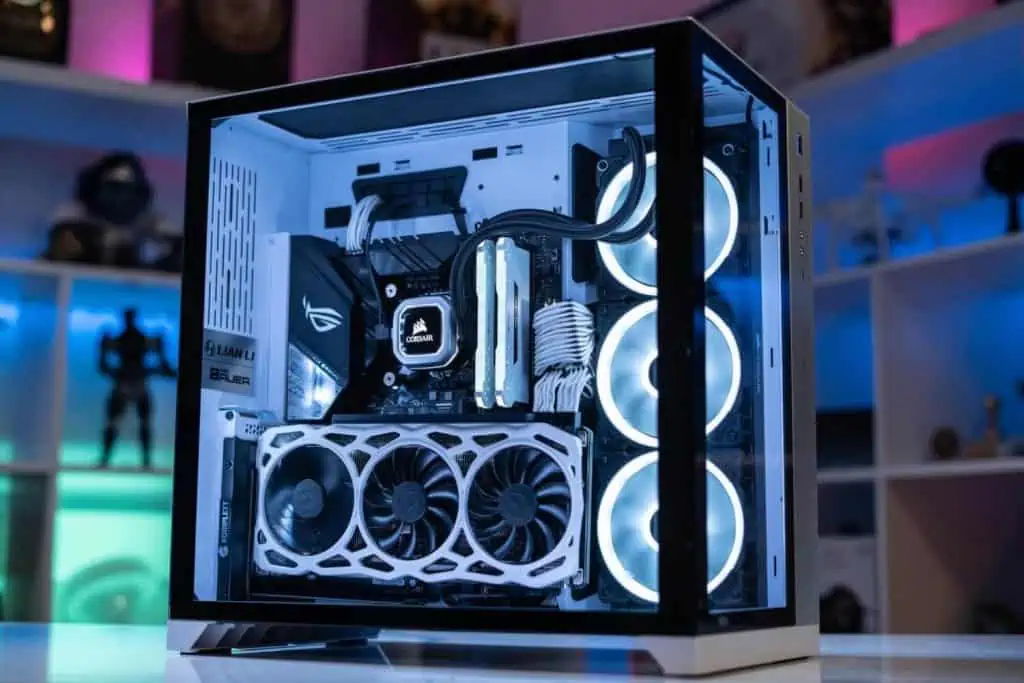
Overall Best Premium PC Case: Lian Li O11 Dynamic XL

The greatest PC case from what we consider the best manufacturer in the game right now, the Dynamic XL is an incredible offering for creating both a beautiful and powerful build.

The build quality and design of the O11 D XL are fantastic. Stock photos do not do this case justice at all. You are getting a full, thick aluminum exterior with a beautiful finish that doesn’t just look good but also feels very solid and durable. Accompanying that exterior is a subtle RGB light on the front and 2 full length high-quality tempered glass windows.

We really can’t overstate how beautiful this chassis looks with a completed build, powered on, the full-length glass on both sides gives amazing visibility for a premium build. You may be thinking there is a little too much exposure with the internals, but this is a dual-chamber PC case. This means there is a large dedicated compartment in the hidden side of the case that is designed to host your “uglier” parts (think your PSU, cables, etc). This helps in not just creating a clean setup, but one that has a fantastic room for airflow.

Speaking of airflow, this case really excels in cooling and is one of the best premium PC cases for gaming & overclocking available, with:

  • Up to 10 120mm fans
  • Or up to 3 360mm radiators

Tie this in with the efficient dual-chamber layout and you have a simply incredible case for performance.

In terms of hardware space requirements, this is one of the XL’s main strengths. Being a premium full tower case, it has enough room for pretty much any powerhouse build:

  • E-ATX Motherboard Support
  • 8 expansions slots (and vertical installs)
  • 6 2.5″ & 4 2.5″ / 3.5″ drive bays
  • Graphics card lengths up to 446mm. Size-wise this is one of the best PC cases for RTX 3080, 3090 & 3070 GPUs

As you can see, whether you’re looking for a premium gaming PC case or something more for production/server use, there is an incredible capability for all of this in the XL. Despite its high-end price range, it’s still one of the cheaper options on this list (and amongst its premium competitors).

By this point, you can probably see why we love this choice so much. With its incredible value in mind, this is comfortably our pick for the overall best premium computer case.

2025 update: The O11 Dynamic XL remains our top pick in 2025; no other premium PC case has matched its overall quality and value.

Best Premium PC Case for Silent Builds: Fractal Design Define 7 XL

Now as much as we love the top Lian Li pick, if there is one premium tower very closely following it, it’s this powerhouse choice from Fractal, one of the other best brands in the case business.

What is so impressive about the 7 XL is how it manages to so easily balance optimum noise reduction with excellent cooling/performance. Usually, you are sacrificing significant airflow when you add the industrial quality sound-dampening panels to a case like the 7 XL has, but this chassis is known to still perform better cooling-wise than many of its louder competitors.

The build quality on the Define 7 XL is beautiful and sturdy; with a monolithic design, it is deceptively striking in person. It’s also a huge space for your setup, with some very impressive specs:

  • Up to E-ATX Motherboard Support
  • 9 x Expansion slots & 3 for vertical install options
  • 359mm graphics card clearance (up to 549mm with certain modular components removed, but 359mm is enough for nearly all cards)
  • Drive bays included: 8 x 2.5″ / 3.5″ (up to 18 available), 2 x 2.5″ (up to 5 available) & 2 x 5.25″
  • 30mm cable routing space (not as good as a dual-chamber but still decent).
  • Up to 9 x 120mm fans (with 3 x high-quality Dynamic X2 GP-14 silent fans included)
  • Or up to 2 x 480mm, 1 x 280mm & 1 x 140mm radiators

As you can see, some of the availability here is insane. This would be a fantastic option as a premium server PC case with all of its storage space.

When choosing between our two top picks, it’s really down to personal preference. You’ll see that the 7 XL has some impressive specs that in many ways beat the O11’s, and for builders focussed on silence, this is definitely the best choice for you (it is, without doubt, the best silent premium PC case for gaming). We gave a slight edge to the Lian Li offering because it still has all of the specs you need for an extremely powerful build; but also offers such a beautiful aesthetic and a dual-chamber layout to maximize airflow and clean design.

Again though, this is a personal preference choice. If you prefer the look of a minimalist PC case, one that is close to silent, or one that has an even crazier amount of storage capability, then the 7 XL is a simply incredible PC case and perfect for you.

Most Innovative Premium PC Case: Antec Torque

The Torque speaks for itself, doesn’t it?

One of the most unique PC cases on the market, this Antec tower is special not just because of its incredible aesthetic, but because it has some fantastic performance to match.

But let’s start with the design. The Torque’s exterior is made of 14 uniquely curved aluminum panels and double-sided tempered glass. The finish across the whole case is incredible. As good is it looks in photos, this is another example of a case that simply cannot be done justice unless you have it in person with a powered-on build.

This premium ATX case has room inside for:

  • 7 x expansion slots
  • Graphics cards up to 450mm length
  • 1 x 2.5″ & 1 x 3.5″ drive bays
  • Compatible with E-ATX motherboards up to 12″ x 11″
  • Up to 6 x 120mm fans or 2 x 360mm Radiators

The storage space is a little lower than our top choices as this case is obviously designed to be exposed from all angles, so its space to hide less-attractive drives is minimal. That said, there is still more than enough space here for a premium gaming PC with 1 SSD & 1 HDD.

Speaking of gaming, perhaps the best feature of this case (aside from its design) is its incredible cooling capability. While 6 x 120mm fans may not sound like much for a premium gaming tower, know that this is an open-air PC case. Your GPU and CPU will be exposed to maximized airflow with the openings surrounding the case, with more than enough capability for overclocking in this machine.

This is one of the most expensive PC cases around today, and you are of course paying (partially) for its fantastic aesthetic. But what we really love about the Torque is that it is a beautiful balance between form and function. Yes, this is the case that will get all of your friends and family to turn their heads; but it’s also a case that can still inform an incredibly powerful PC build.

Best Premium PC Case for Cooling: Thermaltake Core P8

Now if the Antec Torque isn’t in your style (or budget), another incredible option for aesthetic and cooling is the high-end choice in the Thermaltake Core series: the P8.

We have featured this series in many, many articles because of its fantastic versatility as a choice for wall mounting (optional) and clear design.

The P8 really stands at the top of this series. As you can probably tell by the image, if you equip this chassis with some RGB fans and hardware, you have a simply incredible base to show off a beautiful internal setup. With a top-tier build quality compromising of an SPCC steel exterior with 3 thick tempered glass windows surrounding the other sides; the P8 feels as good as it looks, and that’s saying something.

Inside is a space for a seriously powerful premium gaming PC build too, with:

  • 8 x expansion slots
  • GPUs up to 320mm in length (without water cooling reservoir, 280mm with)
  • E-ATX Motherboard support (up to 12″ x 13″)
  • 1 x accessible 2.5″ & hidden HDD bracket to host up to 3 x 3.5″ or 6 x 2.5″ drive bays
  • Up to 18 x 120mm fans
  • Or up to 2 x 480mm, 1 x 360mm & 1 x 240mm radiators

The cooling capability of the P8 is simply insanewith the most fan/radiator allotments we have seen in any chassis (especially impressive as it has no room for side fans with its glass cover). Combined with some nice openings around certain parts of the case, you have one of (if not the) best premium PC case for cooling a powerful gaming/production build, perfect for overclocking.

We love that this case still manages room to hide its main storage drive bay too, with the PSU shroud also nicely covered by another allotment perfect for an RGB fan.

What else is there to say, not only does this case look incredible, but it performs that way too; if this style suits you, it is a fantastic pick.

2025 update: Although we still love the P8 for enthusiast cooling builds, we’ve seen it out of stock frequently recently. If you like what the P8 has to offer but can’t purchase it, check our clear PC case list that offers other similar cases from the Thermaltake Core P series.

Best Premium ITX Case: NZXT H1

For those looking for the best smaller form factor PC case, then this new offering from NZXT is a fantastic option.

Another case featured several times for its incredible achievement in chassis architecture, the H1 is special because it has been specifically designed to be as low volume and “tight” as possible while retaining enough room for airflow and a mainstream graphics card (this is one of the best ITX cases for RTX 3080 & 3070 GPUs, but as always with this form factor, remember to check dimensions beforehand as GPU size will vary depending on the brand).

The H1 accomplishes this task by having an included high-quality water cooler and AIO CPU liquid cooler specifically design for the case pre-installed. Not only does this make the case deceptively high-value despite its premium price-tag, but it also means the case isn’t having to accommodate for a wide range of PSUs/coolers with more generic space requirements.

The H1 is carefully designed with everything inside having a distinct purpose, including:

  • gorgeous SGCC steel/tinted tempered glass design – this is the best premium mITX case build quality we have seen to date
  • A dual-chamber layout that gives fantastic ventilation to the allotted GPU space (up to 305mm x 128mm for your card).
  • 2 x 2.5″ drive bays

We like that they still managed to include 2 SSD slots. We wouldn’t be surprised to see something this small have only one.

The dual-chamber design is perfect to give some independent ventilation to the GPUs and CPUs (with the included AIO cooler being the only intended thermal solution in the case, making the H1 deceptively quiet for an ITX case also).

I know we’ve been over it a couple of times, but it really cannot be overstated how impressive the design and performance of the H1 is; of course, you’re not going to get the cooling of a larger case, but if you’re focussed on a tight form factor, the H1 can easily handle a high-end ITX gaming build.

This is, without a doubt, the best premium mini ITX case on the market.

Quick-Fire Picks (Best of the Rest)

While the 5 chassis above are the picks we wanted to highlight, there are some other really excellent options in the premium markets that we wanted to present. If they fit your needs/style preferences more, know that these are still excellent choices.

Alternative Best Premium PC Case for Airflow & Cable Management: Corsair Crystal Series 680X RGB

One of the most featured cases on What in Tech, the 680X has the largest dual chamber of any premium PC case and is therefore perfect for a clean inner build, good cable management, and airflow (read more about it here).

Best Build-Quality Premium PC Case: Asus ROG Strix Helios GX601

With one of the sturdiest builds we’ve ever seen and some strong handles on the top, this case is built like a tank to be a portable premium PC case (with one of the most beautiful subtle in-built RGB lightings also, read more about it here).

Best Unique Premium PC Case: AZZA CSAZ-802F

Another incredibly unique choice, this cube PC case doesn’t just look pretty but performs well too. If this design speaks to you, know it’s an excellent choice.

Best Premium Micro ATX Case: Thermaltake AH T200

If you’re looking for a premium mATX case, the T200 fits the bill perfectly; with fantastic style and no compromise on airflow (there’s also an ATX version if you prefer the design over the Antec Torque).

Best Premium PC Case for Watercooling Alternative: Thermaltake Tower 900

While the Core P8 takes our top cooling spot, this “fishtank pc case” has been featured many times for not only its excellent unique presentation and sturdy build, but the freedom to create some really fantastic liquid cooling setups, read more about it here.

What's Next?

About the author

Picture of Kaelum Ross
Kaelum Ross
Kaelum Ross, BSc is the Lead Writer at What in Tech and a leading authority in PC hardware and software. With a career as a senior IT professional, Kaelum has led multi-million dollar projects covering everything from bespoke software development to complex Windows hardware upgrades. Today, Kaelum uses his expertise to serve What in Tech's readers and has been featured in numerous global publications including New York Magazine and Lifewire.

The 8 Best PC Cases with Fans Included in 2025

PC Case with Fans

The 8 Best PC Cases With Fans Included in 2025

We've narrowed down the best value picks with cooling covered

PC Case with Fans

We updated this feature to cover the options available in 2025. None of our top picks have changed, but we have added a couple of decent alternatives where relevant.

Why settle for a PC case that doesn’t include your cooling off the bat?

While many options include fans nowadays, it can be hard to know when the quality and quantity are decent for the price of the case in question.

After 100s of chassis reviews, I’ve put today’s features together to guide you through the best PC cases with fans included.

These picks will focus on value. We’ll look at cheaper cases including 1-2 fans/decent ventilation perfect for a budget builder, and also slightly more expensive choices that still offer an excellent deal by including a more extensive RGB fan/cooling setup.

1

Cooler Master N200

Best PC Case with Fans Under $50

Cooler Master N200

Our Rating: 9.5/10

2

MUSETEX T400-MN8 1

Best Case With RGB Fans

MUSETEX T400-MN8

Our Rating: 9/10

3

Thermaltake Core V1

Best ITX Case With Fan Included

Thermaltake Core V1

Our Rating: 9/10

4

Fractal Design Focus G 1

Best ATX Case With Fans

Fractal Design Focus G

Our Rating: 8.5/10

Best PC Case with Fans Under $50: Cooler Master N200

The top pick was a bit of a no-brainer for this feature.

The N200, from one of the best PC case manufacturers in the game, is an absolutely incredible value purchase. Of course, you’re not going to get the same level of product as some more expensive options, but it’s still well ahead of its similarly-priced counterparts.

The build quality is a nice mix of steel, plastic, and metal for the mesh (again, great for the price). I like the choice of mesh in this case. Alongside the vents on the sides, top, and rear, Cooler Master has clearly recognized that purchasers of the N200 don’t want to then spend lots more on expensive fans. So the cooling out of the box is already suitable for your budget gaming PC build (or something for general work).

This case comes with a very generous 2 x 120mm fans installed (1 on the rear & 1 on the front). You could install up to 3 more if you wish to later. But between the mesh and surrounding ventilators, you have all the cooling you need out of the box here. I was pleased with the thermal benchmarking I saw on a test budget build.

Cooler Master N200

Source: jnanof

This is a Micro ATX case, the perfect form factor for a budget builder (not too big that you’re paying for unnecessary material, not too small you’re worried about specialist parts), with room inside for:

  • 4 expansion slots
  • 4 x 3.5″, 3 x 2.5″ & 1 x 5.25″ (optical) drive bays
  • Graphics card clearance up to 355mm in length (more than enough for most mainstream cards)
  • 1 x USB 3.0 & 2 x USB 2.0 on the front I/O panel (many cases this cheap will have fewer ports)

We can’t reiterate enough what an impressive budget offering this is.

The fact that you get a case from one of the most reliable brands with a slick design, build quality, 2 120mm fans, decent ventilation, and enough space for a great gaming build is really impressive.

This isn’t just the best micro ATX case with fans, but the best cheap choice across any form factor I’ve found by a notable margin.

2025 update: The N200 remains my top pick for 4 years running! There’s been some other compelling fan-included offerings, but nothing that quite matches the incredible value that the N200 boasts. The only reason not to enjoy it is style or if you have a larger wallet for something fancier.

Our Rating: 9.5/10

Best PC Case with RGB Fans: MUSETEX T400-MN8

For those with a slightly larger budget who want to build something with a more eye-catching aesthetic, MUSETEX’s T400-MN8 is a very impressive value offering.

If you told me you could get a decent quality mid-tower with 8 addressable RGB fans & 2 sides of tempered glass at this price before I saw this? I would have thought you were lying!

But that’s exactly what you get with the MN8. RGB fans that are addressable can be customized in a huge variety of ways to behave as you want. This can mean anything from what color each light is, to how the lights are animated (they can fade on and off at various speeds or even flare up in sync with your music). The system includes a remote control to change the lights easily (a nice touch, as this can get tiresome if going through software).

The tempered glass windows are full-length, which we always appreciate in showing off a great aesthetic (especially one focussed on RGBs). There is enough room in here for:

  • 7 x expansion slots
  • Up to 380mm GPU lengths (all you’ll need for nearly every card)
  • 3 x 2.5″ & 2 x 3.5″ drive bays
MUSETEX T400 MN8

Source: MUSETEX

There’s all the space you need for a full size card. The ridiculous inclusion of cooling inside the case gives you a great basis for overclocking if you desire. Between these factors, it’s often my top answer when readers ask what the best gaming PC with fans included is on a budget.

Cooler Master N200 vs MUSETEX T440-MN8

MUSETEX isn’t as big and reputable of a brand as Cooler Master, but we still consider them worthy of inclusion, with their various flagship cases being well-received for quite a while now.

The N200 is a little more practical of a choice than the MN8 with far more ventilation surrounding the case. Even though the cooling on the MN8 is very capable with its fans, it’s slightly hampered by the choice to g for a tempered glass front panel. This is clearly an aesthetic-focussed decision and you’ll have to ask yourself if you prefer a more reliable consistent airflow (N200) or a beautifully transparent case that overcompensated for its ventilation issues with plenty of fans (MN8).

As insane as the N200 offer may be, the MN8, with its dual tempered glass and ARGB fans, is the most value I see in the list’s options. Yes, it costs more, but the extra inclusions are even crazier for the price.

If you want an RGB aesthetic, this is a fantastic budget choice.

2025 update: I still recommend the T400, but I’ve seen it run into several availability issues over the last several months. If you catch it out of stock, MUSETEX does some similar models that offer a ton of RGB fan inclusions at a reasonable price, like the Phantom.

Our Rating: 9/10

Best ITX Case with Fan Included: Thermaltake Core V1

If you were looking for a small pc case with good fan inclusion, I have good news.

One of the most popular ITX cases on the market, the Core V1, is a fantastic value offering. At its low price, it only includes 1 fan, but that is a 200mm fan that is as nearly as large as the case and combined with the great ventilation and mesh design, is enough to cool your ITX build on its own (with an option for 2 x 80mm fans in future if you do want to upgrade).

The V1 has a deceptively high-quality build for its price, with SPCC steel and tempered glass surrounding its exterior (not to mention its incredibly unique cube tower design).

Thermaltake Core V1

Source: Seiren2112

Quite largely considered one of the best budget ITX cases for gaming, there’s space inside for:

  • GPUs up to 285mm in length
  • 2 x 2.5″ & 2 x 3.5″ drive bays (both hidden)

The storage space, in particular, is really impressive for a case of its size (with many similar cases only having 1-2 2.5″ drive bays). You of course won’t get the cooling that you would in our larger choices, but still more than enough for a budget gaming PC.

We’re a little disappointed by the GPU length. It’s not uncommon to see this kind of clearance in ITX, but for a case that has gaming in mind, pushing to 295-300mm would’ve been nice to see. With that said, that’s often the sacrifice of getting a great compact aesthetic. It will still accommodate many mainstream GPUs. Just be sure to check your dimensions before you buy (and if this is too small, many of the other options on this list are larger).

NOTE: If you’re looking at the Amazon reviews for this case, know that a majority of the very low ratings are for a different Thermaltake Core series cases (the V200), if you specifically look for the V1 reception, you’ll see that it’s largely very positive for all the reason’s we’ve discussed.

This isn’t just one of the best mini ITX cases with fans, but one of my most common recommendations to budget builders looking for a nice compact case that still packs a punch.

Our Rating: 9/10

Best ATX Case With Fans: Fractal Design Focus G

I know that not everyone is into the big “flashy” aesthetic that a case like our MUSETEX pick above provides. I want to also offer a gaming PC case with fan inclusion that’s a little more traditional (and also from one of the best chassis brands in the business).

Fractal cases are always top quality. The Focus G, despite its lower price tag, is no exception. Featured several times on What in Tech previously, this mid-tower includes a pair of high-quality Silent LL Series 120mm case fans. I’m really pleased by this, as it would’ve been easy to cheap out and offer some very basic fans at this price point. Fractal is known for silent builds, and while this budget offering isn’t as quiet as its flagship choices, it will still be the quietest option on the list.

Inside is room for:

  • 7 x expansion slots
  • GPU clearance up to 380mm (more than enough for most cards)
  • 2 x 2.5″ / 3.5″, 1 x 2.5″ & 2 x 5.25″ drive bays
Fractal Design Focus G

Source: MrThreePik

There’s plenty of graphic card/storage room in here for either a gaming pc or someone looking for more of an enthusiast work build.

There are lots of smaller “quality of life” features in the case too. Including decent cable management and airflow (nicely aided by the mesh front plate). The inclusion of optical drives is great for anyone still using older media (if not, they can easily be converted into more storage space).

Alongside the decent ventilation and included cooling is the option to add up to 4 more 120mm fans (not that you’ll need these on a budget setup, but it’s a nice option for later if you want to consider overclocking).

If the other cases don’t hit the mark for you (perhaps you want more of a minimalist choice from a big brand, and your budget is a little above the N200), this Fractal offering is a great choice.

Our Rating: 8.5/10

Quick-Fire Picks (Best of the Rest)

While the top 4 choices are what we consider the best budget PC cases with fans included, there are a few extra options worth considering in certain situations that we thought worth adding (and are still worth considering if they more comfortably match your requirements).

montech x1

Best Budget Case With RGB Fans: Montech X1

If you want a cheap PC case with RGB fans and the MUSETEX top pick is outside of your price bracket, the Montech X1 will be the best model for you.

Our Rating: 8/10

DEEPCOOL MATREXX 30

Cheapest PC Case With Fan Included: DEEPCOOL MATREXX 30

Although we would recommend pushing you to purchase the N200 model if you can stretch your budget a tiny bit further (with the higher quality/reputable manufacturer behind it), we respect some builders will literally be looking for the cheapest PC case with fans that will get their build up and running. The MATREXX is the choice we’d recommend for just that (only 1 fan included but with enough ventilation for a budget build, though we’d highly recommend adding 1-2 more when possible).

Our Rating: 8/10

DEEPCOOL MATREXX 50

Cheapest ATX PC Case With Fan: DEEPCOOL MATREXX 50

The larger brother of the pick directly above, if you are after the cheapest ATX PC case that also has that classic, tempered glass look, this is it (we would recommend purchasing a cheap second 120mm fan with this as a minimum, however). We would still recommend our top Fractal pick vs this if you have the extra budget for its superior build quality and airflow.

Our Rating: 8/10

Thermaltake V250

Best ATX Case With RGB Fans Alternative Pick: Thermaltake V250

If you prefer an RGB case to be with one of the larger brands as opposed to the MUSETEX offering we present above, this is your best value option. One of Thermaltake’s flagship budget models includes a beautiful tempered glass design and 3 high-quality RGB fans.

We also like the quantity of cooling built-in as we know many readers are after a PC case with 3 fans included.

Our Rating: 8/10

What's Next?

About the author

Picture of Kaelum Ross
Kaelum Ross
Kaelum Ross, BSc is the Lead Writer at What in Tech and a leading authority in PC hardware and software. With a career as a senior IT professional, Kaelum has led multi-million dollar projects covering everything from bespoke software development to complex Windows hardware upgrades. Today, Kaelum uses his expertise to serve What in Tech's readers and has been featured in numerous global publications including New York Magazine and Lifewire.

The Easy Guide to CPUs – Dual Core vs Quad Core vs Six Core vs Eight Core

Dual Core vs Quad Core vs Six Core vs Eight Core

The Easy Guide to CPUs

Ah, the central processing unit; this integral part is at the heart of any PC build.

Despite that, it can be deceptively hard to learn about what makes a CPU good and which one you should buy for your next build.

That’s why today’s feature is here to guide you through

  • The makings of a CPU
  • What elements to focus on depending on your needs (e.g. gaming, production)
  • Some FAQs (i3 vs i5, dual-core vs quad-core, etc.)

We’ve also included our top recommendations if you’re just after the best CPU for your budget/requirements without being bogged down by the details!

Table of Contents

Dual Core vs Quad Core vs Six Core vs Eight Core 6

What makes a CPU good?

The easiest way to answer this question is to break-down the main parts that make up a CPU.

Clock Speed

If you’ve seen processors advertised before, you’ll be familiar with seeing clock speeds (or the clock rate) in GHz.

What this indicates is how many times per second your CPU can perform tasks. So, if your processor has a speed of 3GHz (3,000,000,000 hertz), it can perform up to 3 billion cycles a second (more is better).

Base Clock vs Max Clock (or Boost Clock)

Most Ryzen/Intel CPUs today record their clock rate with multiple figures, usually “base speed” and “max speed”/”up to”.

Essentially, CPUs today are intelligently built to only use the clock speed that is required for the tasks at hand in order to conserve power.

If you have an expensive processor and are just running Netflix, there’s no reason for the hardware to heat up and run at max capacity!

The base clock, as the name suggests, is what your CPU runs at when idling/during low intensity.

The max clock is how much individual CPU cores can climb up to in power when performing intensive tasks (e.g. gaming, rendering).

Both are important, and a higher value for either means a faster system in different circumstances (in most cases, the 2 values increase at a similar rate to each other with more expensive CPUs).

Cores

The other term you’re probably already familiar with when seeing CPUs on Amazon; a core is an integral part of buying a processor today.

Essentially, each core is its own individual processor within your CPU.

So, for example, a quad-core CPU is essentially 4 CPUs in one, each capable of performing its own tasks.

Most processors today are between 4 and 8 cores, but the full range is anything from 1 to 128.

Sounds pretty awesome right? Well, for the most part, it is!

But there is an important point to make, using quad-core as an example: 4 x the cores does not mean 4 x the power in individual processes.

In simplistic terms, having 4 cores means you can perform 4 independent operations as fast as 1 core can perform 1 operation.

If you’re trying to get 4 cores to target the same task (e.g. playing a game), then the clock speeds, IPC, and other aspects of how your CPU works for a single core will be integral too.

That’s not to say having more cores doesn’t help individual processes, many applications (including games, as we’ll discuss further below) are developed with multi-core use in mind and can utilize some of their power.

Cores are important, and the days of single-core are over (with dual-core also on its way out), but we’re just trying to stress that there is no reason to go too crazy with cores. We expect 99% of readers would see close to 0 benefits from more than 16 cores, and many will see diminishing returns past 4-8 (we break this down for each PC type further below).

Threads

Multithreading is a technology that is used by Ryzen (SMT or simultaneous multithreaded) and Intel (hyperthreading) to allocate multiple  “virtual cores” (i.e. threads) inside each core.

In simple terms, this allows cores to split up certain types of workload (e.g. when 1 thread is waiting on information to complete a task, the second thread can be busy doing “prep work” for that task).

They both share the same physical specs of the core, so real-world performance gains are usually only marginal from your thread count.

There’s good news for learners too: nearly every mainstream CPU today has 2 threads per core. Therefore there’s no significant need to focus on thread count when you’re already considering cores.

Dual Core vs Quad Core vs Six Core vs Eight Core 9

IPC

The IPC is best described as the “hidden ingredient” for what makes a CPU good, as it is often not as discussed as the more marketable specs above and below.

Despite that, it’s very important in establishing speed; IPC stands for instructions per cycle/clock.

As you might expect from the name, IPC indicates how many tasks/instructions your CPU can perform for each cycle.

This is an underutilized spec as you could have a CPU with a very high clock speed, but if its IPC is low, it will be slower than a low-clock speed CPU with notably higher IPC.

IPC is often indicated or tested in CPU reviews/benchmarks as opposed to product listings.

The good news/rule of thumb is that newer generation processors from Ryzen and Intel will provide better IPCs than their predecessors, so although this spec is integral, you don’t have to overthink it too hard.

TDP

Thermal design profile (or TDP) is how much power your CPU demands in watts (e.g. 65W).

If just one TDP figure is provided, this is nearly always the max wattage required by your CPU (under heavy loads). Sometimes listings also include the idle/base TDPs, which refer to how much power is drawn at calmer usage.

In terms of performance, TDP does not directly affect your CPU (yes, higher TDP tends to mean a more powerful processor, but this isn’t a great metric, focus on the specs above).

Instead, what TDP is good for is understanding what level of CPU cooling you need and the PSU requirements of your CPU.

It’s also the best indication of how much you can expect your CPU to increase your energy bill (higher = more) but the difference between a modest and high TDP usually won’t mean more than $5-$20 per year.

Cache

Processor cache is the onboard caching system on a CPU that is used to interact with your RAM and access frequently used information from it as required.

The cache is important, but the values between modern CPUs are going to be very similar, and any differences are going to have immense diminishing returns in real-world performance compared to clock speed, core count and IPC. We included this for completeness but would recommend most users to not worry about this spec in their buying decision.

Integrated Graphics

Depending on the model of CPU you’re purchasing, you may have a processor designed to also do the job of a GPU included.

This is more useful if you are building a very budget/basic general use PC or a smaller computer with less graphical requirements to avoid the spatial needs of a graphics card (a common example is building a home theatre PC in a horizontal case).

If you’re building a mid-range desktop or something for gaming, you’ll definitely want a graphics card over integrated graphics; an independent GPU provides much more power (having the integrated functionality may still be useful to have as a backup if your GPU has issues and you need to troubleshoot, but isn’t essential if you’re on a budget).

The same logic goes for laptops, many have integrated GPUs to save on space; this is fine if you are a general user, but you’ll want a laptop with a GPU for gaming, video editing, or longevity.

Which CPU specs are the most important?

We’ve included all the main parts for completeness, but the short answer is how good a CPU is for most users is mostly determined by a mixture of its clock speed, IPC, and core count.

If you’re confused, a great rule of thumb to follow is that the latest generation of Intel and Ryzen processors will be the best “bang for your buck” at each of their respective price ranges and contain the latest innovations in clock speed, IPC, and core counts (we’ve provided some of the best options below).

Dual Core vs Quad Core vs Six Core vs Eight Core 5

How to choose the right CPU for your needs

The utility of a CPU usually overlaps into multiple areas (i.e. a processor good for gaming will be good for general use and media).

The question on how to chose is really around how much power you need.

If you do high-end development (rendering, intensive video editing, etc.) you’ll need a more powerful CPU than the average gamer.

This section is about providing a guideline depending on your individual requirements.

Choosing a CPU for Gaming

How many cores do you need for gaming?

4 is the absolute minimum today, as many developers have begun to use multi-core technology in the fundamentals of their game engines. If you’re using a single/dual-core, you’ll likely not meet the minimum specs for many titles.

While 4/quad core is the minimum, we’re now past the days where it’s recommended. We’ve noticed other resources saying “4 cores are all you need” – but this is an outdated statement.

Many PC gaming benchmarks have tested the average FPS of new popular titles at 1080p, 1440p, and 4k and it’s clear there can be a significant difference between 4 and 6 cores, a notable increase from 6 to 8, and a lesser-but-fair improvement from 8 to 10/12 (above this amount is when diminishing returns really settle in).

Now, benchmarks are examples, and of course don’t reflect your exact setup (GPU, motherboard, cooling, graphics settings, etc.). Additionally, each game has different CPU requirements (with simulation/larger-scale games usually benefitting more from increased processor power).

But the differences noted in various benchmarks demonstrate that the average user is likely to see real-world improvement above 4 cores.

Bear in mind all this advice is about shopping with the latest generation of Intel/Ryzen CPUs (10th gen and 5000 series); a previous-gen 8 core CPU may run slower than a current-gen 6 core CPU.

It’s also worth bearing in mind that the latest generation consoles (PS5 and Xbox One X) are built with 8 core/16 thread CPUs. This doesn’t mean that you need this for gaming, but there will likely be some advantage to having a similar architecture in your gaming PC once developers begin to focus on this layout with major cross-platform titles.

With all that said, a good rule of thumb for gaming core requirement is:

  • 4 cores at a bare minimum 
  • 6 cores as a good standard for budget/lower mid-range 
  • 8 cores for the optimal sweet-spot/mid-range and to match the new console gen standards
  • 10/12 cores for a premium gaming desktop

How many threads do you need for gaming?

We see this question asked a fair bit, but as mentioned in the first section: nearly all mainstream CPUs (especially those focused on gaming) have 2 threads per cores, with the latter half being a more important overall indicator.

In other words, don’t focus on threads, focus on cores.

What other CPU specs are important for gaming?

Clock speed and IPC are also very important, but it’s harder to break these down in the same way as threads/cores (as they vary notably between choices). 

The easiest suggestion is to focus on the latest generation CPUs which will be tailored for the optimum clock speeds/IPCs at each price-range (we list the best for different budget types just below).

Ryzen vs Intel for gaming

No CPU discussion would be complete without a word on Intel vs AMD processors for gaming!

It’s a very close race for the most part.

AMD tends to have a focus on increased core/thread count, while Intel’s focus is on achieving the highest single-core clock speed.

For gaming, single-core clock speed is very important, and typically you’d expect Intel’s approach to win out here.

However, AMD sometimes offers better prices for similar performance and as we’ve seen from benchmarks, core/thread count does also play a notable role in avoiding bottlenecking a GPU’s performance.

We would say it’s usually common for AMD to come out on top, but right now, it’s really too close to call for gaming. As you’ll see in our recommendations below, we choose CPUs from both vendors and the best value is really going to depend on the state of the market at any given time (ignore CPU brand loyalty, it’s a waste of time!).

Best CPU for Gaming (Mid-Range): Intel Core i7-10700K

It’s a very close race for the best gaming CPU between the 10700k and AMD’s new 5800X.

The 5800X usually averages 2-3% FPS improvement in gaming benchmarks but comes at a near 20% increased cost (and is short in stock) therefore we give the crown to the 10700k.

This beastly Intel processor hits the sweet spot with 8 cores/16 threads to match new console architecture, and with fantastic clock speeds/IPC, it’s one of the best CPUs for RTX 3070 & 3080 builders.

Best CPU for Gaming (High-End):
AMD Ryzen 9 5900X

For those after a high-end gaming desktop CPU, we give this accolade to the fantastic new 5900X.

With an impressive 12 cores & 24 threads alongside immense clock speeds, the combinations on offer here is what we consider the maximum you need in a CPU today for gaming (anything more is where you start to see notable diminishing returns), with the right GPU you’ll be able to throw pretty much any game at this CPU and get a great result in 1440p or 4k.

You don’t just have one of the best CPUs for RTX 3090 builds (and other premium gaming machines) but also a CPU capable of working alongside other high-end parts for intensive production work (be it development, rendering, or high-scale video editing).

After the best high-end Intel gaming CPU? Your best option will be the i9-10900K.

Best Budget CPU for Gaming: AMD Ryzen 5 5600X

For cheaper builds, the new budget offering in AMD’s Ryzen 5000 series is a fantastic choice.

The 5600X still hits 6 cores / 12 threads with the excellent clock speeds and IPC you expect from the latest generation of gaming processors.

What’s more, unlike the other 5000-series CPUs, the 5600X comes bundled with AMD’s Wraith Cooler, which is a pretty decent option as far as stock coolers go (especially for a budget build).

We would say, however, that if you could stretch that little bit further and get our top i7-10700K choice (or the Ryzen 7 4800X), we think that is the best value for money in the gaming space today.

But rest assured; if not, this is still a great processor and would work well alongside an RTX 2000 series GPU or even the RTX 3060 when released.

If you’re looking for something even cheaper while still hitting our recommend 6 cores for a budget build, the Core i5-10600K is your best bet.

Choosing a CPU for Streaming

If you’re looking to stream on Twitch or another platform, you can usually expect a couple of cores to be pre-occupied with the streaming tasks.

So as a rule of thumb; follow our gaming core requirements above and +2 for streaming (6 minimum, 8 budget, 10/12 mid-range, and more for premium).

Best CPU for Streaming: AMD Ryzen 9 5900X

With AMD’s focus on cores, you not only have a great CPU for gaming here but something that has enough spatial capacity to handle even demanding streaming requirements.

If you’re after an option that’s cheaper, Intel, or more readily in stock right now, the i9-10900K is a good second place.

Choosing a CPU for General Use

If you’re after a non-gaming CPU and your tasks aren’t much more than internet browsing, Netflix, and business applications (Word, PowerPoint, etc.) or an HTPC/media build, then you can get away with a significantly cheaper processor.

We never recommend too cheap of course, even decent budget CPUs today with the latest motherboard sockets still offer decent core/thread counts to make sure you have a relatively smooth experience, you can just afford to lose the high clock speeds/IPC offered by the more expensive options.

Note: by general use, we do not mean more hefty production tasks like video editing or development work (those are discussed below).

Best CPU for General Use: Intel Core i5-10400

At a fantastic low price-point, the 10400 has enough juice to run a smooth budget non-gaming build.

One of the really nice things about this processor is the integrated Intel UHD 630 graphics, which have enough capability to act as a GPU solution for a basic build (and can reportedly run/stream 4k video, so could be a great option for a budget HTPC).

Choosing a CPU for Video Editing (or Production)

Although people think that a GPU is the be-all-end-all for video editing, most popular software, including Adobe Premiere, Final Cut Pro & Sony Vegas, are all designed to make good use of high core/thread counts.

Therefore, you benefit significantly from the newest generations of CPUs with their excellent core/thread provisions (the same advice goes for other medium intensity software requirements like mid-range animation or development work).

So how many cores for video editing are recommended? We would advise at least six, but more will improve your experience notably too.

Best CPU for Video Editing: Ryzen 9 5900X

It’s another win for the fantastic 5900X, its 12-core 24-thread capability simply provides so much performance potential for a video editing desktop (including 4k/8k).

Do you need to spend this much on a video editing CPU? Of course not, you could still manage edits on a lesser CPU (like the 5600X from our budget gaming picks) but if you’re serious about a productive rig, this is an ideal choice.

The i9-10900K is your best choice for something mid-range or for those after Intel and is still a great choice with its 10 core/20 thread setup.

HEDT CPU for High-End Development & Production

To be clear; an overwhelming majority of users do not need a high-end desktop CPU (HEDT).

HEDT CPUs are specifically designed for very high-end production work; think industry-standard rendering, server builds, and other intensive requirements.

That said, if any of these sound like you, there is a select set of CPUs designed for some incredible levels of computation going up to 64 cores/128 threads while still retaining great clock speeds and enormous caches.

Best HEDT CPU: AMD Ryzen Threadripper 3990X

Arguably the most powerful CPU on the market today, the 3990X includes an immense 64 cores and 128 threads while still retaining other decent specs.

Of course, its single-core clock speeds are not as high, but this isn’t a chip for gaming, it’s about large-scale production work; its productivity potential will be pretty much unmatched by any mainstream CPU line.

Bear in mind that the Threadripper series runs on the TRX40 chipset and requires a different motherboard type to many mainstream choices, we have a recommendation on a good option in our EATX motherboards feature.

Needing a budget HEDT CPU? The best we’d recommend is the brand new Ryzen 9 5950X which is still a productivity machine (with less diminishing returns).

Other Build Types

We’ve aimed to cover a large majority of build types in the picks above, but appreciate some of you may have very refined requirements.

We’d reiterate an earlier point made: if you’re focussing on the latest generation of Intel and Ryzen chips (10th gen and 5000 series) then you’ll be in a good spot to get the best value for whatever budget you have.

The processors this gen are also fairly well balanced between various spec types, so you can take our above gaming/production picks as a template, and we’d expect they would apply to most other purpose you’re looking for (as a rule of thumb).

Dual Core vs Quad Core vs Six Core vs Eight Core 4

CPU FAQs & Head-to-Heads

There are not many things more common in the CPU space than people asking questions like:

What’s the difference between dual-core and quad-core?

or:

What’s better, a core i3 or core i5?

And we’re not surprised! The processor industry doesn’t always do a great job of making what actually makes a CPU good clear.

The answers to these questions aren’t always clear-cut, but we’re going to give you the best summation for someone after the essential knowledge when buying a CPU.

Note: don’t feel inclined to read through all of the FAQs to learn about CPUs; our key knowledge/recommendations are above. These are specifically here for those of you who want a little more clarity on certain areas.

Intel Core i3 vs i5 vs i7 vs i9 CPUs

This i naming structure is how Intel allows users to have a quick reference point to compare CPUs in the same generation depending on their needs as follows:

  • i3 CPUs are the cheapest/budget options (still fairly powerful with the current 10th gen CPUs)
  • i5 CPUs are budget/low mid-range options
  • i7 CPUs are the higher mid-range choices
  • i9 CPUs are for enthusiasts and professionals (i.e. maximizing your productivity or gaming capability, with some diminishing returns for the latter).

These aren’t definitions set in stone, but usually how the I-series go and is a good guideline for you to make sense of all the different offerings (i.e. the higher the number, the better the processor usually is).

There are other non-i processors (like the Pentium series) but in today’s market, for anyone reading this list (providing you have the budget) it’s good to stick to at least i3 for a somewhat smooth experience.

It’s key to remember that these comparisons only make sense for Intel CPUs in the same generation. 

For example, an i5 9400F (9th gen) will provide about the same performance as an i3-10100 (10th gen). This is because the 10100 comes from the next generation which is created using more efficient practices than the 9th gen.

Any resource that says i3 “has X cores or Y clock speed” is false. i3 (or any of the i CPUs) have lots of different meanings depending on the generation, only use these terms as a guideline!

Ryzen 3 vs 5 vs 7 vs 9 CPUs

Very similarly to the Intel naming standard, AMD uses these terms as a guideline naming convention in place to allow you to compare same generation CPUs with some ease:

  • Ryzen 3 CPUs are the lower end choices (still capable for general use)
  • Ryzen 5 CPUs are budget/ lower mid-range choices
  • Ryzen 7 CPUs are the mid-range choices on the premium-side
  • Ryzen 9 CPUs are the enthusiast options

It’s worth noting that we don’t know if there will be a Ryzen 3 5000 CPU as of yet, AMD has only announced Ryzen 5, 7 & 9 5000 series CPUs.

Remember, the terms only work for comparison if the Ryzen CPUs are from the same series.

Intel vs Ryzen CPUs (Non-Gaming)

We touched on Intel vs Ryzen early, specifically for gaming, where the winner isn’t too decisive.

Now, what about other areas like general use, business productivity, and production (mid-range or high end)?

Well, both companies do still have great options.

However, with non-gaming software, it is a lot more common to see more beneficial use from multi-core/thread performance that AMD specializes in (as opposed to Intel’s single-core performance gains).

So generally speaking, AMD comes out on top for providing the best value for non-gaming desktops.

But this is not universal, which is why we highly recommend sticking to our recommended CPU picks above, where both brands are offered for different requirements.

dual core vs quad core vs six core vs eight core

Core head-to-heads

We see many users asking questions about values of specific core quantities and how they compare to others, so we’ve put together a quick-fire reference for some of the most common “battles”.

These head-to-heads are for a rule of thumb only because in reality, for example, a 4 core and 8 core will nearly always have different clock speeds, IPCs, etc. These examples are based on the assumption that all the other specs of the CPUs are identical (other than threads, which we are assuming will be 2 x the core quantity).

Dual-Core vs Quad-Core / 2 Cores vs 4 Cores

While Quad-core processors are becoming less used, dual-core is, in a larger way, on its way out as a valid option for modern desktops.

One of the only CPUs we would consider a valid option for very basic workstations is AMD’s Athlon 3000G (which is nicely on the modern AM4 motherboard socket, but was released in 2019, so is still becoming dated).

Sure, you could build a basic general use PC with dual-core. But for only a tad extra, a quad-core CPU like the i3-9100 will offer significantly more value with its slightly higher price tag. Quad-core is definitely the better choice for even a basic workstation (even 6 core if you can stretch to it, as we detail below).

For gaming, we would pretty much not consider dual-core a valid option as quad-core is the bare minimum for a gaming PC nowadays due to the number of games that require 4 cores / 8 threads as a minimum. Bear in mind that 4 cores are still a tad low for games too (though perfectly doable if you are on a very tight budget).

Dual-Core vs Six-Core / 2 Cores vs 6 Cores

The difference between dual-core and six-core is very significant in modern-day computing. The key change is that 6 cores are way more of a leading market force with more supply/options, so you’ll nearly always be getting way better value with a 6 core processor (even if its price-tag is higher).

Yes, some will argue you can still get away with dual-core for a very basic workstation and we don’t disagree. But our counter would be why not invest a little more for a CPU that will be dramatically more future-proofed for building a long-lasting machine (even for basic use)?

This is why our top general-use/budget recommendation above is the 6-core i5-10400, which still comes on the new LGA 1200 socket and has integrated graphics for a ridiculously low price-tag.

For gaming, this question is a no-brainer; 2 cores is not good enough for modern gaming, 6-8 cores is the sweet spot, with six being perfect for those a little more budget-conscious as we point out in our recommendations above.

Dual-Core vs Octa-Core / 2 Cores vs 8 Cores

At this point, the battle between 2 and 8 cores barely feels fair; with most 8-core options today being premium choices that pack serious power for productivity workstations.

We will say that 8-cores may begin to be the point where your CPU may be overkill if you’re just building a web browsing, media, and/or basic work software computer (where you can get away with a quad-core like the i3-9100 as a budget choice or the 6-core i5-10400 as our recommendation).

If you’re after a machine for productivity, video editing, or mid-range production however, 2 cores is not a good option for you, and 8-core CPUs like the 5800X will provide fantastic utility for more intensive software.

For gaming, 2 cores are below our minimum recommendation of 4 cores; an 8 core processor is what we consider to be on the high-end of the sweet spot of FPS performance gains for most gaming titles (i.e. perfect for mid-range gaming desktops looking for the most value before diminishing returns kick in).

Quad-Core vs Hexa-Core / 4 Cores vs 6 Cores

An argument can be made both ways for a general use PC, but we think the value and longevity a 6-core will provide is the better option for a larger majority of desktop builders even if your needs are simple.

This is largely because modern generations of CPUs are moving to 6-core as one of their standards, so the available options tend to offer better value per dollar.

This is, of course, a rule of thumb only; but taking examples of two of the best value processors for budget builds, the i3-10100 vs the i5 10400. Both of these processors are perfectly suited for a cheap PC, and if your budget is really tight, we can happily recommend the 10100 as a valid option. The reason we focus more on the 10400 as the best budget CPU is because we think that for its modest price increase, having the extra 2 cores will provide you with better longevity that is worth the small price jump.

For gaming, we’d recommend a 6 core processor with better clock speeds like the 4600X if possible. You absolutely can get away with a quad-core CPU if needed, but 6 cores will be better suited to match what games will likely move to in the future as they continue to focus on multi-core/threading optimization.

On a gaming note, while in a perfect world you will have a decent spec GPU and CPU, if your budget is very tight, it will usually be more beneficial to sacrifice CPU specs over investing in a better graphics card.

Quad-Core vs Octa-Core / 4 Cores vs 8 Cores

For a general use PC, we’d definitely recommend four cores over 8 cores, the latter being overkill even for somebody focussed on providing some longevity.

For productivity/production/video editing, 8 cores will usually provide a notable benefit over a 4-core setup.

For gaming, 4-cores is our minimum recommendation, and 8-cores is on the higher mid-range side of the gaming “sweet-spot”, so while we would of course recommend Octa-core processors if possible, it really comes down to if you have the budget as there is certainly a stark difference in cost between the two.

Hexa-Core vs Octa-Core / 6 Cores vs 8 Cores

General workstations with basic internet/software/media needs will usually be fine with the modern 6-core options.

For productivity users, it really depends on how demanding your needs are; there are certainly plenty of 6-core processors that can handle things like 4k video editing, significant compiling, etc. but 8-core options, especially something like the 5800X, will certainly provide you a worthy boost if you can stretch further.

For gaming, 6-8 cores is what we consider the “sweet-spot” for modern-day gaming CPUs; with 6 being on the lower budget side, and 8 being for mid-range users who can fork out for something extra performative.

6 cores would be sensible for someone who needs to invest more in their GPU and there is no shame in settling for something like a Ryzen 5 5600X.

That said; one big reason it would be great to push your build to an 8 core/16 thread CPU if possible as you are then working with a gaming PC that has the same core/thread specs as the new PS5/Xbox Series X. This might not mean much for a little while, but over the console generation, developers will likely start utilizing this architecture layout. Having a CPU that shares these qualities isn’t necessary but will likely open up some better optimization for you on AAA titles made with consoles in mind.

It’s really a close call for gaming, and purely comes down to your budget; we think you’ll be satisfied with the value both options provide.

Hexa-Core vs Deca-Core / 6 Cores vs 10 Cores

Now that our head-to-heads are looking at 10 cores and beyond, we’re really getting into the power-users who are either running intensive workstations or want the absoloute best quality even with diminishing returns.

If you are running demanding production applications with high requirements in rendering, compiling, etc., you will find some value in 10+ core options, but 6 core processor with good specs elsewhere will be more than fine for a budget/mid-range production machine.

For gaming, 10+ cores is where the diminishing returns really settle in. Yes, there will be improvements over 6-core, but most of these will be shared by 8-core processors, so we’d only recommend 10+ for high-end streaming or those who want the absolute best quality regardless of price.

Octa-Core vs Deca-Core / 8 Cores vs 10 Cores

For users with very intensive production requirements, you can expect to see some improvement during your most demanding processes between 8 and 10 cores (but not so much that its a requirement to have those 2 extra cores, 8 will still cope with even some demanding needs).

For gaming, we would recommend sticking to 8 cores unless you are happy with paying significantly more for very minor gains.

Octa-Core vs Dodeca-Core / 8 Cores vs 12 Cores

With AMD being the only player with mainstream 12 core options right now, if you’re interested in this question, we imagine you’re looking at the difference between something like the Ryzen 7 5800X vs Ryzen 9 5900X.

In this case, we would say the 12-core option is reserved for those after a premium productivity machine who significantly rely on intensive processing throughout their day-to-day operations.

For gaming, we would only recommend 12 cores to those who absolutely want the most power out of their desktop, as there are some diminishing returns for the price-tag.

That’s the best way to sum up this head-to-head for most users; 8-core is the better value option for mid-range builds, 12-core is for those more interested in maximum performance over budget concerns.

Octa-Core vs Hexadeca-Core / 8 Cores vs 16 Cores

Although we see this question asked, the difference between 8 cores and 16 cores is becoming so much that it’s a bit of an “apples and oranges” question.

All general users and most productivity users should stick to 8 cores between these two options, which will already provide fantastic power for a large majority of operations.

16 core+ is only recommended today for advanced users with dramatic production/server requirements; we do not recommend going as far as 16 cores for gaming (unless you don’t really care about your wallet!).

Deca-Core vs Dodeca-Core / 10 Cores vs 12 Cores

This head-to-head is a little hard to quantify, as 10-core is where Intel has focussed their higher-end 10th gen options, and 12 core+ is where AMD has defined their premium 5000 series CPUs.

So really, the battle will usually be if you are after a CPU that focuses more on single-core performance (Intel) or more cores/threads (AMD).

In general, we’re more impressed by AMD’s latest 12+ core options and think this will suit more users in this price-range who are likely looking at productivity builds that will benefit from an increase in cores.

Dodeca-Core vs Hexadeca-Core / 12 Cores vs 16 Cores

The only users this question should apply to are those after a very high-spec production machine. Gamers (with finite wallets) will be fine with 12 cores or less, and even advanced productivity machines will get a lot done on 8-12 cores.

So 16 cores and beyond are really reserved for HEDT CPUs that may be needed by large software companies, animators, high-spec production users, and similar. Our honest opinion is that if you’re an individual builder, you almost certainly don’t need 16 cores and we’d only get it if it’s a luxury you can afford comfortably.

Single-Core vs Dual-Core / Multi-Core

We wanted to add this head-to-head just for completeness but realistically, nobody today should build a single-core desktop PC (unless you have some weird nostalgia for it, you may have a hard time finding them though!).

Gaming or not, most applications take advantage of multi-core/threading capabilities and the industry has moved well away from 1 core CPUs, so whatever your build requirement, go for 2 as an absolute minimum.

Final Word

And there you have it! The above is everything we think you need to know about what makes a CPU good and how to pick for your next build.

Feeling overwhelmed? We understand!

We’ve mentioned this point a few times in the feature but it’s worth re-iterating one last time: you don’t need to know every part of the CPU to make a good purchase.

Stay close to our recommendations above depending on your type of build, you can’t go too wrong as long as you’re buying a CPU that’s current-generation (Intel 10th gen/Ryzen 5000 series) and in your budget!

What's Next?

About the author

Picture of Kaelum Ross
Kaelum Ross
Kaelum Ross, BSc is the Lead Writer at What in Tech and a leading authority in PC hardware and software. With a career as a senior IT professional, Kaelum has led multi-million dollar projects covering everything from bespoke software development to complex Windows hardware upgrades. Today, Kaelum uses his expertise to serve What in Tech's readers and has been featured in numerous global publications including New York Magazine and Lifewire.

The 6 Best Motherboards With 8 RAM Slots in 2025

Motherboard With 8 RAM Slots

The 6 Best Motherboards With 8 RAM Slots in 2025

Motherboard With 8 RAM Slots

I updated this article in June after checking for any new releases in 2025. That said, there haven’t been any new 8-slot boards since early 2022.

Today’s 8 RAM options run on HEDT chipsets that are a few years old. These are still very powerful for niche requirements but will have some diminishing returns compared to modern mid-range chipsets (e.g. the below picks have limited Intel processor and DDR5 compatibility).

With that in mind, unless you were aware of these limitations before even reading this article and know what you’re doing, I would highly recommend any builder serious about high-end performance checking out out my premium E-ATX motherboard feature. The top few picks in this article include options that not only boast support for more modern CPUs/GPUs, but also DDR5 support up to 192GB. Even for memory-focussed users, this combo will nearly always outweigh DDR4 @ 256GB.

If you told me there would be motherboards with 256GB RAM support 20 years ago, I would have laughed at your funny joke.

And yet, here we are!

AMD and Intel’s innovations have come so far that there are now premium offerings that boast 8 DIMM slots capable of up to 32GB each.

While the average user does not need this amount of RAM, if you’re building a serious setup for production, hosting, or the most powerful PC you possibly can, then this capability could really take you to the next level.

Today’s feature is here to guide you through the best motherboards with 8 RAM slots. These are premium offerings with lots more going for them than just the RAM, too.

1

MSI Creator TRX40

Best AMD Motherboard With 8 RAM Slots

MSI Creator TRX40

Our Rating: 9.5/10

2

ASUS ROG Strix X299-E Gaming II

Best Intel Motherboard With 8 RAM Slots

ASUS ROG Strix X299-E

Our Rating: 9.5/10

3

Asus Prime TRX40-PRO

Budget AMD Pick

ASUS Prime TRX40-PRO

Our Rating: 9.25/10

4

GIGABYTE X299X AORUS Master

Budget Intel Pick

GIGABYTE X299X AORUS Master

Our Rating: 9/10

5

ASUS ROG Zenith II Extreme Alpha

High-End AMD Pick

ASUS ROG Zenith II Extreme Alpha

Our Rating: /10

6

ASUS ROG Rampage VI Extreme Encore

High-End Intel Pick

ASUS ROG Rampage VI Extreme Encore

Our Rating: 9.25/10

MSI Creator TRX40

Best AMD Motherboard With 8 RAM Slots: MSI Creator TRX40

We’re starting with AMD in no particular order (both leading manufacturers are kings in the high-end desktop space, though AMD is a great choice for those after a CPU with the most cores).

The MSI Creator TRX40 is a fantastic offering. While no mobo with 8 ram slots is cheap, this option achieves a great sweet spot; balancing most of the features you expect in a premium motherboard, while not carrying the 4-figure price tag some HEDT hardware can creep up to.

This Threadripper motherboard doesn’t just boast 8 RAM slots but also supports up to 256GB DDR4 RAM.

Don’t assume this is the case for all 8-sotted offerings, many only go up to 128GB/even 64GB in some budget cases.

What’s more, its JEDEC RAM capacity allows you to achieve 256GB RAM @ 3200MHz, this is an insane speed for this quantity of JEDEC which we would often expect to be bottlenecked further at these amounts.

This is an E-ATX motherboard, with an incredible level of power drawn across the board. With a Threadripper CPU and powerful GPU/s, we can’t imagine any builder, be it for rendering, gaming, or other high-end needs, would be left wanting more power than a build on this motherboard could offer.

Speaking of GPUs; with 4x PCIe 4.0 x16 slots and compatibility for 3-way Nvidia SLI or 3-way AMD Crossfire GPU setups, the amount of graphical capability here is insane. I’m really impressed by MSI’s ability to balance the power draw between the RAM, CPU, GPU, and other onboard features.

The motherboard excels storage-wise too, with 6 SATA 6Gb/s ports & up to 3 M.2 storage slots. I expect this to be a decent option (alongside a premium PC case with high storage capacity) for those after a server motherboard or one for virtual hosting.

On the notion of overclocking your key specs; the Creator TRX40 also lives up to its HEDT name. With plenty of heatsinks operating through the board to maintain appropriate thermal control.

You might not have the bells and whistles of our pricier picks below. But relative to many other options on the market, you can get expect to achieve some impressive speeds.

It’s also worth touching on the I/O panel port and Wi-Fi/audio availability here too. With a whopping 9 x USB 3.2 type-A outputs (some equipped for Flash BIOS use also), a 20G USB type-C port, in-built Intel Wi-Fi 6/bluetooth, Realtek ALC1220 Codec/outputs for high-quality 7.1 audio & 10G Super LAN. 

The inner connectivity is equally impressive, with tonnes of 4-pin fan connectors, ARGB/RGB headers, and all the other ports you’d expect.

What else is there to say? Not only is this the best motherboard with 8 DIMM slots for AMD builders, but it’s an offering that excels in all the categories HEDT users demand.

If you’re looking for the most power possible without getting into nearly 4 figures for your motherboard alone, this is an incredible choice.

Our Rating: 9.5/10

ASUS ROG Strix X299-E Gaming II

Best Intel Motherboard With 8 RAM Slots: ASUS ROG Strix X299-E Gaming II

If you are instead, after an Intel LGA 2066 motherboard with 8 DIMM slot capability, our top pick comfortably goes to this ASUS offering.

Coming in at a very impressive price point for the features, it’s a worthy rival to our top AMD choice.

With its 8 RAM slots also supporting up to 256GB RAM at impressive speeds (or lower quantities at up to 4266MHz). Whether it’s quantity, speed, or a mix of both, you won’t find better RAM capacity at this price point.

With a very impressive set of PCI-e 3.0 x16 slots, you will have the option to install up to 3-way GPU builds with SLI or Crossfire.

ASUS is also a great reliable brand as far as decent BIOs and onboard overclocking software go; often ranking very favorably in benchmarks if you’re after a fantastic OC motherboard.

Another offering with 3 x M.2 slots, the E Gaming II isn’t just great for storage, but also slightly trumps our top AMD pick with an extra 2 SATA ports totaling 8 (6 was already impressive!).

Port-wise, there’s a lot on offer here. With 9 x USB 3.2 Type-A & 1 x Type-C ports, as well as a SupremeFX CODEC S1220A leading its audio ports are perfect for high-quality speakers or headphones. There is little left to desire network connectivity-wise (the LAN port is 2.5G vs our top AMD pick’s 10G, but I don’t expect many users will notice this difference much).

Also for those aesthetic focussed folk, ASUS is a great brand for offering onboard ARGB lighting with the fantastic ASUS ARGB software/onboard headers. I’ve seen these create beautifully illuminated builds alongside an RGB PC case.

Alongside one of the Core-i9 10000X series CPUs in its X299 socket, it’s hard to imagine any type of user wanting more from a high-end build.

At an incredible price for the offering, this is comfortably our top pick for the best Intel mobo with 8 RAM slots.

Our Rating: 9.5/10

Asus Prime TRX40-PRO

Best Budget AMD Motherboard With 8 RAM Slots: Asus Prime TRX40-PRO

Looking for a cheap motherboard with 8 RAM slots feels like a bit of an oxymoron; you’re not going to find the budget options of the mainstream market here.

But with that said, there’s still a huge difference in the price range between the top 8 DIMM options and the cheapest. I’m pleased to say this AMD offering is a very decent choice for those with a tighter budget.

One of the cheapest Threadripper motherboards available today, I’m impressed that the TRX40-PRO still boats 256GB memory support across its 8 DIMM outputs. I expect with the onboard specs, you won’t get quite the same speeds as that of our top AMD pick @ 256GB, but the board will still be capable of a very impressive speed/GB balance when compared to a huge majority of other market offerings.

One of the biggest changes to our more expensive offerings is a slightly reduced power draw to PCIe. With 3 4.0 slots, it’s still a fantastic capability for a budget, but supports a max of 2-way SLI/CLX instead of our main choice’s triple-GPU capability. It’s really up to your if this matters, dual GPUs will still offer incredible utility for most HEDT builds.

The unit still boasts plenty of onboard M.2, VRM, and active chipset thermal protection with its heatsink arrays (alongside the great ASUS UEFI BIOs, you’ll have plenty of customization available).

For storage, we’re pleased to see the TRX40-PRO boasts 3 x M.2 slots and 8 x SATA ports at 6Gb/s; if your prime needs are storage, this may even be a better choice for you than our overall best AMD pick!

Port-wise, you still have a great array of connectivity, with 9 x USB-Type A, 1 x USB Type-C, and decent onboard audio. Compared to our more expensive picks, it’s worth noting the outputs are slightly less capable, with only 3 of the Type-A USB ports being 3.2 Gen 2 (we expect most users will be fine balancing their needs here though).

There is no included Wi-Fi or Bluetooth onboard. We expect this has been done to achieve both the fantastic price and also minimize the power draw. If you do need these, a good Wi-Fi card and Bluetooth adapter will do the job just fine.

The budget hasn’t compromised on headers either, with decent fan, RGB & ARGB connectivity.

If the reduced ports, no Bluetooth/Wi-FI, missing third GPU capability, and slightly lower expected RAM speeds don’t bother you much, know I very nearly made this our top overall AMD pick. It’s great for the price and I was impressed by the performance I saw from it.

Our Rating: 9.25/10

GIGABYTE X299X AORUS Master

Best Budget Intel Motherboard With 8 RAM Slots: GIGABYTE X299X AORUS Master

Although our top pick is already a very cheap 256GB motherboard offering, there’s another compelling option in the AORUS Master.

Previously highlighted on our E-ATX motherboard feature, I consider it one of the best HEDT options on the market and have reviewed some fantastic builds operating on it.

Let’s start with one of the most impressive capabilities of the X299X; its PCIe bandwidth is capable of 4-way GPU builds (with a 48-lane CPU).

You’d be forgiven for thinking this means it’s better than many of our pricier offerings, and for those focussed on graphical capability, it’s a very compelling choice!

RAM-wise, the system still boasts the ability to support 256GB RAM (we expect slightly lower speeds than the top overall/high-end Intel choices, but not significant in the grand scheme of things). Bear in mind that if your CPU is <48 lanes, the maximum support will be 128GB RAM (still a fantastic amount even for a production machine).

Port-wise, the motherboard is still plenty equipped with 9 x USB 3.2 Type-A and 1 x Type-C. The audio codec is a little more basic than our higher ends choices but still capable of great sound output to the average listener (especially with a good pair of headphones). We’re happy to see the board still includes Wi-Fi and Bluetooth too.

The inner connectivity is still good, with plentiful fan headers and outputs for the front I/O panel.

The only thing to reiterate is that to access its 4-way GPU capability, and many other features (including 256GB RAM instead of 128GB max) the motherboard requires a 48-lane CPU to draw from.

That’s the secret to the X299X, part of its lower price tag is achieved by utilizing more capability from the onboard CPU.

While more expensive offerings definitely still require high-lane CPUs for their capability, they can get more done with less. With this dependence, you can also expect to be a little more limited speed-wise if you choose to use all of the Master’s functionality (e.g. quad GPU, 256GB RAM, max storage).

So if you’re a top-end user, you may desire one of the other picks. But on a budget, there is no contender more worthy than the Aorus Master.

Our Rating: 9/10

ASUS ROG Zenith II Extreme Alpha

Best High-End AMD Motherboard With 8 RAM Slots: ASUS ROG Zenith II Extreme Alpha

Now, we will say that we think the mid-range or budget AMD board picks will satisfy many users, even those after a HEDT setup with 256GB RAM.

That said, if you want the best sTRX4 motherboard possible in the premium price range, this is our choice for you.

With its E-ATX form factor, the Zenith II Extreme Alpha has a feature list as long as its name and is an incredible solution for balancing high-end RAM, CPU, GPU, and storage combinations.

With its 8 DIMM slots, this ASUS offering doesn’t just support 256GB RAM, but according to user reports, can handle that quantity at 3600MHz.

This is an incredible achievement on modern hardware, if your needs are of a serious production/rendering persuasian, this RAM capability could be a game-changer for high-end productivity.

The PCI-express 4.0 x16 capability is what you would hope for in a top-end choice, with excellent bandwidths capable of 3-way SLI/Crossfire and unrivaled overclocking capability.

Now, onto storage…

The Extreme Alpha boasts, wait for it…5 PCIe 4.0 bandwidth M.2 drive & 8 x SATA ports!

We are floored by how ASUS has managed to utilize the power draw to incorporate this on top of all of the other specs throughout the motherboard and we can’t imagine anybody needing more storage capability.

There is no compromise on ports either, with 2 x USB Type-C, 6 x USB 3.2 Gen 2 & 4 x USB3.2 Gen 1 outputs, we haven’t come across a motherboard with more USB connectivity. These are accompanied by a 10Gbps ethernet port, AX200/Wi-fi 6, and a fantastic codec for high-quality audio output.

Internal headers are what you would expect in a premium ASUS mobo too, with plenty of connectivity for ARGB/RGB lighting and 4-pin fans.

As you’d expect at this high-end price, it’s also one of the most beautiful motherboards we’ve come across.

Not only does it have some gorgeous ARGB lighting surrounding the top and bottom, but its various heatsinks are designed in a way that has clearly put aesthetics in the equation (without compromise on thermal control capability, something the Extreme Alpha is unrivaled for).

Speaking of thermal control, with all of its onboard heatsinks, intelligent layout, various buttons to test/switch during failed OCs, and fantastic BIOs, the Extreme Alpha is one of the best overclocking motherboards available for Threadripper (or any socket, for that matter).

There is even a customizable OLED screen to display either key thermals or other overclocking stats you’re focussed on at a given time.

Is there anything I don’t like about this offering? Well, I could certainly say it’s easy to praise something that is this expensive because it has all of the bells and whistles you can imagine. But that comes at a price that might be overkill for some builds.

So with that in mind, ask yourself: do you need everything the Extreme Alpha offers to enjoy the benefits of 8 RAM slots? No, our above choices are very respectable offerings.

But if you want to build on the most powerful AMD HEDT motherboard possible in nearly every sense of the word, then this is the choice for you.

Our Rating: 9/10

ASUS ROG Rampage VI Extreme Encore

Best High-End Intel Motherboard With 8 RAM Slots: ASUS ROG Rampage VI Extreme Encore

Last but most certainly not least is our premium 8 DIMM Intel motherboard option.

The Extreme Encore is made for the top echelon of HEDT and overclocking with its 16 70 amp power stages giving an incredible capability across the board.

Its 8 RAM slots are capable of 256GB with decent speeds, its PCIe capable can support up to 3-way Crossfire/SLI & with 3 x m.2 outputs and 8 x SATA ports, it’s got fantastic storage allotment.

Similar to our top AMD pick, the overclocking capability is top class. Working alongside the fantastic AI overclocking/UEFI BIOs is an active VRM heatsink & onboard M.2 heatsinks (not to mention an incredible array of fan headers).

It’s one of the best-looking motherboards, with its metal heatsinks sharply covering many of the more traditional “ugly” board components, with ASUS design lighting on the front and further illumination on the bottom; this would look gorgeous in a clear PC case.

One thing we will say; if you are trying to support the best of the best as we expect for this price range, we think that AMD may be the better choice for you.

That’s not to say the Extreme Encore isn’t capable of an immensely powerful build for rendering, production, server-building, or more.

We just recognize that our AMD premium pick above offers unparalleled connectivity with PCIe 4.0 and its 5 M.2 slots amongst all the other incredible features.

That said, if your heart is set on an Intel HEDT, this is comfortably our choice for the best 8 RAM slot motherboard for LGA 2066 and still packs an incredible punch.

Our Rating: 9.25/10

LGA 1200, 1700 or AM4 Motherboards with 8 RAM Slots

We appreciate some users may be looking for significant RAM on mainstream, non-HEDT motherboards.

However, for 8 RAM slots, you need to be looking at LGA 2066and sTRX4 motherboards.

Not only are these the only type with support for 8 slots, but also the only sockets that can accommodate up to 256GB of RAM.

On top of this, if you are building a production/hosting machine that requires 8 RAM slots, we expect you’ll probably want a HEDT motherboard to match anyway. These machines give you CPUs with insane amounts of cores, the power to draw lots of PCIe slots (for multi-GPU builds), and much more.

If however, you want to build a setup with mainstream GPUs, then check our best E-ATX motherboard picks, which include premium AM4/LGA1200 mobos (some of which can accommodate a hefty 128GB RAM).

What's Next?

About the author

Picture of Kaelum Ross
Kaelum Ross
Kaelum Ross, BSc is the Lead Writer at What in Tech and a leading authority in PC hardware and software. With a career as a senior IT professional, Kaelum has led multi-million dollar projects covering everything from bespoke software development to complex Windows hardware upgrades. Today, Kaelum uses his expertise to serve What in Tech's readers and has been featured in numerous global publications including New York Magazine and Lifewire.

The 8 Best 1440p 240hz Monitors of 2025

1440p 240hz Monitor

The 8 Best 1440p 240hz Monitors of 2025

1440p and 240hz? What a time to be alive!

For those after the best gaming display possible, this combination hits an incredible sweet spot between resolution and refresh rate, perfect for competitive and immersive titles.

Today’s feature is here to break down the best 1440p 240hz monitors available for your setup.

Top Picks

Best 1440p 240hz Monitor Alternatives

Upcoming 1440p 240hz Monitors

  • Eve Spectrum 1440p 240hz

Quick Word on Availability/Where to Buy 1440p 240hz Monitors

This technology is new to the market. Therefore there are, unfortunately, some issues with availability.

Amazon has by far the best selection as it stands, but we will also be including any upcoming 240hz 1440p monitors that may be worth considering and are regularly updating this list to ensure it’s as accurate as possible for availability/pricing.

Hopefully at least one of our top picks (which are all worthy of a high-end setup) are available for you. But if not, we’ve finished the list with some alternatives if you have no luck finding this spec of monitor available. Now, without further ado…

Overal Best 1440p 240hz Monitor: Alienware AW2721D

Arguably one of the most powerful gaming displays on the market today in any category at its price-point, this Alienware IPS QHD 240hz monitor is a beast.

We previously listed it as our top high-end pick. But over time, Alienware has lowered the price of this offering so it’s actually only slightly more expensive than the other mid-range choices (despite it offering significantly better specs in certain areas). You really feel like you’re getting a premium choice for a deceptively low price with the AW2721D.

Boasting Vega DisplayHDR 600, 1ms GTG response time, and a gorgeous IPS display, this offering has everything we would hope for to accommodate the beast-like 2560 x 1440 240hz leading the monitor’s specs (in other words, you don’t feel like you’re buying a monitor just for 240fps and QHD, the picture quality and latency matches the demands of a premium gaming/e-sports setup).

But let us specifically call out where this Alienware pick excels over the mid-range options below:

  • Up to 600-nits brightness is a fantastic feat with everything else the monitor offers; combined with HDR and the monitor’s contrast capabilities, you’re going to get some fantastic blacks/whites.
  • 98% DCI-P3 color coverage – an insane spec for a monitor focussed on resolution and framerate. You can expect a very vibrant, colorful picture.
  • One of the best build qualities of any gaming monitor on the market – with a beautiful, sturdy design, reliable tilt/swiveling options, and one of the best HDMI, DisplayPort, and USB output setups on the list.

We love how all of these specs have been built on an IPS panel. We would expect, with its clear quality across the board in color, contrast, and latency, for this Alienware offering to be on a TA/VN panel.

But that’s the beauty of this pick; it doesn’t feel like any corners have been cut.

If you’re in the market for the perfect display for esports, immersive gaming, or another type of high-end setup, we think this is the one for you.

At an incredible price for the way it balances refresh rate, picture quality, response time, build and design; this is, without doubt, the best 1440p 240hz monitor on the market today.

Best Budget 1440p 240hz Monitor: HP Omen X 27” 240 Hz 1ms Monitor

Update note: While this HP Omen choice is usually going to be one of the cheapest 240hz 1440p monitors available for you, be sure to check the prices of our top overall, curved, and second-best IPS options, as these are all occasionally on discount.

Ranking consistently as one of the top picks through all of our updates, this cheap 240hz 1440p HP monitor is fantastic, and our favorite TN panel choice.

The Omen X’s screen still boasts a lot of what gamers will look for in such a high-spec display, including:

  • 1ms response time: perfect for avoiding ghosting on hud-based games and blur on fast-motion titles
  • AMD Radeon Freesync 2 HDR & G-sync compatibility
  • With 90% DCI P3 color spectrum and up to 400 nits brightness, you’ll be getting fantastic color accuracy for TN.

Although the specs aren’t as good as our top pick, you can still expect a great picture quality for competitive gaming, immersive titles, media, and general use.

While a lot of people prefer IPS over a TN panel, the monitor still demonstrates sharp colors, blacks, and decent viewing angles.

With its low latency (1ms) and high refresh rate, this is one of the best monitors for Fortnite, PUBG, and readers who take competitive gaming/esports seriously but can’t stretch their budgets any further.

Having a reliable low input lag is, in our opinion, the most important quality in choosing the best budget 1440p 240hz monitor, so we’re pleased to see this pick retains that despite being one of the cheapest picks on the list.

The one notable downside of the Omen X is its stand/mount. While it looks fantastic, it’s disappointing that for this price-range, HP hasn’t included a rotatable/tiltable stand or easy cable routing/management options in the back.

With that said, the important thing here is the quality of the picture and response; and boy does the Omen X smash this department at a price we would not expect this to be achieved in.

Not only is this the best cheap 1440p 240hz monitor, but if it’s a very respectable alternative to our top Alienware pick, and worth picking up if that model is out of stock or your price range.

Best Curved 1440p 240hz Monitor: SAMSUNG 32-inch Odyssey G7

We know that for many gamers, having a curved monitor is an important factor (if you’re never used one before, it’s hard to describe the additional immersion it can add in words).

If that describes you, then this Samsung QHD display is a fantastic choice and comes in at a very impressive low price-point (that often rivals our cheapest 1440p 240hz display picks).

With a choice of the usual 27″ size or a gorgeous large 32″ display, the Odyssey G7 comes with up to 600-nits brightness, 1ms grey to grey response time, and decent color accuracy. In other words, the Odyssey G7 still meets many of the specs integral to a premium gaming monitor.

The 1000R curve is stunning too. The angles from the curvature provide a unique, immersive bonus that suits what we think most people will be looking for.

This Samsung offering is a VA 1440p 240hz display; this panel type is good at balancing viewing angles/display quality and reliable response times at a lower price.

So with all that said, why isn’t this our top overall/budget choice? Well it is a close one to call, but the Odyssey G7 has a couple of slight cons:

  1. While the picture quality and brightness on this monitor is still great by most gaming display standards, the other main choices on this list come out slightly ahead in providing a very vibrant picture (especially the Alienware pick).
  2. Some users report G-sync issues in regards to flickering (though using this software isn’t a necessity for a great display and an overwhelming majority of users appear to have no issue)
  3. The package doesn’t include the high-quality cabling you’d expect for a premium monitor. To get the full potential of your picture, you’ll need to pick up some VEGA-certified cabling (it’s not a big deal, just a bit disappointing for a monitor of this caliber).

Now don’t mistake us; this is still a fantastic display.

The build quality/design is beautiful (as you’d expect from Samsung), the curvature is fantastic and nearly all the specs are very impressive for being one of the cheapest choices on this list.

If a curved gaming monitor is important to you, we think the Odyssey G7 is a great choice.

Best Ultrawide 1440p 240hz Monitor (High-End Choice): SAMSUNG 49-inch Odyssey G9

What an incredible display this is.

Let’s start by being clear; this is the most expensive monitor choice on the list by far and is a very premium offering.

But if you have the budget, what you are getting is a pick that excels across the board and offers an unparalleled gaming/work screen real estate.

Let’s start with the obvious, and re-iterate; this is a 49″ super ultrawide 240hz monitor.

The “super” isn’t just a marketing term, this means the monitor extends beyond the usual UWQHD resolution of 3440×1440 (21:9) and is instead a whopping 5120×1440 (32:9).

Doubling the width of the standard 16:9 aspect ratio, what you are getting in the Odyssey G9 is essentially 2 traditional 1440p monitors in 1. 

Reaching this as QHD alone is impressive, but with 240hz too? This display is simply stunning and alongside its very deep 1000R curvature, offers incredible levels of immersion during gaming, and a wonderful space for productivity/general use

We’re pleased to say that this monitor excels in its other main specs too, with up to 1000 cd/m^2 and a 2500:1 contrast ratio, the blacks/whites and brightness on this display are breathtaking (especially with HDR1000 content).

Color-wise, you’re getting a 125% typical SRGB coverage, 0.95 DCI color gamut, and 92% Adobe RGB coverage. The panel is VA, but between these specs and the QLED backlighting/quantum-dot technology the display runs with, the monitor is still able to offer the kind of picture vibrancy you expect from a high-end choice.

We’re happy to still see a 1ms GTG response time here too, making the odyssey G9 a great choice for ultrawide gaming/esports, as well as ensuring minimal complications with ghosting/blur.

The G9 also boasts support for Radeon FreeSync Premium Pro, one of the latest monitor software technologies for gaming on very high-end displays.

Between all these specs, you can expect the gaming/general use experience to be one of the best you can find on the market.

Now, let’s talk build quality.

Samsung is usually pretty decent at providing beautiful, durable monitors, but this is one of our favorites from them in a while.

With a heavy, sturdy stand, the monitor certainly feels built to last, which is important for something with this aspect ratio and curvature.

Design-wise, I’m sure the pictures of the monitor speak for themselves; looking like it came out of Star Wars or the Avengers Tower, the G9 boasts a slick black/white aesthetic and a wonderfully unique (and customizable) RGB “infinity core” that tastefully lights the back of the machine.

This is definitely one of the best-looking monitors we’ve come across and perfectly suits the high-tech nature of what the product accomplishes.

What else is there to say? This is the most expensive monitor on the list, but you’re getting what you pay for with the G9.

If you want the best, and ultrawide appeals to you, we think you’ll love this pick.

Second Best IPS 1440p 240hz Monitor: Acer Nitro XV272U Xbmiipruzx

Don’t be deceived by the “second best” accolade; this Acer WQHD 240hz monitor is a fantastic offering and worthy of your consideration.

At one point our pick for the best 240hz 1440p display, the XV272U offers a lot of power at a very respectable price-point.

Built on an IPS display that uses agile-splendor technology to reach 0.5-1ms response times, the display manages to avoid the usual big disadvantage that a lot of gorgeous IPS screens have (i.e. higher latency than TN and VA panels). 0.5-1ms makes this extremely responsive and one of the best 1440p 240hz gaming monitors under $1,000.

The screen also boasts HDR400 & a great color gamut of 99% Adobe RGB. Tied with the IPS panel, you can expect gorgeous colors and sharp blacks/whites for gaming, watching media, and general use (if you’re after a higher nits monitor, then our top Alienware/Samsung picks are ideal, but 400-nits is a decent balance between price and brightness).

With the ability to use AMD FreeSync Premium (or Nvidia G-Sync if desired) the monitor is able to effectively minimize stuttering and screen-tearing which can be a worry for some higher refresh rate displays.

Speaking of refresh rates; while this Acer screen stands tall at 1440p 240hz, there is the option to overclock your display up to 270hz if using DisplayPort or USB Type-C. We’d recommend this monitor as highly even if it didn’t have this capability, so it’s a nice bonus-add and makes it the highest refresh rate 1440p monitor available.

The XV272U also boasts a great build quality. With very thin bezels on the sides and top, the nice screen-to-body ratio makes the Nitro work well in a multi-monitor setup. It comes with decent tilt, swivel, and height adjustment capability too.

Is there anything we don’t like about the XV272U Xbmiipruzx? Well, the model name is horrific, but we won’t drop points for that!

We’re floored by how this monitor manages to tick all the boxes for gaming, esports, and much more. It has a great build quality, gorgeous colors/brightness, a fantastic response time that is uncompromised by its beautiful IPS panel.

The only real issue is that some of its competition is just that much better; with the Alienware display reducing price slightly over time.

But if the top Alienware pick is out of stock, or the specs of this offering resonate more with you, then know it’s still one of the best 1440p 240hz monitor available today.

Lowest Response Time 1440p 240hz Monitor: AOC AGON AG273QZ

This TN 1440p 240hz monitor was one of the first major offerings on the market in its category.

It’s worth noting for one specific feature; a 0.5ms MPRT response time.

This is an impressive spec and really the single crowning feature of the monitor. It puts the offering in a good place (alongside Freesync) to be great, on paper, at ghosting/flicker reduction.

Alongside this are other respectable features like 400-nits brightness/HDR and fantastic build quality (even offering great rotation options for vertical monitor alignment).

So, why is this towards the bottom of our top picks?

Well, while the AG273QZ is a great monitor in its own right, the competition for the best 1440p 240hz monitor is fierce, and this offering is let down in some areas:

  • Even for a TN panel, the contrast ratio (745:1) is really disappointing on this screen, especially for its high-end price tag. The contrast on our other choices will (largely) look notably better.
  • While the other monitors on this list are mass-produced, the availability of the AG273QZ is fairly low (unless you’re in the UK/Europe, which has a better listing) – For the U.S., this results in some pretty heavy inflation/price gouging most of the time, and we expect our other choices will nearly always represent a better value for money.
  • Despite the fantastic MPRT response time, some users have noted issues with flickering on this monitor, which is disappointing given this should be the problem the AG273QZ is best at avoiding.

Finally, the monitor has a 1ms GTG response time, the same as a majority of our top picks. It’s also a little less obvious to find this spec next to the constantly advertised 0.5ms MPRT, which we find a tad deceiving. Yes, with the MPRT latency, this can still be considered a very responsive monitor, but in 2021, fast IPS technology has really narrowed the gap between the practical difference between TN and IPS.

It’s a controversial opinion, but thinking TN is better than IPS for gaming is becoming an outdated view (at least at the highest price-ranges), pro players across pretty much all genres are happy with 1ms GTG/MPRT.

Even if your concern is exclusively competitive, the argument could be made that the improved contrast/picture quality of something like our top Alienware pick would serve you better in identifying surroundings on screen as quickly as possible. While the difference between 0.5 and 1ms is technically noticeable for humans, it’s just not as big a deal compared to the myriad of other effects once we get to this level.

With all that said, if having the lowest response time monitor is the most important thing to do, then know we still gave it a spot on the list for a reason.

The AG273QZ is a great 1440p 240hz monitor if you can live with its shortcomings.

Honorable Mention: Porsche Design AOC Agon PD27

While we don’t give the PD27 one of our “top spots”, it’s worth your consideration if the other monitors are out of stock/price gouged (or if you happen to be very aesthetic focussed).

Boasting many of the same specs as the Odyssey G7 (likely because this display was built on a very similar Samsung panel), the PD27 comes with a great 1000R curve, decent color accuracy (119.76% sRGB), a VA panel, and HDR400.

The PD27, like the AOC display above, also boasts a 0.5ms MPRT response time (this is great to see, but we won’t repeat why we think it’s not as important as you might think as we cover that in the pick directly above).

One stand out feature, as you would expect from a Porsche collaboration, is a gorgeous, very sturdy metal frame. There’s no denying this is a beautiful monitor, we appreciate the craftsmanship and know that some of our readers may get a bit of a vanity kick from the slick Porsche Design logo running across the front (don’t worry, we’re not judging you!).

These are pretty decent features for a QHD 240hz monitor, but there are a couple of reasons why we don’t rank it quite as highly as our other picks.

In a lot of ways, this feels like a head-to-head pick with the Odyssey G7. The G7 offers a notably improved HDR600 over the Porsche’s HDR400 and is usually around 10% cheaper.

To get improved HDR/typical brightness for a lower cost sounds like a good deal to us. Of course, some of you may consider the cost/reduced HDR a worthy trade-off for the sleek design of the PD27.

And if that’s worth it to you, that’s totally fine! We just already like the design of the G7 and its build is not lacking in sturdiness, therefore it feels like the better pick for a majority of setups.

We dislike that there are not too many user experiences for the PD27 to confirm if there are any issues after some medium-term usage too (the Amazon reviews are all for a different 120hz UW model).

With all that said, this 240hz 1440p monitor is still a great product, and have included it for a reason. We only rank it a little lower because of the quality of its peers.

If the design/brand speaks deeply to you, or you were after the G7 and happen to catch a rare point where the PD27 is cheaper, then by all means go for this monitor, it’s still a great choice for a high-end setup.

Alternative Options

Unfortunately in the world of 1440p 240hz displays, we’re occasionally seeing these great screens without any availability.

If that is the case for you, don’t fret! The below 2 options are great alternative choices should you want to complete your setup and the above aren’t available.

Alternatively, we have monitor features on 4k 144hz, 1440p 144hz ultrawide and the highest refresh rate monitors available which are all suitable for a premium gaming setup.

Best 1440p 155hz Monitor: Dell S2719DGF

Capable of a fantastic picture and still boasting an excellent refresh rate, the S2719DGF is a perfect compromise between achieving smoothness and resolution you can’t get in 60hz and 1080p

Best 240hz Monitor: ASUS TUF Gaming VG279QM

If your focus is more on ensuring you have a 240 fps monitor (e.g. if you’re a competitive gamer or simply value high refresh rate over anything else), the VG279QM is the best we’ve found in the full HD range

How we chose the best 1440p 240hz Monitors

Considering this technology is brand new and targetted for gamers after the best setup possible, this list has focussed on picks that specifically tick nearly all the boxes, as we don’t expect someone wants to pay for a high-end monitor without a decent, responsive picture and reliable build.

With that in mind, the top picks have been ranked based on:

  • Panel type – When considering VA vs TN vs IPS monitors, some publications/gamers may favor choosing TN options for the perceived low latency. While this is a sensible choice at lower price ranges, the technology available for these premium monitors means that IPS displays, with their typically improved color vibrancy, also offer comparably low response times even for the likes of competitive gaming. Therefore we consider IPS (especially our Alienware pick) the best choice for most readers (if you like VA or TN however, the Samsung Odyssey and HP Omen monitors are respectively great choices and perfect for lower budgets).
  • Black vs white sharpness – With consideration to the average and maximum nits brightness availability, as well as HDR features and contrast ratios to ensure the top picks have a deep image.
  • Color vibrancy – With attention paid to the various color gamuts used to measure the top picks (as well as IPS panel superiority in a majority of cases).
  • Response time – Respecting that many readers are after the best esports/competitive gaming monitor, we’ve ensured our top picks are weighed against their low latency capabilities. This includes consideration for GTG versus other latency recording methods; all of our top picks are extremely responsive, with our top Alienware choice shining in this regard (impressive considering its IPS panel use).
  • Supporting Software – Technology like AMD Freesync, Nvidia G-Sync (and Freesync 2 and G-Sync Ultimate for some of our premium choices), ensuring our top picks have suitable software in place to reduce risks of stuttering and screen tearing at high refresh rates.
  • Port availability – Our top picks have decent DisplayPort, HDMI, and USB outputs available as you would expect in high-end picks for PC gaming.
  • Build quality – Monitors were ranked with consideration for their durability, stand quality, and designs; with nearly every monitor excelling in all of these areas (save perhaps the HP Omen’s stand, which makes up for it with its low price).

And of course, all of these factors have been tallied up against each respective model’s price.

We’re pleased to report that for this technology, we were expecting a majority of the choices on this list to be even more expensive than what they are in reality. Yes, these are pricey displays, but you’re really getting some immense, future-proofed value for a premium setup.

Final Word

And there you have it! After deliberating against our criteria, the above options are easily the best 1440p 240hz monitors available today for gaming, media, and general use.

While we will continue to update this article regularly (already having gone through several iterations), we would say that if you’re in the market now; it’s a great time to buy.

The best options have remained relatively stable for some time, and no upcoming choice looks to significantly rival the quality of our favorite choices.

So with that said, whether you’re going for our top pick, on a budget, or considering the premium option, we think you’ll love picking up one of these 2K 240hz screens as your future main display.

What's Next?

About the author

Picture of Kaelum Ross
Kaelum Ross
Kaelum Ross, BSc is the Lead Writer at What in Tech and a leading authority in PC hardware and software. With a career as a senior IT professional, Kaelum has led multi-million dollar projects covering everything from bespoke software development to complex Windows hardware upgrades. Today, Kaelum uses his expertise to serve What in Tech's readers and has been featured in numerous global publications including New York Magazine and Lifewire.

The Best 1TB MicroSD Cards of 2025

1TB Micro SD

The Best 1TB MicroSD Cards of 2025

I updated this feature after reviewing new and upcoming options for 2025. The top picks remain the same, but I’ve included a couple of other good options where relevant.

A 1 Terabyte MicroSD card? What a time to be alive!

This technology has only come around very recently, and with no signs of 2TB Micro SD cards on the market any time soon, we expect this to be the largest MicroSD card size you can buy for Nintendo Switch, cameras, phones, and more for a long time.

Unfortunately, as with most portable storage, there is a swarm of fake 1TB micro SD cards on the market.

So if 1TB flash drives aren’t portable enough for you, we’ve put together this list of the best genuine 1TB MicroSD cards worth buying!

Top Picks

Fake 1TB MicroSD Cards / Where to Buy Real Ones

If you’re already looked for a 1TB MicroSD card on Amazon, amongst the expensive options from SanDisk, you’ll see a bunch of 1TB MSD cards that are literally 10% of the price.

So, what gives?

Unfortunately, I’m here to tell you that getting a 1TB Micro SD card for $30 isn’t something you’ll be seeing for a long, long time.

These deceptively low priced items are all fake. Some of these products will change the data on the card to “look like” there’s 1TB available (but will corrupt/stop working quickly), others will simply send you a smaller SD card and hope you don’t notice.

Thankfully, a lot of these listings have either bad or no reviews. But there are some tricky listings that deceive buyers further by using a well-reviewed product page that was made for a previous card (e.g. lots of good reviews on a 128MB MicroSD) and then proceed to change the page to a fake 1TB card, luring customers in with the misleading good reviews for old products.

It’s a tricky space to navigate, especially when there are only a couple of genuine 1TB microSD cards on the market right now.

This is why we’ve made this list of the best options that we highly recommend sticking to. But if, for whatever reason, you want to look elsewhere and need to know how to find real 1TB Micro SD cards, just make sure you stick to the best MicroSD brands: SanDisk, Samsung, Corsair, etc.

Overall Best 1TB MicroSD Card: SanDisk 1TB Ultra microSDXC

Even though genuine 1TB Micro SD cards are hard to find and brand new to the market, we’re very pleased to see that the king of portable storage, SanDisk, is the one to lead this exciting technology.

At a very respectable price-tag for the innovation, the 1TB Ultra MicroSD is an incredible package.

With read speeds up to 120MB/s and write speeds up to 90MB/s, the transfer rates on this card are very fast and impressive even when compared to smaller, more refined sizes (which is key when you’re dealing with such large photo/video/game storage).

It’s nice to see that on read/write speed benchmark tests, the 1TB Ultra manages to reach speeds close to the advertised 120 & 90 Megabytes per second read/write values (often, microSD storage has the issue of demonstrating lower speeds once tested in the normal use cases).

We also consider this the best 1TB MicroSD for Nintendo Switch, and the largest MicroSD for Switch consoles too! Offering incredible game storage, it’s important to note that while we talk about SanDisk’s premium offering in the next pick, the Switch will not utilize the higher read/write speeds of that card, so the Ultra is the best for you if you’re looking for some seriously impressive storage space for your Switch.

What else is there to say? With fantastic read/write speeds, the largest size on the market, and from an incredible, reliable manufacturer; the SanDisk is not just the best option, but also an impressively cheap 1TB microSD card considering you’re getting brand new technology. If you’re in the market for one and aren’t after the highest possible transfer speeds of our next pick, this is a no-brainer.

2025 update: While we still consider the SanDisk Ultra the best overall choice, a notably cheaper product has appeared recently; the Lexar Play 1TB, despite having notably slower performance in read/write speed tests, is still fast enough to perform decently as a Switch/basic phone storage so we highly recommend it as a budget alternative if the Extreme is too expensive for you. If you’re looking for professional use (e.g. a high-fidelity camera work) or simply want the best product possible with the brand quality that SanDisk provides, we’d stick to the Extreme.3

Best 1TB MicroSD Card (High-End Pick): SanDisk 1TB Extreme microSDXC

Now, as much as we think the SanDisk Ultra will be the best MicroSD card for a majority of readers, if you want the best card regardless of value/price, then this one is for you.

When considering SanDisk Ultra vs Extreme cards, the Extreme series represents an upgraded version of the Ultra. These Micro SDs tend to have some of the highest read/write speeds available at their respective sizes.

For the 1TB version, the Extreme boasts read speeds up to 160 MB/s. The write speed is the same at up to 90MB/s, but this is not too surprising, as the write-speed was already fast. High-end MicroSDs tend to focus on improving read speeds in order to enable users who require them for very demanding content such as 4K/UHD.

On that note, the Extreme is one of the best MicroSD cards for 4K, with its enormous size and high read speeds (you could probably get away with using the Ultra for 4K content, but there are no guarantees, while SanDisk proudly boasts the Extreme’s capability in this area).

With all that said, the Extreme is 25% more expensive than the Ultra.

For a large majority of users, we don’t think this extra read speed is worth the price.

But if you’re after the best 1 terabyte MicroSD regardless of price, or specifically need the very high transfer speeds, then know that budget-withstanding, this is the best solution on the market.

Best Cheap 1TB MicroSD Card Alternative: 2 x SAMSUNG EVO Select 512GB

OK, so we’re kind of cheating with this pick.

As far as we’re concerned, the SanDisk Ultra is an incredible price for a MicroSD with 1TB storage, we’re confident SanDisk could’ve charged significantly more and still had a large consumer-base for this new technology.

That being said, we appreciate that the price is a fair step up from 512GB MicroSD cards. So for our best budget 1TB MicroSD card alternative, we’d recommend picking up a pair of 512GB cards instead.

Yes, you then have the inconvenience of having to swap out if using for a Nintendo Switch, camera, or supported phone, but 2 x 512GB Samsung EVO Selects are nearly half the price of 1 x 1TB SanDisk Ultra.

The Samsung pick also still has decent transfer speeds, with up to 100MB/s read and 90MB/s write. A tad slower on the read speeds than our SanDisk choices, but still enough for most content.

We love our top SanDisk picks and would recommend them highly for anyone in the market for the largest Micro SD card today, but we appreciate some people will need to consider a cheaper option. If that’s you, picking up 2 Samsung EVO cards is the next best thing.

2025 update: The TeamGroup GO card on Amazon is another option. They have a 1TB card which I wouldn’t recommend at full price but often goes on offer for 20-30% off. There’s also a very reasonably priced 2 x 512GB bundle. While I prefer the SanDisk/Samsung offerings where possible, this is an excellent alternative for those on a tight budget.

What's Next?

About the author

Picture of Kaelum Ross
Kaelum Ross
Kaelum Ross, BSc is the Lead Writer at What in Tech and a leading authority in PC hardware and software. With a career as a senior IT professional, Kaelum has led multi-million dollar projects covering everything from bespoke software development to complex Windows hardware upgrades. Today, Kaelum uses his expertise to serve What in Tech's readers and has been featured in numerous global publications including New York Magazine and Lifewire.

The 10 Best Looking PC Cases in 2025

Best Looking PC Case

The 10 Best Looking PC Cases of 2025

After 100s of reviews, these are the ones that look extra special

Best Looking PC Case

Source: Robeywankenobi

I updated this feature for 2025; after reviewing the latest (and upcoming) case releases. I’ve included a couple of extra options, but most of our picks remain the same this time.

Come on now, don’t lie.

When looking for your perfect chassis, you may be focussed on the classic factors; motherboard fit, airflow, etc.

But we all know you’re also looking for the most beautiful PC case you can find!

And that’s fine! I strongly disagree with some of the elitist advice that suggests your desired aesthetic shouldn’t be a key part of your final choice.

There are so many great-looking towers, in all shapes and sizes, that fit the bill in offering fantastic utility for a powerful build. In other words, you don’t have to choose between functionality and aesthetics, you can have both.

I’ve reviewed a ton of options throughout What in Tech. Today’s feature is to guide you through the best-looking PC cases for gaming, general use and much more.

1

Lian Li Dynamic PC-O11

Overall Best Looking PC Case

Lian Li PC-O11

Our Rating: 10/10

2

NZXT H510 Elite 2

Runner-Up Best Looking PC Case

NZXT H510 Elite

Our Rating: 9.5/10

3

Corsair 680X RGB Edition

High-End Best Looking PC Case

Corsair 680X RGB Edition

Our Rating: 9/10

4

Best Looking Budget PC Case

NZXT H510

Our Rating: 9/10

5

Antec Torque

Best Looking Unique PC Case

Antec Torque

Our Rating: 9/10

6

Corsair 280X RGB Edition 2

Best Looking Micro ATX Case

Corsair 280X RGB Edition

Our Rating: 9/10

7

NZXT H1

Best Looking Mini ITX Case

NZXT H1

Our Rating: 9.5/10

8

Thermaltake Core P3

Honorable Mention

Thermaltake Core P3

Our Rating: 9.5/10

Source: jerameyj

Overall Best Looking PC Case: Lian Li PC-O11

Pictures of this case simply do not do it justice.

I’ve seen many completed builds across my community of the PC-O11 and they always look fantastic. But what’s more impressive than that is when I reviewed it in person, it looked even more aesthetic.

Built on a gorgeous, thick SECC steel exterior and aluminum front, the PC-011 looks and feels very high quality. Moreso than other cases in its price range.

Covering the front and left side of that exterior is two high-quality tempered glass windows.

A glass side panel is nothing out of the ordinary, but the addition of the one on the front gives your build beautiful visibility.

The other reason this is such a good-looking PC case is its dual-chamber layout. This is when you have a separate, dedicated, secluded chamber to hide some of your “less attractive parts”. Think PSUs, HDDs, and various cables.

Essentially, the PC-011 offers the best of both worlds between offering transparency to show off your build while still offering you space to hide components. I slightly prefer this to fully exposed looks like the Thermaltake P3.

Lian Li PC-011 Dynamic

Source: Jinair

Having a nice-looking PC case is one thing, but there’s something even better about the PC-011: it’s not just pretty.

One of the top picks on the market, there is so much utility here for a powerhouse ATX build.

That includes:

  • GPU cards of up to 420mm
  • 2 x 3.5″ / 4 x 2.5″ drive bays (no 5.25″)
  • Up to 9 x 120mm fans or 1 x 360mm, 1 x 280mm & 1 x 240mm radiators
  • 8 expansion slots

The utility available makes this an ideal basis for any mainstream build type. Be it for gaming, streaming, video editing to other high-end production

Not only do you have the room for demanding hardware, but fantastic ventilation between the cooling capability and the dual-chamber layout ensuring cables/other hardware isn’t blocking airflow.

Is there anything we don’t like about the PC-O11? Honestly; not really.

The price and size are on the larger end of cases, which is why I’ve covered plenty of smaller/cheaper options below.

Beauty is, of course, subjective too. Even though I’m confident it’s hard to make a build that doesn’t look fantastic in the PC-011.

If it’s within your budget and fits your idea of a beautiful chassis, then I would say it’s a no-brainer.

This is easily the all-around best-looking ATX case and my undisputed pick as the best PC case in any category.

2025 mid-year update: For 5 years running, the Dynamic PC-011 doesn’t just remain my top choice in aesthetics, but also for the best overall PC case category. I’ve seen some other gorgeous options enter the market but nothing that balances everything as well as this beauty!

Our Rating: 10/10

Source: Mar.Mak

Runner-Up Best Looking PC Case: NZXT H510 Elite

If you’re familiar with NZXT and their various cool PC cases, I’m sure it’s no surprise to you that one of our top spots goes to this flagship model.

The build quality of this chassis is fantastic. With an SGCC steel exterior and thick tempered glass window on the front and side.

The exterior is given a matte finish. Different from the Lian Li which goes for more of a “metallic” aesthetic.

Both look and feel great. It’s really up to you which type you prefer.

While not a dual-chamber tower like our top pick, you are still getting decent utility to cover “uglier” parts with good cable management space and the bottom portion of the case being covered to hide the PSU.

The H510 Elite is also one of the best-looking RGB PC cases, offering a lot of lighting features out of the box, with: 

  • 2 x NZXT AER RGB 2 case fans
  • Included Smart Device 2 fan/RGB controller
  • 1 x LED strip to shine in the exterior

Tied with its clear, visible glass presentation, you have an amazing basis for an RGB build in the H510 Elite.

NZXT H510 Elite

Source: Yolenzo

And for non-aesthetic features, the case really shines too. Including:

  • 7 expansion slots + 2 vertical slots: great to show off your GPU
  • VGA lengths up to 381mm (without front radiator installed, 320mm with)
  • 2 x 2.5″ & 2 x 3. 5″ drive bays, with an option to expand to one more of each (likely not needed for a gaming tower)
  • Up to 2 x 140mm & 2 x 120mm fans or 2 x 140mm & 1 x 120mm radiators

While some of this space isn’t super impressive for an ATX case, the H510 Elite is a “compact mid-tower”.

Essentially meaning it’s on the smaller side of mid-towers. Really carefully balancing a nice tight look while still offering the space you’ll need for most builds.

Tied with the good internal ventilation/cable management utility, you’ve still got everything you need here for a powerful gaming machine.

If you want a slightly cheaper option you can check out our budget pick below, and we also break down the difference between the NZXT 510 models in another feature.

NZXT H510 Elite vs Lian Li PC-O11

So with all this said, why do I rank the PC-O11 over the H510 Elite?

Well, it’s a close one, as the H510 is fantastic across the board and I enjoyed what it had to offer. But I think the PC-O11 wins in space (particularly with its dual-chamber to better hide less attractive parts), build quality, and in overall aesthetic when a setup is fully built with its fully transparent front panel.

I also love how the PC-O11’s windows run down the full length of the front and side. the 510 Elite has the more traditional PSU shroud which covers about a third of the inner case.

That said, this is all very subjective. If you prefer the look (or the price tag) of the H510 Elite, know that it is still an amazing option and easily one of the coolest, most aesthetic ATX PC cases around.

2025 update: If you happen to like both of our top picks, there is something of an in-between option released by NZXT; the H9 Flow boasts the slick sharp lines of the H510 Elite, while also offering the full-length display of the Lian Li Dynamic. All 3 are great cases, so it’s really down to your aesthetic preference.

Our Rating: 9.5/10

Source: MarkHawk

High-End Best Looking PC Case: Corsair 680X RGB Edition

One of the most featured cases through What in Tech, the 680X has so much going for it across all the important chassis areas.

But focussing on aesthetic: you’ve got a wonderfully built, unique design that really shows off a good-looking interior build.

With a thick, high-quality steel exterior, the 680X has one of the nicest metallic finishes I’ve encountered and feels as great as it looks.

Alongside that steel material, the exterior is surrounded by 3 x beautiful tempered glass windows.

Having an extra window over our above picks, its third window is on the top of the case, making room for even further visibility.

Now while you can get this case without fans, we specifically recommend the RGB edition as it comes included with 3 x LL120 RGB fans & a Corsair Lighting Node Pro Fan Controller.

I consider these to be some of the best RGB case fans available. The LL120s look beautiful shining through the glass front.

Corsair Crystal Series 680X

Source: jjzeng21

Like our Lian-Li top pick, this is a dual-chamber PC case.

But the 680X takes it one step further, with its second chamber being particularly large.

If you look at example pictures of a finished build with it, you’ll see you can get an incredibly clean-looking interior that only displays your most “attractive” parts.

Now with all that said, I love this case for much more than its aesthetic. Including:

  • 10 expansion slots (2 vertical)
  • GPUs up to 330mm
  • 3 x 3.5″ & 4 x 2.5″ drive bays (hidden in the second chamber)

And then there’s the cooling capability. With up to 8 120mm fans or 360mm front, 280mm top, 140mm rear & 280mm bottom radiator support.

When you consider the excellent ventilation that the dual chambers add, the fact that you can have so many fans/radiators makes this one of the best PC cases for airflow and cooling I’ve encountered.

There’s no denying it, this is an expensive chassis.

But if you want a gorgeous computer case that also ticks the box for building one of the most powerful PCs possible. Then this is the option for you.

Our Rating: 9/10

Source: dannybae.16

Best Looking Budget PC Case: NZXT H510

If you’re looking for a cheap PC case that doesn’t compromise on awesome aesthetics, you can’t go wrong with the H510.

Topping our list of best NZXT towers due to its insane value for money, I’ve seen this as the basis for loads of quality mid-range builds.

NZXT H510 vs H510 Elite

You’re getting the same high-quality SGCC steel+ matte finish as the NZXT elite.

This cheaper version only has a tempered glass window on the left, but the front of the case still looks very slick even if it offers less transparency of your internals.

If you’re looking at a budget build too, you may not be as focused on high visibility on the inside anyway (with hardware not being as “aesthetically pleasing”).

NZXT H510 2

Source: Zuby300

This more “covered” exterior tied with the sharp edges and coloring give it a fantastic, slick “monolith” look. Really nice if you’re looking for more of a minimalist style.

In terms of non-aesthetic features, this case is practically identical to the H510 Elite specs listed above.

The only exceptions are that you’re not getting the RGB fans/controllers/strips and 2 x vertical GPU expansion slots.

But really, for budget builds, these aren’t things you’re going to need. You can always pick up RGB upgrades later too.

Simply put, if you’re on a tight budget, this is the best-looking mid-tower available and still offers plenty of utility for a great gaming PC.

Our Rating: 9/10

Source: neo457

Best Looking Unique PC Case: Antec Torque

We know that some of you will be wanting something more….unique.

Well, look at this thing!

There are plenty of excellent innovative PC case options out there like the Thermaltake AH T600 and the Cougar Conquer.

But this incredible offering from Antec is on its own level.

Built with 14 aluminum panels and thick tempered glass on both sides, I was blown away by how this case looked and felt in person.

Consider too that all of these panels are uniquely curved/tilted, this is so far gone from a traditional “cuboid” PC.

With its beautiful open-air presentation, it really shines once a build is fully installed/powered on.

If you created a decent RGB setup in here, it’s hard to imagine coming across a more unique-looking rig!

Antec Torque

Source: neo457

There’s also plenty of hardware room in the Torque too, with:

  • 7 expansion slots
  • GPUs up to 450mm in length
  • 1 x 2.5″ & 1 x 3.5″ drive bays
  • Compatible with EATX motherboards up to 12″ x 11″

We think it’s great that Antec has managed to create a PC case suitable for SLI/crossfire (if desired) despite the focus on design.

The disappointing spec here is, of course, the storage capacity.

We expect this is because the Torque is so aesthetic-focussed (and HDDs/SSDs are often on the “uglier” side) so creating too many hidden bays would hamper its appearance.

But with a large capacity SSD, HDD (and potentially some NVMe storage on the motherboard), you’ll still have more than enough storage for gaming and most other build requirements.

The most impressive feature the Torque offers is its cooling.

The case can host up to 6 x 120mm fans or 2 x 360mm radiators.

While this may not seem too out of the ordinary for a mid-tower, this is an open-air PC case. These types of chassis usually offer way less cooling utility as they instead rely on high/open ventilation. Manging to pack this much fan/water cooling availability with the number of open areas is fantastic.

So with that said, while the selling point of the Torque is its design, I’ve seen some powerful builds and overclocking achieved with it as a basis.

 If you have the budget and want to stand out from the crowd, this luxury PC case is such a treat.

2025 update: I still highly rate the Torque for a trendsetting build, but unfortunately it seems to have run into some stock issues this year. If it’s not available for you, there is also the fantastic Thermaltake AH T600 case available. You can also check out my unique-focussed feature for some crazier choices.

Our Rating: 9/10

Source: PTjutsu

Best Looking Micro ATX Case: Corsair 280X RGB Edition

If you’re looking for the most beautiful PC case in the mATX form factor, you really can’t go wrong with the 680X’s little brother.

This chassis has the same fantastic steel exterior and triple tempered glass presentation.

Its height/width gives it more of a cube PC case design, looking very unique for its form factor.

This case comes with 2 x Corsair LL120 RGB case fans and a Lighting Node controller.

This is some of the best RGB hardware around. The fans really beautifully illuminate such a high proportion of the case given its compact size.

This is certainly another chassis aesthetic that you can only fully appreciate when you see a fully built rig powered on within it.

Corsair 280X RGB Edition 2

Source: mgkhn

It’s also another dual-chamber tower (and the best one for mATX builds. With great capability to hide your cables, PSUs, and drives; keeping the focus on the “prettier” hardware.

Corsair 280X vs 680X: Both cases are built with the same focus on build quality & aesthetics, so the decision for your build really comes down to which version meets your space/cooling requirements (the 680X will perform better in cooling/airflow given its large size, but the 280X is still formidable for most builds).

The utility you’re getting is great for the mATX form factor, with:

  • 4 x expansion slots
  • Graphics cards up to 300mm
  • 2 x 3.5″ & 3 x 2.5″ drive bays (in the hidden chamber)
  • Up to 6 120mm fans or 1 x 280mm top & 2 x 240mm front/bottom radiators

The cooling, in particular, is great for the size. I’ve seen great results for mATX overclocking here compared to many competitors.

It’s pricey, but bear in mind the inclusion of its top-tier RGB kit and build quality really set it above so many other towers.

Looking for a cheaper option in this size? The darkFlash DLM21 is a great choice with a range of different colors/designs.

That said, if you’re after the best-looking mATX case around that is also capable of running a powerful gaming/production machine, I don’t think you can get better than the 280X.

Our Rating: 9/10

Source: THLNG

Best Looking Mini ITX Case: NZXT H1

I know from experience that some of the best looking builds are in the smallest form factor.

The NZXT H1stands at the top of those tiny offerings. It has been featured several times on What in Tech.

Aesthetically, the case boasts an incredibly unique “monolith” style. Standing tall but also very small with an awesome SGCC steel exterior.

The tempered glass surrounding a lot of the case is tinted. Cases with window tinting really stand out to me amongst the crowd as they make the presentation of a bright internal build feel so much more tasteful in presentation.

The case most excels at being so incredibly compact which adds so much to the style. This is easily the most aesthetic portable case available.

The H1 achieves its size by a really intricate dual-chamber build layout, designed to accommodate a decent gaming/production build despite its small volume.

NZXT H1

Source: Jinair

That means the case does excellently in features for its size too, with:

  • A PCIe riser card for vertical GPU install
  • 2 expansion slots and GPUs up to 305mm in length
  • 2 2.5″ drive bays – even some larger ITX cases only have 1

The GPU room means you’ll have space for most of the mainstream graphics card choices (but remember to understand the dimensions before buying parts for such a small build).

The chassis may come across as a tad expensive, but bear in mind you are getting a pre-installed 650W 80+ Gold PSU.

Not only does this really add to the value factor, but the case was designed with this PSU in mind (meaning you’re not losing out on the case having to accommodate different types of custom PSUs).

And to top off the value; you also have an integrated AIO 140mm Liquid Cooler for your CPU.

Due to the GPU and CPU residing in independent chambers, while you’ll never get the airflow of an ATX case in a Mini ITX form factor, it still offers impressive cooling for the size.

For a high-end ITX build, you would need a compatible PSU and cooler anyway so it’s not like you’re paying a tall premium for just the case. There is a lot of value in the price tag.

We’d go as far as to say that the NZXT H1 isn’t just the best-looking ITX case on the market, but one of the best value cases for a compact/portable gaming build too.

2025 update: NZXT has released a second version of the H1. This version boasts more space, a slightly better airflow setup, and a superior PSU. While these are great upgrades, I’ve also seen that version 1 is currently floating at a notably lower price-point. I would suggest that if you can pick up V1 cheaper than V2, it’s a good option for those on a budget. Where I would recommend V2 is for those with who are building particularly powerful builds (RTX 4090, etc.) where the extra space and PSU wattage will come in handy.

Our Rating: 9.5/10

Source: Sherlock_Q

Best Looking Clear PC Case: Thermaltake Core P3

When ranking picks for this feature, I’ve focused as much as possible on the design of the case itself.

However, sometimes, a minimalist PC case that focuses more on very high visibility for inner parts (versus a more covered exterior) is what you may want to make your next build look amazing.

Featured on What in Tech several times, the Core P3 is an absolute monster.

A perfect option for wall mounting, RGB builds, and much more, the Core P3 gives you so much potential for expression in your build.

Pictures don’t do this chassis justice. If you’re building your own PC, chances are the hardware you’re buying will look awesome if given the visibility the P3 offers.

Thermaltake Core P3

Source: LmNoPg007

Your GPU, CPU, and Motherboard will be displayed through a thick, high-quality tempered glass and plenty of space for an ATX gaming build, including:

  • 8 x expansion slots
  • Installation option for vertical GPU (perfect for showing off)
  • Graphics card lengths up to 450mm (with cooling reservoir removed)
  • 2 x 2.5″ or 3.5″ hidden and  2 x 2.5″ or 3.5 visible drive bays

Cooling-wise, the P3 has space for either 3 140mm fans or a 420mm radiator.

This may not seem like much for a mid-tower chassis, but remember that this is an open-air PC case (with 4 sides of open ventilation). The high visibility doesn’t just make the case look better but offers great airflow too.

Don’t be deceived by this not getting a “best overall” pick. The P3 is the best-looking case for someone really wanting to show off their internal parts above all else.

2025 update: If you like the look of the P3 but want something different size-wise, there are a whole host of cases in the P-series. Check out my clear PC case guide for a breakdown of each one.

Our Rating: 9.5/10

Quick-Fire Picks

The above 8 picks are our favorite recommendations for the best good looking PC cases around today.

That said, we wanted to show a few alternative options that are still worthy of consideration.

InWin A1 Plus

Alternative Best Looking Mini ITX Case: InWin A1 Plus

From a fantastic PC case brand, we’ve featured the inWin A1 Plus several times before. With a power supply included and wonderfully unique ARGB lighting, this is one of the coolest tower cases available for a compact build.

Our Rating: 8.5/10

iBUYPOWER Snowblind S

Best PC Case with Monitor Built-In: iBUYPOWER Snowblind S

That’s right, you heard us correctly.

This iBUYPOWER PC case has a transparent monitor built-in to the window side panel!

A fantastic unique looking PC case, the Snowblind S also comes with great build quality and an internal layout for a decent gaming build.

Our Rating: 8/10

What's Next?

About the author

Picture of Kaelum Ross
Kaelum Ross
Kaelum Ross, BSc is the Lead Writer at What in Tech and a leading authority in PC hardware and software. With a career as a senior IT professional, Kaelum has led multi-million dollar projects covering everything from bespoke software development to complex Windows hardware upgrades. Today, Kaelum uses his expertise to serve What in Tech's readers and has been featured in numerous global publications including New York Magazine and Lifewire.

The 10 Best Quiet PC Cases for a Silent PC Build in 2025

Silent PC Case

The 10 Best Quiet PC Cases for a Silent PC Build

Guiding you through the quietest PC cases for all shapes, sizes, and budgets

Silent PC Case

This feature has been updated after reviewing models available in 2025. Most of our top picks remain the same, but we’ve included a couple of decent alternatives throughout.

Hear that?

It’s the wonderful sound of a silent PC case!

Years ago, having a loud computer was almost a boast point; “check out my huge, high-RPM fans through my thin case window!” one would shout over the sound of their jet-engine PC.

Thankfully, today, there has been an emergence of really great cases that focus on various noise-dampening methods. Padding/insulation, modular components to reduce fans/vibrating parts, and other features combine into a desktop that is capable of outputting extremely low decibels when you are idling or even testing the computer to its limits.

Whether it’s for home theatre (HTPC), gaming, streaming, video editing, or music/studio production, here are the best quiet PC cases available after our extensive cases reviews (including deep-dives in decibel/cooling benchmarking).

1

Overall Best Silent PC Case

Fractal Design Define 7

Our Rating: 10/10

2

Runner-Up Silent PC Case

Be Quiet! Silent Base 802

Our Rating: 9.5/10

3

Best Budget Quiet Case

Corsair 100R Silent Edition

Our Rating: 9/10

4

Best Silent MicroATX Case

Fractal Design Define Mini C

Our Rating: 9.5/10

5

Best Silent Mini-ITX Case

Fractal Design Define Nano S

Our Rating: 9.5/10

6

High-End Silent Case

Be Quiet! Pro 900 Full Tower

Our Rating: 8.5/10

7

Alternative ATX Pick

Corsair Carbide Series 678C Low-Noise Case

Our Rating: 8.5/10

8

Alternative Micro ATX Pick

Cooler Master Silencio S400

Our Rating: 9/10

9

Silent Super Tower Case

Deep Silence 6

Our Rating: 8/10

10

Alternative Budget ATX Pick

Thermaltake Suppressor F31

Our Rating: 8/10

Fractal Design Define 7

Overall Best Silent PC Case

SPECIFICATIONS*

Form Factor: Mid Tower | Motherboard Support: E-ATX, ATX, Micro-ATX, mini-ITX | CPU Clearance: 185mm | GPU Length Clearance: 315mm | Dimensions: 547 x 240 x 475 mm | Weight: 13.5kg | Radiator Support: 360mm | Fan Mounts: 9

REASONS TO BUY

+ Fantastic sound isolation

+ High-quality/sturdy

+ Great internal layout for cooling & parts

+ Beautiful look


REASONS TO AVOID
 −  Expensive
 
 −  More spacious than some will need (similar smaller versions available)
 

Our Rating: 10/10

What a fantastic chassis this is.

The latest version in a long line of excellent mid-towers from the best silence-focused brand, the Define 7 is unmatched in its ability to balance low-decibels and cooling.

The assumption with a silent case is that you are having to sacrifice a great deal in the way of airflow and heat management for the quietest performance.

But the Define 7 has an excellent track record of ranking very well in component heat tests (often out-scoring many other cases that are much louder!).

The sound dampening panels covering most of the chassis offer excellent low-decibel levels during idling and high loads (often benchmarking as one of the quietest PC cases in tests against the notable competitors).

The chassis comes with 3 pre-installed Fractal fans designed for low noise output.

If your heart is set on water-cooling, the Define 7 has a fantastic setup and radiator space to cater to you. We’ve seen builds in all sorts of shapes and sizes accomplished in the D7.

Fractal Design Define 7

Source: Hubwest

The Define 7 has all the usual features you’d expect in a high-quality PC case; lots of space for HDDs/SSDs, large enough to fit nearly all GPUs (but be sure to check based on your size requirements, we have larger cases reviewed below) and a decent front I/O panel that includes a USB 3.1 Type-C, 2 x USB2.0, 2 x USB3.0 & headphone/mic ports.

The case boasts great customization, with plenty of modular parts like its 6 universal drive trays that you can remove or reposition depending on the need of your components, airflow, and cabling. This is one of the many reasons we rate the case so highly in the pursuit of maximizing quietness as unused trays/cages can often result in slightly more vibration.

If you are willing to sacrifice a few decibels for more airflow you can install up to 9 140mm fans (though most builds will be completely fine using just the 3 included).

The non-window version also boasts a gorgeous minimalist aesthetic and allows for maximum noise-reduction. If you want to show off your parts and go for the windowed version, its still going to be notably more quiet than other windowed cases as it boasts a thick tempered glass panel (and all of the other features that make the Define 7 quiet).

It’s true that the case is on the expensive side, but if you’re serious about making a quiet build, this is the best silent PC case on the market overall and we think it’s worth the investment; especially when you consider the high-quality fans included and very long lifespan you can expect with the excellent build quality.

Like the case but seeing it out of stock or looking for something a tad cheaper? The R5 version is an excellent alternative (the R6 is also great, but a very similar iteration of the R5 while often costing significantly more on price checks). We also feature smaller Fractal cases in this list that run cheaper if you can build your PC compactly.

2025 update: The Define 7 remains our top pick for 4 years running! We recommend the Define R5 just as much for users who don’t need the enormous space the Define 7 boasts (featured in our best overall case article).

Be Quiet! Silent Base 802

Runner-Up Best Silent PC Case

SPECIFICATIONS

Form Factor: Mid Tower | Motherboard Support: E-ATX, ATX, Micro-ATX, mini-ITX | CPU Clearance: 185mm | GPU Length Clearance: 432mm | Dimensions: 539 x 281 x 553mm | Weight: 13.2kg | Radiator Support: 420mm | Fan Mounts: 7

REASONS TO BUY

+ Great sound dampening

+ Solid build quality

+ Plenty of modularity/customization


REASONS TO AVOID
 − Some complaints of difficulty with fitting large parts & cable management
 

Our Rating: 9.5/10

Very close behind the Define 7 is one of the latest Be Quiet! models, the only brand to rival Fractal in noise cancellation.

The German-made Silent Base 802 performs excellently in both heat and noise tests, with 3 140mm Pure Wings 2 Be Quiet! fans pre-installed. It boasts an impressive array of modular customization with its HDD/SSD trays and removable insulation mats should you desire a boost in cooling over quietness. The 802 essentially has everything you need to get a quiet build up and running off the bat.

Some users have reported problems with previous versions of the case fitting their larger components (such as E-ATX builds) however the dimensions of the 802 seem apt for a majority of mid-range builds (just make sure to check the dimensions with your specific parts before purchasing).

One great feature of the 802 is the fan controller switch on the top of the case (giving easy access to different speeds and an “auto” setting). This is great for those users who want to have more control over their fans (e.g. maximize speeds while gaming, but minimize while recording/watching content). There is plenty of good software for fan control though, so if you’re interested in another case on this list, not having the physical button isn’t a big deal, it’s more of a “nice-to-have”.

Be Quiet Silent Base 802

Source: Gioriv

The 802 is an improved iteration of the previous 801 version that was received excellently.

The main differences between the Silent Base 802 and 801 are better ports on the I/O panel (now includes USB type-C) and a nice touch for the front panel. We like that both a mesh and solid panel cover are included. This means you can choose whether to have a slightly better airflow or slightly lower noise depending on your needs.

With that said, if you happen to be interested in the 802 but it’s out of stock or expensive, the 801 is a great alternative if the above differences don’t bother you too much.

When ranking the 802 versus the Define 7 and R5, the Fractal Design choices perform slightly better in most decibel benchmarks and temperature ratings for CPU, GPU, and storage (both idle and high-load) which is why we give the edge to Fractal.

That being said, it’s still a close race. If you prefer the design or something else the 802 offers over the Define 7 or R5, we don’t think you’ll be disappointed in choosing this case.

Corsair 100R Silent Edition

Best Budget Quiet PC Case

SPECIFICATIONS

Form Factor: Mid Tower | Motherboard Support: ATX, Micro-ATX, mini-ITX | CPU Clearance: 150mm | GPU Length Clearance: 414mm | Dimensions: 471 x 200 x 430mm | Weight: 4.8kg | Radiator Support: 120mm | Fan Mounts: 5

REASONS TO BUY

+ Fantastic value

+ Plenty of space for a budget build

+ Still performs decently for quiet & cooling


REASONS TO AVOID
 − Cheaper quality material
 
 − Airflow, layout & sound dampening notably inferior to our top picks
 

Our Rating: 9/10

For a sub-$100 case, the 100R is a very impressive mid-tower value option.

One 120mm fan is included and a maximum of 5 can be installed (we would recommend at least buying a second fan to give yourself manageable airflow, more if you plan on overclocking or running a bulky gaming/editing rig).

The 100R comes with the usual power/audio buttons and USB ports (just 2) on the front with all the HDD/SSD/Universal Drive support you are likely to need on a budget build.

Corsair 100R Silent Edition

Source: Mybooo

With a lower price comes fewer features. There is little in the way of modularity for the various drive bays compared to our top Fractal/Be Quiet! picks (meaning more risk of vibration and a less “clean” internal setup). Some of the general build quality is less impressive than the more expensive cases on this list (e.g. plastic thumb screws and cheaper quality noise-dampening panels)

That being said, for the price point, the case still manages to output low noise levels over many other popular budget PC cases. If you’re a new builder, some of the modular options available in pricier options may be more than you need. The 100R will be quick and easy to get up and running even if it isn’t the quietest.

A common question is what case wins in a battle between the Corsair 100R vs 200R. Bear in mind that while the 200R comes with some marginally improved features/cooling, it’s not a case focused on noise-canceling (there’s a reason the 100R is called the “silent edition”!). The 200R is a good case, but if noise-cancellation is your goal, we would stick to the 100R.

You’re not going to get the same silence and quality as the Define 7 or Silent Base 802, but if you are on a budget, this is a great option for a cheaper quiet build.

2025 update: The 100R is still a great option, but we’ve seen it encounter some stock issues this year(or get sold grossly over RRP by third-party vendors). If the 100R isn’t available at a low price, we recommend the Corsair 110Q iteration, (just check this option meets your storage requirements, this is where the cases differ most). The Thermaltake Versa H17 is another decent option for very low budgets.

Fractal Design Define Mini C

Best Silent Micro ATX Case

SPECIFICATIONS

Form Factor: SFF | Motherboard Support: Micro-ATX, mini-ITX | CPU Clearance: 170mm | GPU Length Clearance: 315mm | Dimensions: 210 x 399 x 399 mm | Weight: 6.9kg | Radiator Support: 280mm | Fan Mounts: 7

REASONS TO BUY

+ Best M-ATX sound-dampening

+ High-quality build material

+ Lots of internal space despite its small size


REASONS TO AVOID
 − Slightly expensive for an M-ATX case
 

Our Rating: 9.5/10

Trying to create the quietest mATX desktop you can? Then the Mini C is quite the case for the job.

Pre-installed with 2 Fractal Design Dynamic X2 GP-12 120 mm fans with all the usual top buttons and ports (only 2 USB3.0, but this is standard on an mATX unit).

Just like its larger Define 7 counterpart, the case comes with great customization capability. With removable drive bays & filters depending on your component/airflow needs (with up to 5 bays and 5 PCI expansion slots available).

Fractal Design Define Mini C

Source: mjmill4

If you’re concerned about having enough cooling options in a smaller case, this pick comes with space for up to 7 fans, excellent for an mATX chassis.

The Mini C performs very well in noise level tests against the mini-tower competition while maintaining good airflow, solid cable management options, and even enough space for a dual GPU setup should you need it.

It’s very impressive how much freedom Fractal has managed to put into an mATX case. Not only are your customization options great, but they’re balanced against a really impressive noise-dampening layout.

If you’re looking for a Micro ATX case with a focus on silence, you will be hard-pressed to find better than this.

Fractal Design Define Nano S

Best Silent Mini ITX Case

SPECIFICATIONS

Form Factor: SFF | Motherboard Support: mini-ITX | CPU Clearance: 162mm | GPU Length Clearance: 315mm | Dimensions: 203 x 330 x 400 mm | Weight: 5kg | Radiator Support: 240mm | Fan Mounts: 6

REASONS TO BUY

+ Great sound-dampening

+ Same great quality as larger Fractal cases

+ Fantastic space/cooling options for mITX


REASONS TO AVOID
 − Slightly larger/heavier than some other ITX offerings
 

Our Rating: 9.5/10

I know what you’re thinking, “another Fractal case?”. Hear me out!

It just so happens Fractal has managed to create wonderful offerings in all 3 of the most popular case size categories.  There’s no point in switching the products across our top picks if one name has done it best!

When it comes to Mini ITX specifically, there is really no other chassis  that comes close right now. The Nano S defies what little space it has to offer impressively quiet readings (with high-quality noise-dampening filters and 2 quiet fans pre-installed). It also still manages to offer decent temperatures and a layout for good cable management/airflow.

Fractal Design Define Nano S

Source: MrNathanielP

As always with Mini-ITX builds, be extra careful about the parts you’re installing and their size requirements. That being said, the Nano S has managed an impressive inner dimension against its competitors (the case somehow manages to fit some of the largest GPUs on the market!). It may be a little larger than a few other ITX options, but this isn’t surprising as it allows more airflow to run fans at lower RPMs, notably reducing noise output.

The Nano S comes with the usual ports and buttons on the front panel (including 2xUSB3.0), up to 4 drives including 2 dedicated SSD areas, 2 expansion slots, and up to fans (for such a small machine, this is great!).

In such a tiny case dedicated to silence, it’s incredible what balance is managed here, this is a no-brainer for any mITX builder.

Be Quiet! Pro 900 Full Tower

Best High-End Silent Case

SPECIFICATIONS

Form Factor: Full Tower| Motherboard Support: E-ATX, ATX, Micro ATX, mini-ITX | CPU Clearance: 185mm | GPU Length Clearance: 323mm | Dimensions: 577 x 243 x 586mm | Weight: 16.5kg | Radiator Support: 420mm | Fan Mounts: 10

REASONS TO BUY

+ Incredible noise isolation

+ Tons of customization options

+ Huge case for high-end cooling/space


REASONS TO AVOID
 − Very expensive
 
 − Some build process annoyances
 

Our Rating: 8.5/10

If budget isn’t a word you care about, the Be Quiet! Pro 900 is a great option.

In terms of noise reduction, there are diminishing returns after the price points that the Fractal Define 7 or Be Quiet! 802 sit at. You’re not getting too much of an improvement on the search for silence by spending more on this case.

That being said, this full tower offering has very impressive space, modular capabilities, and control. With 5 relocatable/removable HDD slots (and support for up to 10 SSDs) and many other customization options within the case to get the airflow/presentation you want, the large dimensions make this a great option for most E-ATX/XL-ATX motherboards.

Source: Xocet

Be Quiet! focussed on maximizing the water-cooling potential of the 900, with 4 areas for radiators of up to 420mm, or 7 additional fans if air cooling is your preferred route. Even if you’re building something truly monstrous, there is so much airflow & hardware space for you to play with.

Included are 3 Silent Wings 140mm PWM fans to get your build up and running with close to no noise. The case has the most feature-filled front panel on the list, with an advanced fan controller, the usual ports and a USB 3.1 Gen 2 Type C input. The Rev 2. version even includes a QI charger on the top of the case.

The main reason we don’t score this case higher is its price. We think that a large majority of users will have everything they need in the Define 7 or Be Quiet 802.

But if you’re building something very expensive with overclocking, multi-GPUs, and other large goals in mind, the Pro 900 is the quietest you can get with an extra-large PC today.

2025 update: The Pro 900 is still usually available, but we’ve seen it go out of stock/over RRP a couple of times recently. If that’s the case, the Fractal Define 7 XL is just as worthy for a large, high-end build. 

Other Options

None of the cases so far take your fancy? The above picks are our top choices for a silent computer case, but we’ve included some further recommendations below that are still great options:

Corsair Carbide Series 678C Low-Noise Case

Corsair Carbide Series 678C Low-Noise Case

Alternative Quiet ATX Case

SPECIFICATIONS

Form Factor: Mid Tower| Motherboard Support: ATX, Micro ATX, mini-ITX | CPU Clearance: 170mm | GPU Length Clearance: 370mm | Dimensions: 549 x 239 x 497mm | Weight: 13.1kg | Radiator Support: 420mm | Fan Mounts: 9

REASONS TO BUY

+ Decent sound dampening

+ Well constructed


REASONS TO AVOID
 − Less value than Fractal choices
 

Our Rating: 8.5/10

Another option in the price range similar to the Define 7/Silent Base 802, Corsair has built a case that performs great across noise and cooling benchmarking.

The chassis is surrounded by a rich amount of sound-dampening material, with the option to remove it out for dust filters should your cooling be more of a priority to you.

3 high-quality silent fans are included with a maximum space of 9 (at 120mm), not to mention water-cooling capabilities with space for multiple radiators. The 678C hasn’t compromised on performance options for silence.

Corsair Carbide Series 678C Low-Noise Case

Source: idarwin

It comes with modular capabilities not too dissimilar from the D7/801, with plenty of space for your HDDs, SSDs, and drives (and the option to remove the casing you don’t use).

You may also be drawn to this case by its sleek design; the white color option boasts a great look for someone wanting something a little different.

The front panel has the usual ports/buttons and also includes a USB3.1/Type C input. It only has 2 USB ports, however (3.0).

The Define 7 and 802 perform marginally better in noise tests and offer a slightly better value point. So as good as this case is, we can’t help but ask why anyone would choose it over those 2. But if you are drawn to this case or see it on offer, we say go for it. It’s still a great option as far as quiet windowed PC cases go.

Cooler Master Silencio S400

Cooler Master Silencio S400

Alternative Quiet Micro ATX Case

SPECIFICATIONS

Form Factor: SFF| Motherboard Support: Micro ATX, mini-ITX | CPU Clearance: 166mm | GPU Length Clearance: 319mm | Dimensions: 418 X 210 X 408mm | Weight: 7kg | Radiator Support: 280mm | Fan Mounts: 5

REASONS TO BUY

+ Great value

+ Sturdy build & slick aesthetic

+ Decent modularity/space for mATX


REASONS TO AVOID
 − Sound dampening inferior to Mini C
 

Our Rating: 9/10

The S400 vs Mini C was a close race for the best silent mini-tower and this pick certainly deserves your consideration.

From another classic manufacturer, this chassis performs great across decibel tests with good noise-dampening material surrounding it (a mix of vinyl, foam, and steel) while still offering great ventilation options.

Two Silencio FP 120mm PWM come pre-installed, offering you a great starting point for cooling. The S400 comes with space for up to 6 fans or 3 radiators for a water-cooling build (impressive for such a small case!).

Cooler Master Silencio S400

Source: Litebeard

Comes with space for 1 ODD, 4 HDDs, and 2 SSDs (and the ability to remove unwanted bays). The usual ports are seen on the front panel (2xUSB3.0) with an SD card reader also.

A small feature some of you might appreciate is the reversible door hinge setup, if you want the front panel of your PC to open the other way to the standard right side, this might be a positive USP for you.

The reason we choose the Mini C is because it performs slightly better in noise tests. We also slightly prefer the build & aesthetic of the Fractal case (though this is highly subjective).

With great modular options, cooling, noise levels, and large inner dimensions considering its small size, the S400 is a great option for you if you are drawn to it over the Mini C.

Deep Silence 6

Deep Silence 6

Best Silent Super Tower

SPECIFICATIONS

Form Factor: Super Tower| Motherboard Support: HPTX, E-ATX, ATX, Micro ATX, mini-ITX | CPU Clearance: 200mm | GPU Length Clearance: 405mm | Dimensions: 644 x 250 x 655mm | Weight: 20.8kg | Radiator Support: 360mm | Fan Mounts: 9

REASONS TO BUY

+ Incredible space for cooling & high-end builds

+ Fantastic sound isolation for a case of its size

+ One of the most modular PC cases around


REASONS TO AVOID
 − More than most users need in space and cost
 

Our Rating: 8/10

2025 update: The Deep Silence 6 is unfortunately often out-of-stock and doesn’t seem to re-supply regularly. If you like the sound of it (or lack thereof!), you’ve got 2 great alternatives; the Be Quiet Pro 900 pick above or the Fractal Define 7 XL.

Trying to fit a skyscraper into your case? We haven’t forgotten you!

While the Be Quiet! 900 PRO is our preferred full-tower choice if your desired build fits that case’s dimensions, the DS6 is the largest case on the market with a focus on silence.

Deep Silence 6 is designed to have all of the impressive features the cases above have. Including very quiet noise levels with its sophisticated sound-dampening materials, fan controllers, and modular options (with up to 18 HDD/SSD slots!).

With high-quality silent fans pre-installed and the option of up to 7 more, the case is in great shape for cooling. One of the downsides in this tower is due to some of the limitations of the top panel, you are likely going to have some slight sound leakage if you install radiators on the top side.

For that reason, if you’re looking at water cooling we would suggest the 900 PRO if possible, or keep your radiators off the top panel.

This thing is truly a beast and the only case on the list capable of HPTX motherboards. If you have a very demanding component size and cooling requirements but still don’t want to compromise on a silent build, the DS6 is your best option.

Like the sound of the Deep Silence cases but not this one? Check out the Deep Silence 3 or Deep Silence 5 for other options. While we wouldn’t recommend them over the above cases, they are certainly not bad choices.

Thermaltake Suppressor F31

Thermaltake Suppressor F31

Alternative Budget Quiet Mid Tower Case

SPECIFICATIONS

Form Factor: Mid Tower| Motherboard Support: ATX, Micro ATX, mini-ITX | CPU Clearance: 180mm | GPU Length Clearance: 278mm | Dimensions: 497 x 250 x 515 mm | Weight: 10.6kg | Radiator Support: 360mm | Fan Mounts: 8

REASONS TO BUY

+Good mid-range value choice

+ Decent space/cooling for the average build


REASONS TO AVOID
 − Other cases beat it out for silence
 

Our Rating: 8/10

To round up our list we have included another cheap option from a great PC case brand.

While not out-performing most of the above competition in regards to silence or cooling, it certainly holds its own at its price point and is impressively quiet for a case in the $100 range; high-quality sound dampening panels on the front, side, and back.

Thermaltake Suppressor F31

Source: TheNolanK

The case has great options for air and water cooling builders alike, with 2 pre-installed 140mm fans (up to 6 total) and decent space for radiators.

The F31 has great modular options too. You’ll be able to remove the unnecessary drives for your cabling/airflow preferences, and with the case boasting 8 expansion slots, you’ll have a good amount of room to fit an ambitious build.

This is certainly a time where “last but not least” applies. If your budget is around the $100 mark, this is a really solid case and strikes a great balance between price, silence, and cooling.

Why no quiet NZXT option?

We know a lot of readers really enjoy the design of NZXT or have a positive history with the brand. That said, we simply can’t recommend any of their cases when considering a silent build. The ones above are far superior and we would strongly suggest them. If your heart is really set on NZXT, the H510 has performed OK on some noise benchmarking tests, combined with quiet fans/water-cooling you could still achieve a relatively quiet build.

Further Advice on a Silent PC Build

The importance of cooling

As a lot of the above alludes to, the setup of your PC cooling and airflow is an integral part of what level of silence you’re going to build.

Below we talk about the hardware cooling requirements, remember: the physical layout of your PC is also key. Make sure when building your silent PC, you remove unneeded trays/disc shelves, neatly arrange your cables and position your parts to allow for airflow. Doing so means you have fewer cooling requirements and thus, less noise!

Is water cooling quieter than fan/air cooling? If you are running a very intensive build (I’m talking full-tower or a beefy mid-tower, expensive GPU/CPU with lots of other inner components) then water cooling will be your best choice (not just for silence, but for the advantages of superior cooling in general). The problem with fan builds is that noise tends to appear when you have a high quantity and they’re all blasting at maximum RPM.

For an average desktop, unless budget really isn’t a concern, we would say stick to fans. Frankly, the expense & complication of water cooling isn’t necessary unless you’re running a monstrous build (or really like the aesthetic). Just make sure you get fans that are designed for quiet performance as discussed below.

Want the absolute optimal setup for cooling and silence? Then get both! This may sound like an odd answer but it’s the truth. If you have both fans and a water cooling system in place, your fans can run at low RPM and the water cooling at low speeds. The real noise comes from when either system is working hard. So for silence, keep your cooling of choice running low.

Quietest PC Case Fans: We strongly recommend picking up some Noctuna NF-S12A FLX fans which rank excellently on noise tests and are the closest to silent PC fans you’ll find.

Quietest traditional CPU Cooler: This is an easy one: the Be Quiet! Dark Rock 4 is the choice for a CPU cooler with a focus on silence. In noise benchmarking, this cooler is nearly always one of the top on the list for decibel minimums and still ranks excellently on keeping CPU temperatures low.

Quietest CPU Water Cooler: We recommend the Corsair Hydro Series115i. The included fans are specialized for very low noise even at high-stress levels and the included Corsair software has a zero RPM mode that can turn off (silence!) when the fans aren’t actively needed. On top of this, the Hydro is a fantastic cooler in its own right regardless of its impressively low noise levels.

Final quick-fire tips for a silent PC

Glass panel vs no panel cases: If you care about silence, having a PC case without a window is going to be the quieter option. However, with the high-quality cases above mostly using thick tempered glass, the difference isn’t severe if you want to show off your beautiful build!

Go for SSDs over HDDs: Hard drives are prone to vibrate and spin at high speeds, you’ll likely be familiar with this noise. If you can’t afford a full SSD build, then just make sure to put your OS and most used applications on your SSD space.

High-quality PSU: Getting a Power supply that can more than handle your needs is important to reduce noise (similarly to your cooling, if a PSU is under heavy load, it’s going to be noisy!). We recommend the Fractal Design Ion+ range (high wattage is better but even the low watt options will cover most builders’ needs) – excellent performance, noise ratings, and user options to set the PSU fan to zero RPM at low loads.

Keep it clean: Dust and any other build-up in your PC will cause the cooling to work harder for performance. Clean regularly with compressed air for silence and a healthy machine.

Finally, enjoy the sound of silence!

What's Next?

About the author

Picture of Kaelum Ross
Kaelum Ross
Kaelum Ross, BSc is the Lead Writer at What in Tech and a leading authority in PC hardware and software. With a career as a senior IT professional, Kaelum has led multi-million dollar projects covering everything from bespoke software development to complex Windows hardware upgrades. Today, Kaelum uses his expertise to serve What in Tech's readers and has been featured in numerous global publications including New York Magazine and Lifewire.

* Specifications throughout our articles are double-checked and intended to inform our users, but should not be treated as factual information. When making final decisions on your products, please check the manufacturer pages to confirm the fine details.

The 15 Best Monitor Brands in 2025 (Gaming, Work & More)

Monitor Brands

The 15 Best Monitor Brands in 2025

I updated this feature to cover the latest releases of 2025. None of the brand picks have changed, but I’ve updated a couple of the monitor recommendations throughout the article.

Are Dell monitors good?

Is HP overpriced?

When searching for your next display, it can be overwhelming when you’re met with so many options, one of your many questions is likely which PC monitor brands you should consider.

Well, today, we will be helping you answer just that!

This feature will take you through everything from the best gaming monitor brands, to the best manufacturers for work displays. We’ll also include where each brand shines the most.

The Top 7
  • Best Overall Monitor Brand: Dell / Alienware
  • Best Gaming Monitor Brand: ASUS
  • Runner-Up Best Monitor Brand: Samsung
  • Runner-Up Best Gaming Monitor Brand: Acer
  • Solid All-Round PC Monitor Brand: HP / Omen
  • Great Brand for High-End Monitors: LG
  • Fantastic Gaming Monitor Brand: BenQ

Worth Considering

  • Best Budget Gaming Monitor Brand: AOC
  • Second Best Budget Monitor Brand: Sceptre
  • Great Gaming Monitor Brand: MSI
  • Great Brand for Video Editing / General Use: Philips
  • Great Monitor Brand for Work Display: Lenovo
  • Cheapest Monitor Brand: Viewsonic
  • Cheapest High-Spec Monitor Brand: Viotek
  • Good Gaming Monitor Brand: Gigabyte

Honorable Mentions

  • Good But Limited: Razer
  • Cheapest PC Monitor Brand Alternative: Pixio
  • Cheapest High-Spec Monitor Brand Alternative: Nixeus
  • Limited Cheap Monitor Brand: Monoprice

The Top 7

We’ve ranked this list into 3 parts; “The Top 7” & “Worth Considering” for the best 15 brands, and a few more “Honorable Mentions” for certain companies who we don’t rank as the best, but shouldn’t be completely written off.

Our 7 front-runners are the best monitor manufacturers at balancing great screen specs, gorgeous design/build quality, reputation, and price.

Bear in mind that these manufacturers have 100s of different monitors and who is best will often depend on your needs (resolution, framerate, budget, etc.).

This is why we’ve included the best picks for each brand to guide you while we go.

Best Overall Monitor Brand: Dell / Alienware

At the top of our list is the behemoth manufacturer in all things technology.

Texas-founded Dell has always been a frontrunner in providing a great mixture of budget desktops with everything a simple general/work users would want, and then higher-end displays with great color gamuts, contrast ratios and build qualities.

At this point, however, what makes us consider Dell the best manufacturer overall is their ownership of the Alienware brand.

With this combination, Dell now has something for everybody:

  • Cheap IPS panels that offer great budget use
  • Mid-range monitors for gaming, video/photo work, or a premium office setup
  • With Alienware; high-end monitors that represent the best display technology on offer today with incredible options for premium gamers.

A huge majority of their options also come at a very competitive price-point (you don’t feel like you’re paying an unfair amount for the reputation/service of a well-known brand with many of Dell’s screens).

Our main highlighted monitor today is the SE2719h. This display is one of the best balances between specs and price for your standard user.

With a 27 inch screen, IPS panel, fantastic picture quality for the price, and all hosted in a gorgeous build quality/design, there’s a reason why this is one of the most popular monitors on the market (and with its thin bezels, would be perfect for a dual-screen setup).

For gamers, the Alienware AW2721D is one of the best monitors for gaming today and tops our list of 1440p 240hz screens (a very hard category with a lot of competition). This is a premium monitor of course, and we have more budget-friendly options highlighted by other manufacturers below.

With something for everybody, and often with specs/prices rivaling other frontrunners, we think Dell is on the top of their game today and well deserving of the best PC monitor brand accolade.

2025 update: Dell, alongside their Alienware subsidiary, remain my top pick for 4 years running. With a solid stream of new releases and some fantastic products old and new that stand the test of time, Dell has done a good job at providing options for every major use type and budget in today’s market.

Best Gaming Monitor Brand: ASUS

While Dell is very capable in the gaming sector (especially at the premium range with Alienware), ASUS gives them a run for their money in this category and is equally worth your consideration.

With a huge range of monitors, Taiwanese-based ASUS has its fingers in all of the gaming pies; with some very innovative monitors in the high and low-end price points.

Where we think they shine most, however, is in the mid-range offerings.

Few (if any) monitor companies have more compelling balances between specs for the average gamer, build quality, and price.

Taking our best ASUS monitor pick, the VG27VH1B, as an example: offering 165/144hz options, very fast 1ms MPRT response time, a decent 1500R immersive curvature, AMD Freesync & Nvidia G-sync compatibility, a fantastic 120% sRGB color gamut great technology for sharp blacks all hosted in a full HD 27″ offering with perfect, close-to-frameless build quality.

For all of this to come in its relatively cheap price tag is a fantastic offering and demonstrates just how capable ASUS are of providing some of the best value monitors for gaming.

Don’t count them out if you’re after a more expensive offering too; we constantly feature ASUS across our articles touting more premium specs like the highest Hz, 1440p 240hz, 4k 144hz & 1440p 144hz ultrawide monitors.

While there are a few great contenders on this list for gaming, ASUS offers the best balance of specs and value in today’s market and is our pick for the best gaming monitor manufacturer.

Runner-Up Best Monitor Brand: Samsung

Our next display manufacturer is one that needs no introduction…

One of the biggest players in the TV space, Samsung has extended its reach to providing its efficient screen supply chains to create high-quality monitors and very competitive offerings in some of the main PC display categories.

Samsung positions many of its offerings as business monitors, with lightweight, cheap yet deceptively decent LED screens leading their budget range, their monitors are a compelling choice if you want a great picture quality for general use/media without breaking the bank.

Our best Samsung monitor pick is a shining example of that; the LS24R356FZNXZA is a gorgeous full HD display hosted in a fantastic shell and is a very close competitor to our top Dell pick if you’re after something simple but capable of a beautiful picture for the price (we’d go for whichever is cheaper at the time of viewing if this describes you).

For gaming; we wouldn’t recommend Samsung in most cases for budget/mid-range offerings, but they do have some mouth-watering expensive gaming displays. Our favorite of which is the Odyssey G9, with its QHD, 1000R Curve, 240hz setup in a super-ultrawide aspect ratio (essentially, 2 16:9 screens in one) and dual DisplayPort output, this is arguably the best gaming monitor on the market for those after next-level immersion.

While not our #1 pick due to its gaps in non-premium gaming, Samsung is a behemoth for a reason.

With the company’s huge capability in producing high-quality LED panels, they are easily one of the best monitor brands for work setups (and gaming if your budget is very high!). 

Runner-Up Best Gaming Monitor Brand: Acer

Although we rank ASUS as the best brand for gaming monitors, it was a close race, and just behind them is another Taiwanese powerhouse.

While far from exclusively focussed on gaming, this area is where Acer really shines. With some very compelling options in budget, mid-range, and premium, we often feature Acer for their innovative products, leading the pack for 1440p 144hz ultrawide screens.

We appreciate Acer is also good at balancing offerings with TN, VA, and IPS panels, allowing them to cater to a wide range of user requirements and budgets.

Our best Acer monitor pick is one to rival the ASUS offering above if your budget is just a little tighter.

With a smaller screen size but still boasting a gorgeous quality full HD screen, 1ms response time, and 144hz, the XFA240 bmjdpr contains all the necessities of a gaming monitor (including DisplayPort/HDMI, G-Sync, and more) if you don’t need a 27-inch display at a price that feels like a steal to still get such a quality product from a very reputable brand.

All in all, Acer is one of the best gaming monitor manufacturers in the field today and is easily one of the companies you should focus your searches on when looking for your next immersive setup, whatever the price range.

Solid All-Round PC Monitor Brand: HP / Omen

Don’t be deceived by us not ranking HP as the top/runner-up overall pick, we’ve called these brands the top 7 for a reason!

Californian-based Hewlett-Packard doesn’t have quite the same level of offerings in the mid/high-range, but they have some really fantastic products for a budget office/general use monitor.

Leading that charge is one of the best budget options on the list; the 1D0J9AA.

With the fantastic, sleek build quality you expect from HP hosting a full HD screen with respectable specs; you’re, of course, not going to get the best picture quality at this price range.

But for the budget users? We’re quite floored by how HP has packed such a beautiful offering in this price-tag. Especially considering many larger brands often opt to add what feels like a “tax” to purchase from a reputable manufacturer with decent customer service.

This would be a great option for an office setup (even purchasing multiple units to run a productive multi-screen environment).

On the gaming front, HP’s sub-brand, Omen, doesn’t rule the roost as much as ASUS, Alienware, and Acer, but in certain categories, has some of the best value options.

Our favorite example is in the 1440p 240hz category; whereby the Omen X is one of the cheapest screens in the category, capable of offering a high-end gaming experience at a deceptive low premium price.

While there are some gaps in the mid-range, if you’re looking for a budget monitor that still has a great reputable company behind it, or like the look of some of the high-end value offerings from Omen, know that HP is still without a doubt one of the top PC monitor manufacturers today.

Great Brand for High-End Monitors: LG

If you’re in the market for a premium display, either for top-quality video/photo editing, gaming, or other professional usages, LG is one of the best choices for you.

With a rich experience in the display market, this South-Korean company seems to really understand the demands of users on the premium end, creating some fantastic screen innovations to match these demands like 4k, top-end color gamuts, and contrast ratios, while still boasting compelling price tags.

Our favorite example of this is the 34WN80C-B. With its stunning WQHD setup (in other words, 1440p ultrawide resolution) hosting an HDR10 compatible IPS panel with a superb color gamut, this screen would be a productivity dream for pretty much any kind of work user. We also cover a cheaper 1080p alternative here.

For gaming, LG has a host of other premium innovations on the market and we consistently feature them in many of our gaming monitor posts.

The most impressive amongst them is the incredibly feature-reach 27GN950-B, which is the highest Hz 4k monitor available today, and easily one of the best in any high-res/refresh rate combo category when considering its other specs, build quality, and price. Despite being aimed at gaming, this would also be a dream for 4k video editing work.

While other PC monitor companies seem to come out on top when considering the best picks for a basic office display or a budget gaming monitor, LG is among the best for really cutting-edge screens.

If you’re after the best money can buy (while still retaining impressive value at higher price-tags) LG is one of the top monitor brands for you.

Fantastic Gaming Monitor Brand: BenQ

Last but most definitely not least is a company that has stormed the market in the last decade or so to match many of the largest gaming display manufacturers.

While we give Acer and ASUS the top accolades for gamer monitor brands, we can comfortably say BenQ is on the same level as them and is particularly impressive for those after an esports monitor or someone focusing on fast, reflex-based gameplay (note: Acer/ASUS monitors are great at this too, we’re just talking about in general, for those with a focus on latency above all else).

While the company has plenty of offerings for more immersive titles and even non-gaming, their best capability is when they’re focussed on designing screens for the competitive gaming scene at modest price-points, this will include the highest frame rates, lowest latencies, and lots of quality-of-life features an esports enthusiast will demand to take the edge.

Our pick for the best BenQ monitor is the perfect personification of all of these great traits; the BenQ ZOWIE XL2566K is arguably the best esports monitor at its price range.

At a mid-range budget, the screen manages to pack in a 240hz refresh rate and a visual setup specifically designed to better highlight environmental details (e.g. help the player notice enemy movement ASAP).

On top of that, it boasts great adjustability, a quick-settings change remote, and customizable sideways sliders to avoid distractions in your peripheral; all examples of the great mini-features you often see in BenQ innovations.

For good old-fashioned immersive gaming, this stuff might be overkill.

But for esports players? Having the extra edge in the competition can be what really makes a monitor stand out, which is why we still consider BenQ one of the best gamer monitor brands today.

Worth Considering

The next section contains some monitor manufacturers who we may not think of as the same level as the top 7, but are still great and will often have offerings to compete with the above brands in certain specific specs/price-ranges.

Best Budget Gaming Monitor Brand: AOC

AOC is a fantastic gaming display company often capable of producing options that offer comparable value to the top 7 or sometimes offer worthy budget options by sacrificing an optional spec (e.g. a cheap panel type, fast but slightly slower latency).

The AOC C24G1 is a fantastic budget gaming monitor offering 144hz, 1ms, and a 1500R curve all in one affordable package.

Second Best Budget Monitor Brand: Sceptre

Sceptre has really impressed us as of late, with their commitment to often undercutting larger brands with very comparable specs.

Yes, you won’t always have the same exact specs or a large reputable brand behind manufacturing, but if you want a premium experience on a budget, we think this is a great option.

Take the C345W-2560UN as an example, which is an absurdly cheap gaming ultrawide monitor – we would not expect to see one geared for gaming at this price, but they managed it!

Great Gaming Monitor Brand: MSI

A lot of people might be surprised to not see MSI in the top 7.

As great as the company is, we think that their monitor offerings that compete with other brands are limited (and have some history of less impressive customer service).

There is one huge exception though, the Optix MAG27CQ is one of the best gaming monitors on the market, balancing a QHD, curved, 144hz setup in fantastic build quality and price, this single monitor is so good it pretty much puts the company into this category alone!

Great Brand for Video Editing / General Use: Philips

Philips is a great TV brand that needs no introduction.

While we don’t rate them as high in some monitor categories (not competing with the budget office picks or expensive gamer options), they are a really nice player when it comes to high-quality picture specs for production-focused setups or someone after a nice media/general use screen hybrid.

The 346E2CUAE is a superb example, with a gorgeous 1440p ultrawide screen made better by its excellent contrast and color gamut, it represents what Philips is great at: focussing on picture quality above all else.

Great Monitor Brand for Work Display: Lenovo

Lenovo is a company we love for its domination in the laptop market.

But they are also a decent manufacturer of some aesthetically pleasing, well-specced monitor setups for work (no surprise, as work has always been a leading focus of this brand).

Standing at the top of their offerings is the fantastic Lenovo Q24h-10. With QHD, a great picture quality, and one of the most beautiful thin designs we’ve seen in any monitor, this display exemplifies Lenovo as a great choice for someone looking to build a premium work environment.

Cheapest Monitor Brand: Viewsonic

Viewsonic isn’t a powerhouse brand like many of the ones we’ve mentioned today.

But as far as the companies that focus on the absolute cheapest possible? We think they’re arguably the best for the lower-range choices.

Take the VA2446MH for example, yes it has an included VGA cable instead of HDMI, sure the speakers will be the bare minimum.

But for a full HD monitor with a decent picture quality at this price? If you can’t afford anything more, they’re a respectable option.

Cheapest High-Spec Monitor Brand: Viotek

What if you want to fork out on hardware that is impressive say, in resolution, framerate, and/or latency, but have a very limited budget?

This is Viotek’s specialty, often sacrificing some spec to sell a relatively comparable monitor to its competitors at 10-20% less of the price.

The GNV34DBE is their best offering, which is 15% cheaper than the average curved 1440p 144hz ultrawide gaming monitor and has likely achieved this through its slightly slower 4ms latency.

For some gamers (like those focusing on single-player titles like Cyberpunk 2077/Red Dead Redemption 2), the difference between 1ms and 4ms will be insignificant, so we appreciate Biotek, despite not being a huge brand, still has carved a respectable space for a certain type of user.

Good Gaming Monitor Brand: Gigabyte

Gigabyte, a huge reputable brand in motherboards, GPUs, and laptops, has a few great options in the monitor space (we just don’t rank this company higher due to only having a few options and being a tad more expensive for what you’re getting).

The FI27Q-P is one of the best 1440p monitors for gaming if you have the budget; with up to 165hz, gorgeous colors/contrast, and perhaps the most beautiful monitor design we’ve seen at the price point (with tons of adjustability options).

Honorable Mentions

While we don’t consider these brands part of the top 15, we wanted to include them as there may still be a situation or two where you might be rightly inclined to pick them for your next PC monitor.

Good But Limited: Razer

Everybody knows Razer; a gaming company geared for selling high-spec, beautiful products at a premium.

They only have 1 monitor offering right now, the Razer Raptor, which is why we wouldn’t give them any large accolade.

But the Raptor is a great choice in itself! With stunning picture quality and a beautiful design. You are paying more for the brand and aesthetic, but if it speaks to you, it’s a strong option for a gaming setup.

Cheapest PC Monitor Brand Alternative: Pixio

Pixio is another choice if you’re very tight on cash and none of our competitors seem to have something for you.

We do think Viewsonic is usually the better choice for ultra-cheap displays, however.

Cheapest High-Spec Monitor Brand Alternative: Nixeus

Nixeus is a little like Viotek; a brand trying to compete with many of the premium offerings on the market.

Our issue is, they tend to be at a similar price to the Top 7 or where not, lacking in stability across their products (e.g. complaints of G-Sync not fixing ghosting in games).

They’re not a bad manufacturer, but we can’t help but ask “why go for Nixeus if Dell, ASUS, Acer, etc. offer something similar?”.

Limited Cheap Monitor Brand: Monoprice

Monoprice is a respectable monitor brand in a few very limited scenarios, usually not competing with other value options.

Perhaps the biggest exception is the Monoprice 35in Zero-G, which offers a very impressive value for a UWQHD 35 inch setup.

Final Word

And there you have it! The above are our top choices for the best monitor manufacturers available and we expect in most cases, the monitor you’re looking at should be amongst these companies.

We’ll re-iterate one last time; most of our top picks have tons of choices, this list is about summarising the best average performance of a brand.

For example; even though we cite ASUS as the best gaming display brand, don’t assume that they are the best in every gaming category, it will depend on your individual needs.

So with that said, focus on our top product picks for each brand, or check out our other monitor features here (or below) to find the perfect screen for you!

What's Next?

About the author

Picture of Kaelum Ross
Kaelum Ross
Kaelum Ross, BSc is the Lead Writer at What in Tech and a leading authority in PC hardware and software. With a career as a senior IT professional, Kaelum has led multi-million dollar projects covering everything from bespoke software development to complex Windows hardware upgrades. Today, Kaelum uses his expertise to serve What in Tech's readers and has been featured in numerous global publications including New York Magazine and Lifewire.

The Easy Guide to I/O Shields – What are They, Do you Need One, and How to Install?

IO Shield

The Easy Guide to I/O Shields

Everything you need to know explained in plain English

IO Shield

There is a surprising lack of simple answers to the common queries around I/O shields.

What is an I/O shield?

Do you need one?

How do you install an I/O shield anyway?

Thankfully, the answers to these questions are quick and easy. Today’s feature is here to guide you through everything you need to know about I/O shields.

Table of Contents

What is an IO shield?

An I O shield, or “motherboard input-output shield” is a metal plate that is included with nearly every motherboard on the market. 

These plates are designed to be installed at the rear of a PC case where there will be a cutout hole perfectly designed to fit snugly. Each IO shield is designed to match the ports of the motherboard it comes with (i.e. holes in the same locations).

What does an IO shield do?

A PC IO shield has 2 main purposes; the first is to protect against electromagnetic interference (EMI) between your motherboard and the components you are connecting to the IO panel (USB, HDMI, ethernet, etc.).

The second purpose is to act as another physical barrier on the back of the case. Without the IO shield, you will have an enormous hole for dust (and potentially insects) to enter your computer.

One could argue an IO shield also makes the back of your PC look neater too!

What are the Metal flaps/prongs on the IO shield?

As per the example picture below, a majority of mobo IO shields have some little “prongs” or “flaps” near some/all of the port cut-outs.

These are used to allow a part of the metal on the IO shield to lightly touch the metal on the motherboard’s IO panel, this then offers sound static grounding between the shield and your motherboard, further reducing the chances of any electrical interference.

IO Shield Example

Do I need an IO shield for my PC?

Your motherboard should come with an IO shield (either separately or already pre-installed) so for most users, the question is really why wouldn’t you install the IO shield? It offers some additional protection, improves the look of your device, and is super easy to install as we detail below.

If for whatever reason, you don’t have one, how important is an IO shield? Well, many people (myself included) have gone through periods of not using one with their PC.

The electromagnetic interference protection is not as big a concern now that most connections you make on your IO panel are digital. Your only real risk is if you are plugging something into a port on your motherboard’s IO panel and accidentally slip/have the output touch a part of your motherboard and short a component.

This is a worst-case scenario, and if you’re careful, the chances of something like this happening are very low. If, for example, you were just trying to skip using an IO shield temporarily while a replacement was being delivered, then this isn’t much cause for concern; we all understand being impatient with a shiny new PC. (I’ve had colleagues who have not used one on a build for 5+ years!).

The other problem is of course the rear of your PC being significantly exposed to dust/insects – to me, this issue is the more annoying one, but can be negated with regular cleaning.

Disclaimer: While the risks of not using an IO shield are very low, it’s still a risk that you have to accept – we will always recommend using a shield where possible.

How do I install an IO shield?

Motherboard-IO-Panel Example

Thankfully, installing an IO shield is one of the most simple parts of a PC and should be added to your case before you install your motherboard.

  1. Align the metal I/O plate with the cut-out on the back of your PC case on the inside, the easiest way to establish what way your plate needs to be is by seeing how it aligns with your motherboard, and then matching that position with the orientation your motherboard will be installed.
    • Take the IO panel on the right for example, if you aligned this motherboard with the back of your PC case and saw that the circular audio ports were on the bottom, then you know you need to install the computer’s IO plate with the circular ports downwards.
  2. If your IO shield has any metal prongs/tongs that are already bent, these should be pointing into the case (as they are supposed to make light contact with the motherboard once it is installed).
  3. Now that you’re aligned, simply apply some pressure and push the IO shield onto the case hole (from the inside).
    • With some light force, you should hear a “clacking” or “popping” noise to confirm the shield has attached to the case.
  4. And that’s all there is to do on the install IO shield process! When you’re installing your motherboard, the ports should neatly align with the IO shield like the example picture in this section.
    • If the IO shields prongs/tongs aren’t touching the metal of the motherboard ports, you can lightly bend them to do so, however, most should be set up to touch automatically.

How to remove an IO Shield?

Removing an IO shield is very simple.

First, uninstall your motherboard from the PC case. Once there is nothing connected to your IO panel (other than the PC case it “popped” into), simply push the IO shield with some pressure from the outside of the case inwards.

After a moment or two, the computer IO shield should pop out.

Where can I buy a replacement IO shield?

If your motherboard did not come with an IO plate, my first piece of advice would be to contact the supplier, as every motherboard should absolutely come with one.

If for whatever reason, you can’t get an IO shield replacement from the buyer, I would try these things (in order of recommendation):

  • Contact your motherboard manufacturer, they will usually be able to re-arrange a replacement.
  • If not, check Amazon, eBay, or Ali Express for your motherboard model number as they may have the exact model in stock.
  • There are a couple of mesh IO plates available online, such as the IOmesh. These allow you to fashion your own IO plate by snipping holes in the mesh in the places you need room for input to come through. It’s not as elegant/dustproof as a traditional metal plate, but it’s a nice, easy alternative if needed.
  • Failing that, you can try the universal IO shield below (recommended for experienced DIY’ers only).

Custom / Universal IO Shield Option

The SuperMicro MCP-260-00011-0N is a simple blank IO shield that is usually used for covering a PC case IO panel cut-out that has no ports.

However, some tech-savvy folk have previously used this as a replacement IO shield by drilling through the necessary holes.

We would strongly recommend trying our replacement steps above before trying this one, and only attempting if you have some competence with cutting metal accurately.

Final word on IO shields

And that’s really is all there is to know for the average PC builders on I/O connector plates! It’s thankfully one of the nicer parts of an installation.

We appreciate it can be a pain if you’re running into problems with a motherboard not including one. But from my experience, manufacturers and suppliers are usually well equipped to supply a replacement (providing the mobo is still in production).

Good luck and happy building!

What's Next?

About the author

Picture of Kaelum Ross
Kaelum Ross
Kaelum Ross, BSc is the Lead Writer at What in Tech and a leading authority in PC hardware and software. With a career as a senior IT professional, Kaelum has led multi-million dollar projects covering everything from bespoke software development to complex Windows hardware upgrades. Today, Kaelum uses his expertise to serve What in Tech's readers and has been featured in numerous global publications including New York Magazine and Lifewire.